Need help?
Do you have a question about the Denver BTS-63 and is the answer not in the manual?
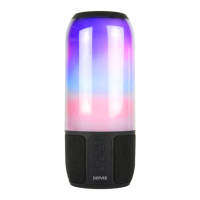
The DENVER BTS-63 is a portable Bluetooth speaker designed for wireless audio playback from compatible devices. Its primary function is to amplify audio signals, allowing users to enjoy music and other audio content with enhanced sound quality and volume compared to a device's built-in speakers. The speaker is equipped with an internal rechargeable lithium battery, providing the convenience of portable use without the need for a constant power connection.
For initial setup and operation, the speaker requires charging before its first use. This is achieved by connecting the included micro USB cable to the "Charging" hole on the speaker and then plugging the USB connector into a USB port on a computer or a suitable USB power adapter (not explicitly mentioned but implied for charging). A red indicator light illuminates to signify that the battery is currently charging. Once the battery reaches full capacity, this red light will automatically turn off, indicating that the charging process is complete and the speaker is ready for use. This visual cue helps users monitor the charging status effectively.
The core usage feature of the DENVER BTS-63 is its Bluetooth connectivity. To activate this, the user needs to slide the power switch to the "ON" position. Upon powering on, a blue light on the speaker will begin to blink. This blinking blue light serves as an indicator that the speaker is in pairing mode, actively searching for a Bluetooth-enabled mobile device to connect with. To establish a connection, the user must then access the Bluetooth settings on their mobile device (e.g., smartphone, tablet, or laptop). Within the list of available Bluetooth devices, the speaker will appear under the name "BTS-63." Selecting this name initiates the pairing process. In most cases, the device will pair automatically without requiring a password. However, if a password is requested by the mobile device, the standard default password "0000" should be entered to finalize the pairing. Once the pairing is successful and the connection is established, the blue light on the speaker will transition from rapid blinking to a slow, steady flash, confirming that it is actively connected to a device.
After a successful Bluetooth connection, users can begin playing music or other audio content from their paired device. The speaker will then wirelessly receive and amplify the audio. For optimal performance and to maintain a stable connection, it is recommended to keep the paired device within a range of approximately 33 feet (10 meters) from the speaker. The volume of the audio playback is primarily controlled through the connected mobile device, allowing users to adjust it to a comfortable listening level. When the speaker is no longer needed, it should be turned off by sliding the power switch to the "OFF" position to conserve battery life.
In addition to Bluetooth, the DENVER BTS-63 also offers a universal speaker operation mode for devices that do not have Bluetooth capability or when a wired connection is preferred. This is facilitated by an auxiliary input. The speaker comes with an auxiliary cable that can be connected to the speaker's "Auxiliary port" and then to the "aux-in" port of the audio source device. When an auxiliary cable is connected, the speaker automatically switches to auxiliary mode, bypassing the Bluetooth function. In this mode, all controls and functions, including volume adjustment, are managed directly through the connected mobile device or audio source. When the wired connection is no longer required, the auxiliary cable should be disconnected from both the speaker and the audio source.
Regarding maintenance and general care, several important cautions are provided to ensure the longevity and safe operation of the DENVER BTS-63. Firstly, it is explicitly stated that the product is not a toy and should be kept away from small children to prevent potential hazards. Users should also ensure that the speaker is kept away from water and excessive heat sources, as exposure to these elements can damage the internal components and affect performance. A specific note highlights that low power levels in the battery can lead to poor Bluetooth connection quality or even prevent the Bluetooth function from working entirely, emphasizing the importance of keeping the battery adequately charged. Furthermore, users are advised not to over-charge the battery, as this can potentially reduce its lifespan or lead to other issues. Finally, the battery pack itself should not be exposed to excessive heat, such as direct sunlight, open flames, or similar conditions, to prevent overheating and potential damage. Adhering to these guidelines will help maintain the speaker's functionality and ensure a safe user experience.
 General
| Brand | Denver |
|---|---|
| Model | BTS-63 |
| Type | Portable Bluetooth Speaker |
| Bluetooth Version | 5.0 |
| Frequency Response | 100Hz - 20kHz |
| Connectivity | Bluetooth |
| Battery | Li-ion 1200mAh |
| Charging Time | 3 hours |
| Input Voltage | 5V |
| Power Source | Battery |

 To Next Page