Need help?
Do you have a question about the Denver BTS-110 and is the answer not in the manual?
Step-by-step guide to connect the speaker to a Bluetooth source.
Essential safety guidelines regarding hearing, moisture, and handling.
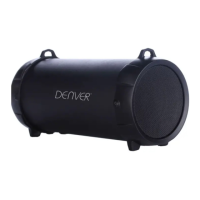
This document outlines the operation and features of the Denver BTS-110 Bluetooth speaker, a portable audio device designed for wireless music playback, radio listening, and hands-free calling. The speaker supports multiple input methods, including Bluetooth, Micro SD cards, USB drives, and an auxiliary input, offering versatile connectivity options for various audio sources. It also includes a True Wireless Stereo (TWS) function, allowing two BTS-110 speakers to be paired together for an enhanced stereo sound experience.
The Denver BTS-110 is a multi-functional Bluetooth speaker that serves as a portable audio system. Its primary function is to play audio wirelessly via Bluetooth from compatible devices such as smartphones, tablets, or computers. Beyond Bluetooth, it offers integrated support for playing music directly from Micro SD memory cards and USB flash drives, making it a standalone music player. An AUX IN port further expands its compatibility, enabling connection to non-Bluetooth audio sources using a standard audio cable. The speaker also features an FM radio function, allowing users to tune into their favorite radio stations. For communication, it includes a speakerphone feature that allows users to answer and end calls when connected to a smartphone via Bluetooth. A unique feature is the True Wireless Stereo (TWS) function, which enables two BTS-110 speakers to connect wirelessly to each other, creating a stereo sound system from a single audio source. Additionally, the device incorporates a voice assistance function, providing convenient access to mobile voice assistants.
To power on the speaker, press and hold the power button (8). The speaker's mode can be changed by pressing the MODE button (7), cycling through Bluetooth mode, Micro SD mode, USB mode, and Radio mode.
To pair the speaker with a Bluetooth device, ensure the speaker is in Bluetooth mode (indicated by a flashing LED light). Place the speaker near the Bluetooth device, then search for "Denver BTS-110" in your device's Bluetooth settings. Select the speaker name, and if prompted, enter the password "0000". Once successfully paired, a voice prompt will confirm the connection, and music can be streamed wirelessly. The speaker can only connect to one Bluetooth device at a time. If pairing fails, it is recommended to delete other Bluetooth devices from the list of connections, restart the speaker, and attempt to search again.
For playing music from a Micro SD card, insert the card into the Micro SD port (2) with the contacts facing the USB plug. Similarly, for USB playback, insert a USB memory card into the USB port (3). The speaker will automatically begin playing music from the inserted media.
To use the AUX IN function, connect an aux-in cable from the AUX IN jack (4) on the speaker to the external audio device. Once connected, music can be played from the external device through the speaker.
Volume can be adjusted by pressing and holding the Volume - button (5) to decrease, or the Volume + button (6) to increase. To skip to the previous track, press the Volume-/Previous Track button (5) once. To move to the next track, press the Volume +/Next track button (6) once.
During music playback, press the power button (8) once to pause or resume the audio.
Before using the FM radio, insert the Micro USB cable into the USB port (1); this cable acts as a receiving antenna. Press the MODE button (7) to select the radio function. To automatically search and store radio stations, press and hold the MODE button (7). Once stations are registered, use the Volume-/Previous Track button (5) to select the previous station, or the Volume +/Next track button (6) to select the next station.
If a call is received while the speaker is connected via Bluetooth, press the power button (8) to answer the call and activate the speakerphone feature. Press the power button (8) again to end the call.
To enable TWS for two speakers, power on both BTS-110 speakers. Ensure the Bluetooth function on your phone or other Bluetooth device is turned off. Long-press the M button on either speaker. A sound will confirm that the TWS function has opened. After a few seconds, both speakers will provide a voice prompt. When one speaker's LED light is flashing and the other's is solid (not flashing), it indicates that the two speakers are connected to each other. Then, open your mobile phone's Bluetooth settings, search for "Denver BTS-110," and select it. A voice prompt will confirm the Bluetooth connection, allowing you to enjoy music from both speakers in stereo. To exit the TWS function and revert to single-speaker playback, long-press the M button again on either speaker.
To activate the mobile voice assistance function, press the MODE button (7) twice.
The speaker must be recharged when its battery is low or depleted. Connect the supplied USB cable to the micro-USB jack (1) on the speaker and the other end to a USB port on a PC or a 5V, 1A USB charger (not included). A red LED indicator will light up to show that the speaker is charging. Once charging is complete, the LED indicator will turn off.
It is crucial to read the safety information provided in the manual to prevent personal injury or device damage. The manufacturer is not responsible for incorrect installation or non-intended usage. To avoid hearing loss, do not use the appliance at high volumes for extended periods. The appliance should never be used in damp areas or near water sources such as sinks, wash stands, bathtubs, or showers. Avoid touching the appliance with wet hands.
The device contains electric and electronic components and batteries that can be hazardous to health and the environment if not disposed of correctly. The crossed-out trash can symbol on the product indicates that it should not be disposed of with household waste. Instead, it must be disposed of separately at designated collection points for recycling electric and electronic equipment and batteries. This ensures that materials are recycled in accordance with legislation and do not harm the environment.
 General
| Number of drivers | 2 |
|---|---|
| Number of speakers | 1 |
| Audio output channels | 2.0 channels |
| Battery type | Built-in battery |
| Battery capacity | 1200 mAh |
| RMS rated power | 10 W |
| Wi-Fi | No |
| Bluetooth | Yes |
| Bluetooth range | 10 m |
| USB connector type | USB Type-A |
| Connectivity technology | Wired & Wireless |
| Quantity per pack | 1 pc(s) |
| Package depth | 72 mm |
| Package width | 162 mm |
| Package height | 76 mm |
| Product type | Stereo portable speaker |
| Product color | Bordeaux |
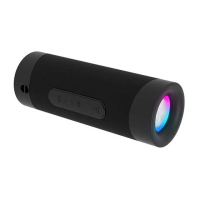
| Product design | Cylinder |
| Volume control | Digital |
| Recommended usage | Universal |
| Built-in microphone | - |
| Audio formats supported | MP3 |
| Compatible memory cards | MicroSD (TransFlash) |
 Weight and Dimensions
| Width | 70 mm |
|---|---|
| Height | 160 mm |
| Weight | 440 g |

 To Next Page