EasyManua.ls Logo

Denver BTV-208 - User Manual

Denver BTV-208
5 pages
Print Icon
To Next Page IconTo Next Page
Loading...
BTV-208
INSTRUCTION MANUAL
Safety information
Please read the safety instructions carefully before using the product for the first time and
keep the instructions for future reference.
1. This product is not a toy. Keep it out of the reach of children.
2. Warning: This product includes a rechargeable lithium ion battery.
3. Keep product out of the reach of children and pets to avoid chewing and
swallowing.
4. Product operating and storage temperature is from 0 degrees Celsius to 40
degrees Celsius. Environments under and above this temperature might affect
functionality.
5. Never open the product. Do not touch the inside electronics, or you may get an
electric shock. Repair or service are only to be performed by qualified personnel.
6. Do not expose to heat, water, dust (dusty environment), moisture, direct sunlight!
7. Please protect your ears against loud volumes. Loud volumes can damage your
ears and lead to hearing loss.
8. Bluetooth wireless technology can only operate within a range of about 10 m (30
ft). The maximum communication distance may vary depending on the presence
of obstacles (people, metal objects, walls, etc.) or the electromagnetic
environment.
9. Microwaves emitted by a Bluetooth device may affect the operation of electronic
medical devices.
10. The unit is not waterproof. If water or foreign objects enter the unit, it may result in
fire or electric shock. If water or a foreign object enters the unit, stop using it
immediately.
11. Only charge with the supplied USB cable.
12. Do not use non original accessories together with the product as this can make
the product functionality abnormal.
13. Do not block the ventilation openings. The product needs them to disperse heat.
PLEASE READ ALL INSTRUCTIONS CAREFULLY AND RETAIN FOR FUTURE USE
Question and Answer IconNeed help?

Do you have a question about the Denver BTV-208 and is the answer not in the manual?

Overview

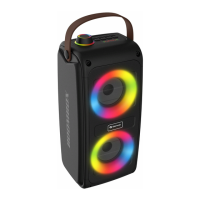
The BTV-208 is a wireless speaker designed for portable audio playback, offering a range of features for an enhanced user experience.

Function Description:

The BTV-208 serves as a versatile audio output device, capable of connecting wirelessly via Bluetooth to various devices like smartphones, tablets, and computers. It also supports playback from physical media through its USB port and microSD card slot, allowing for MP3 file playback. Additionally, an AUX-in port enables wired connections to other audio sources, such as MP3 players. The speaker features an integrated LED light show, adding a visual element to the audio experience. It includes controls for power, mode selection, volume adjustment, track navigation, and play/pause functionality. The device also supports hands-free calling when connected to a smartphone, with options to answer, end, reject, and redial calls. A key feature is its True Wireless Stereo (TWS) connection capability, allowing two BTV-208 speakers to be paired for a full stereo sound experience.
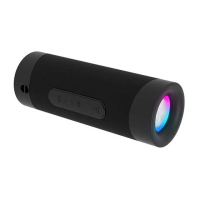
Important Technical Specifications:

  • Bluetooth Version: V5.0, ensuring a stable and efficient wireless connection.
  • Bluetooth Range: Up to 10 meters (30 feet), providing flexibility in device placement.
  • Battery: Built-in 1800 mAh Lithium Ion Battery, offering a balance of power and portability.
  • Operating Time: Approximately 3 - 4 hours on a full charge, suitable for extended listening sessions.
  • Charging Time: Approximately 2 - 3 hours, allowing for quick recharging.
  • Speaker Output Power: 2 x 5 W, delivering clear and robust sound.
  • Frequency Range: 55 Hz - 20 kHz, covering a wide spectrum of audio frequencies.
  • Bluetooth Frequency: 2402 MHz - 2480 MHz.
  • Connectivity: USB port and microSD card slot for MP3 playback, 3.5 mm audio input (AUX In).
  • Operating and Storage Temperature: 0°C to 40°C, ensuring reliable operation within a typical environmental range.

Usage Features:

  • Power On/Off: Press and hold the mode button for three seconds to turn the speaker on or off.
  • Mode Selection: Press the mode button to cycle through Bluetooth, USB, microSD card, and Aux in modes.
  • Bluetooth Pairing: In Bluetooth mode, search for 'BTV-208' on your device's Bluetooth settings and connect. A sound notification confirms successful pairing.
  • Volume Control: Press and hold the "+" button to increase volume or the "-" button to decrease volume.
  • Track Navigation: Press the "+" button for the next track or the "-" button for the previous track.
  • Play/Pause: Press the play/pause button to play or pause music.
  • LED Light Show: Press and hold the play/pause button to turn the light show on or off.
  • TWS Connection: To achieve stereo sound, turn on two BTV-208 speakers, then press the "+" button on both speakers twice to pair them.
  • Phone Calls:
    • Answer/End Call: Press the play/pause button.
    • Reject Call: Press and hold the play/pause button for 2 seconds.
    • Redial Last Number: Press the play/pause button twice.
  • Charging: The device is charged via the supplied Type-C USB cable.

Maintenance Features:

  • Battery Care: The device is equipped with a rechargeable lithium-ion battery that is integrated and cannot be replaced. Users are warned not to attempt to remove the battery from the device.
  • Cleaning and Handling: Avoid exposing the product to heat, water, dust, moisture, or direct sunlight. The unit is not waterproof, and ingress of water or foreign objects can lead to fire or electric shock. If this occurs, discontinue use immediately.
  • Ventilation: Do not block the ventilation openings, as they are essential for heat dissipation.
  • Accessories: Only use the supplied USB cable for charging. Using non-original accessories may cause abnormal functionality.
  • Repair: Repairs or service should only be performed by qualified personnel. Users are advised not to open the product or touch the internal electronics to avoid electric shock.
  • Disposal: The product contains electric and electronic equipment and batteries. These should not be disposed of with household waste but must be submitted to appropriate recycling facilities. The crossed-out trash can symbol indicates separate disposal is required. This ensures proper handling of hazardous materials and contributes to environmental protection.
  • Safety: Keep the product out of reach of children and pets to prevent chewing or swallowing. Protect ears against loud volumes to avoid hearing loss.

Denver BTV-208 Specifications

General IconGeneral
BrandDenver
ModelBTV-208
CategorySpeakers
LanguageEnglish

Related product manuals