For the power capacity in the ba ery, refer to the following icons:
Full Middle Low
1. Connect device to car adaptor through Mini-USB port, device will power on automa
cally & enter standby mode and start
charging with green in dicator light ON.
Once device has been full y charged, red indicator light goes out.
2. Connect device to PC via USB cable, device will power on automa
cally. Choose between and ‘Mass Storage (MSDC)’ mode
or ‘PC-Cam’, by pressing ‘UP’/’DOWN’ and confirm by pushing ‘OK’ bu
on and start charging.
Once device has been full y charged, red indicator light goes out.
Installa
on an d Removal of micro SD card
1
. In the direc
on as in dicated, insert the micro SD card into the slot un l it is held firmly.
2. To take the micro SD card out, slightly press the micro SD card to eject it.
[Note]:
1. Observe the direc
on to insert the micro SD c ard; if the direc on is wrong, the device and/or the micro SD card may be
damaged.
2. When the micro SD card is inserted into the device, the machine will set the micro SD card as preset storage.
3. If the micro SD card is incompa
ble with the device, please insert the card again or replace it for retry.
4. PLEASE USE 8GB
-32GB/CLASS 10 (C10) MICRO SD CARDS ONLY.
5. Please insert the micro SD ca rd ONLY when device is OFF.
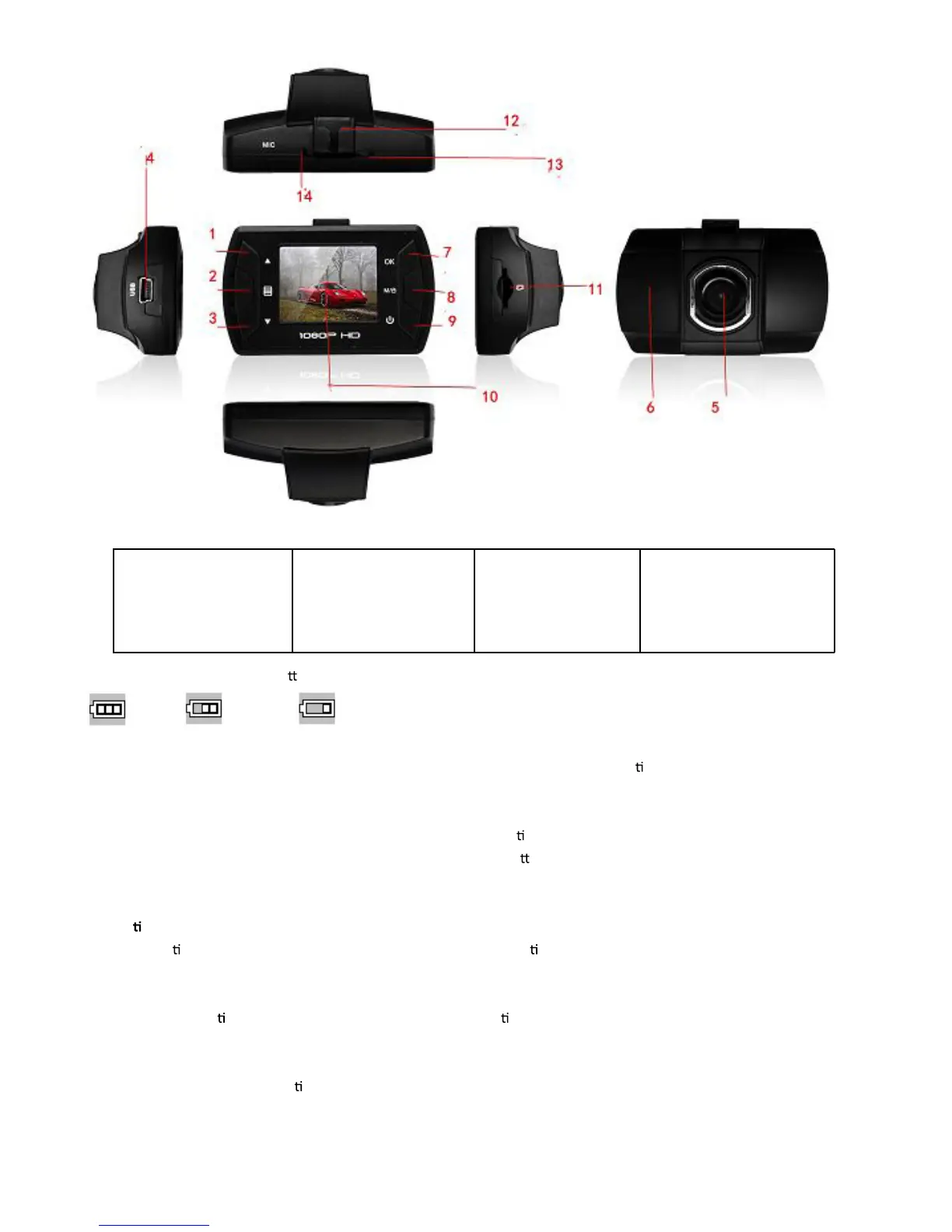
01. Up (Zoom in)
02. Menu
03. Down (Zoom out)
04. Mini USB
05. Lens
06. Speaker
07. REC/OK
08. Mode (video lock)
09. ON/OFF
10. LCD Screen
11. Micro SD card slot
12. Holder soc ket
13. Reset
14. Microphone
-ENG 02-



 To Next Page