EasyManua.ls Logo

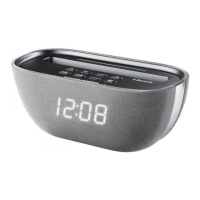
Denver CRB-818 - User Manual

Denver CRB-818
9 pages
Print Icon
To Next Page IconTo Next Page
Loading...
OPERATING INSTRUCTIONS
Bluetooth Clock Radio
MODEL : DENVER CRB-818
Question and Answer IconNeed help?

Do you have a question about the Denver CRB-818 and is the answer not in the manual?

Summary

Safety and Warnings

Electrical Safety Precautions

Warnings regarding electric shock risk, not removing covers, and user-serviceable parts.

General Appliance Warnings

Precautions against liquids, proper AC/DC adaptor use, and unobstructed placement.

Polarization and Grounding

Guidance on matching plug blades to wall socket slots for safe operation.

Device Controls and Features

Front and Top View Controls

Identifies buttons and features on the front and top surfaces, including LED display and device slot.

Back View Controls and Ports

Details controls and connection sockets on the rear, such as USB charger, Aux-Input, and DC Input.

Power and Time Settings

Power Supply and Standby Mode

Instructions for using the AC-DC adaptor, powering on, and operating in standby mode.

Display Brightness and Clock Setting

How to adjust display brightness and set the digital clock time.

Alarm Function Setup

Setting the Alarm Time

Procedure to set the desired wake-up hour and minute for the alarm.

Selecting Alarm Source (Buzzer;Radio)

Choosing between a buzzer or FM radio as the alarm sound.

Advanced Functions

Alarm Management and Snooze

How to deactivate alarms, use the snooze function, and repeat snooze cycles.

Sleep Timer Function

Setting the automatic power-off timer for music playback.

Bluetooth Wireless Playback

Streaming audio wirelessly from a Bluetooth device and pairing procedures.

Playback and Radio Operation

Audio Line-In Connection

Connecting external audio devices via the Aux-Input socket.

Volume Control and FM Radio Tuning

Adjusting volume, tuning FM stations, and improving reception.

Radio Tuning and Charging

Radio Frequency and Memory

Manual/automatic station tuning and saving favorite radio stations into memory.

USB Charging Functionality

Using the unit's USB port to charge external devices like smartphones.

Specifications

Summary

Safety and Warnings

Electrical Safety Precautions

Warnings regarding electric shock risk, not removing covers, and user-serviceable parts.

General Appliance Warnings

Precautions against liquids, proper AC/DC adaptor use, and unobstructed placement.

Polarization and Grounding

Guidance on matching plug blades to wall socket slots for safe operation.

Device Controls and Features

Front and Top View Controls

Identifies buttons and features on the front and top surfaces, including LED display and device slot.

Back View Controls and Ports

Details controls and connection sockets on the rear, such as USB charger, Aux-Input, and DC Input.

Power and Time Settings

Power Supply and Standby Mode

Instructions for using the AC-DC adaptor, powering on, and operating in standby mode.

Display Brightness and Clock Setting

How to adjust display brightness and set the digital clock time.

Alarm Function Setup

Setting the Alarm Time

Procedure to set the desired wake-up hour and minute for the alarm.

Selecting Alarm Source (Buzzer;Radio)

Choosing between a buzzer or FM radio as the alarm sound.

Advanced Functions

Alarm Management and Snooze

How to deactivate alarms, use the snooze function, and repeat snooze cycles.

Sleep Timer Function

Setting the automatic power-off timer for music playback.

Bluetooth Wireless Playback

Streaming audio wirelessly from a Bluetooth device and pairing procedures.

Playback and Radio Operation

Audio Line-In Connection

Connecting external audio devices via the Aux-Input socket.

Volume Control and FM Radio Tuning

Adjusting volume, tuning FM stations, and improving reception.

Radio Tuning and Charging

Radio Frequency and Memory

Manual/automatic station tuning and saving favorite radio stations into memory.

USB Charging Functionality

Using the unit's USB port to charge external devices like smartphones.

Specifications

Denver CRB-818 Specifications

General IconGeneral
TypeClock Radio
Tuner TypeDigital
Supported radio bandsFM
RMS rated power1W
Built-in speaker(s)Yes
Display typeLED
Power sourceAC
Frequency Range87.5 - 108 MHz
Headphone JackNo
Weight0.3 kg
Power Supply230V~50Hz

Related product manuals