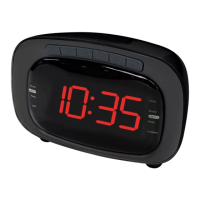
Need help?
Do you have a question about the Denver CRP-616 and is the answer not in the manual?
Step-by-step guide to setting the device's time and calendar values.
Detailed steps for setting up both primary and secondary alarms.
Choose between buzzer or radio for alarms, and disable alarms.
Details on alarm length, snooze function, and display changes.
How to use the sleep timer and manage Daylight Saving Time.
Using the built-in thermometer to check room temperature.
Instructions for operating the radio and connecting external audio devices.
Steps for resetting the device to factory defaults.
Essential safety guidelines to prevent hazards.
Detailed technical information about the device's capabilities.
Use sensor to display Alarm 1 and Alarm 2 times when radio is off.
Use sensor to activate sleep and snooze functions.
How to set the time and adjust focus for the projection unit.
 General
| Display | LED |
|---|---|
| Alarm Function | Yes |
| Snooze Function | Yes |
| Radio | FM |
| Wake up to radio | Yes |
| Wake up to buzzer | Yes |
| Backup Battery | Yes |
| Battery Quantity | 2 |
| Backlight | Yes |
| Weight | 0.3 kg |
| Type | Clock Radio |


 To Next Page