Need help?
Do you have a question about the Denver ECQ-103 and is the answer not in the manual?
Key safety instructions for product use, handling, and environmental considerations.
Identifies and explains the purpose of the device's physical buttons.
Instructions for connecting the device and details on wireless charging capabilities.
Guide on setting clock time, format, and basic alarm functions.
Detailed steps for alarm setup, snooze, and adjusting display brightness.
Information on battery usage and essential safety precautions for operation.
Detailed technical parameters including input/output power, efficiency, and dimensions.
Contact details for customer support across various geographical regions.
This document details the operation, safety, and maintenance of the DENVER ECQ-103, a wireless charging alarm clock. It is designed to be user-friendly while offering essential functionalities for daily use.
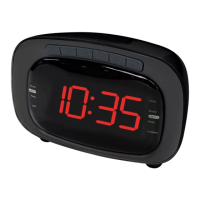
The DENVER ECQ-103 serves as a multi-functional device, primarily an alarm clock with integrated wireless charging capabilities and a USB output for additional device charging. Its core function is to display time clearly, with adjustable brightness settings to suit various environments. The clock features a 12-hour or 24-hour display format, allowing users to choose their preferred time representation. An alarm function is included, enabling users to set wake-up times. The alarm can be snoozed for an additional 5 minutes, providing flexibility for those who need a few extra moments of rest. The device also incorporates a power-saving function, ensuring that the clock memory is retained even if the external power supply is disconnected, thanks to a button battery.
Beyond timekeeping, the ECQ-103 offers a convenient wireless charging pad on its top surface, compatible with devices that support wireless charging. This allows users to simply place their smartphone or other compatible devices on the pad to initiate charging without the need for cables. Additionally, a USB-A output port is provided, enabling wired charging for other electronic devices, expanding its utility as a charging hub. The device's design emphasizes ease of use, with clearly marked buttons for setting the clock, adjusting the alarm, and controlling display brightness.
Operating the DENVER ECQ-103 is straightforward. To begin, connect the device to a power adapter using the supplied USB-C to USB-A cable. For optimal performance, especially when utilizing the alarm clock, wireless charger, and USB output simultaneously, it is recommended to use a QC2.0 or QC3.0 power adapter. If only a 5V voltage supply is used, the wireless charger and alarm clock will still function normally.
The wireless charging status is indicated by a light: it flashes twice when connected, remains steady when charging, and turns off when fully charged. If a foreign object is detected on the charging pad, the light will flash, indicating a FOD (foreign-object detection) warning.
Setting the time involves pressing the "M" button to enter the time setting mode, then using the "+" and "-" buttons to adjust the hour and minute. Holding down these buttons allows for continuous adjustment. Once the time is set, pressing "M" again exits the setting mode. Similarly, setting the alarm requires holding down the "+" or "-" key to activate or deactivate the alarm, indicated by a light. Then, holding down "M" allows for setting the alarm hour and minute using the "+" and "-" buttons. When the alarm rings, it will automatically turn off after 3 minutes if no action is taken, or it can be turned off by holding down the Clock button. Pressing any button during an alarm will activate the snooze function, causing the alarm to ring again after 5 minutes. The brightness of the clock display can be adjusted to three levels (high, low, off) using the "+" and "-" buttons, with the brightest setting as default. Each press of "-" reduces brightness, while each press of "+" increases it. Pressing the button again will turn off the clock display completely.
Maintaining the DENVER ECQ-103 is simple and primarily involves adhering to safety guidelines to ensure its longevity and safe operation. The device is not waterproof, so it is crucial to keep it away from water, moisture, and direct sunlight. Should water or foreign objects enter the unit, discontinue use immediately to prevent fire or electric shock.
Cleaning the charger should only be done when it is disconnected from the power supply. Use a soft, dry cloth for cleaning; avoid abrasive cleaners or solvents that could damage the device's surface or internal components.
The operating and storage temperature for the product ranges from 0°C to 40°C, and the ambient humidity should be kept between 20-85% (at 40°C). Avoid using the wireless charger in extremely high temperatures, humidity, or corrosive environments, as this can damage the circuit and cause leakage.
To prevent magnetic card failure, do not place magnetic cards (such as ID cards or bank cards) too close to the unit. For individuals with implanted medical devices like pacemakers or cochlear implants, maintain a distance of more than 20 cm from the wireless charger to avoid potential interference.
The device is not a toy and should be kept out of reach of children and pets to prevent chewing or swallowing. Children should be supervised to ensure they do not play with wireless chargers as toys. Never attempt to open the product, as touching the internal electrics can cause electric shock. Repairs or service should only be performed by qualified personnel. Only charge the device with the supplied USB cable, and avoid using non-original accessories, as this can lead to abnormal product functionality. The device contains a lithium battery, which is primarily for clock memory function during power outages.
 General
| Type | Digital Clock |
|---|---|
| Display | LED |
| Power | Battery |
| Time Format | 12/24 Hour |
| Alarm | Yes |
| Power Source | 2 x AAA batteries |
| Weight | 0.10 kg |


 To Next Page