ENG - 3
Alarm Clock Wireless Charger
Model: ECQ-103
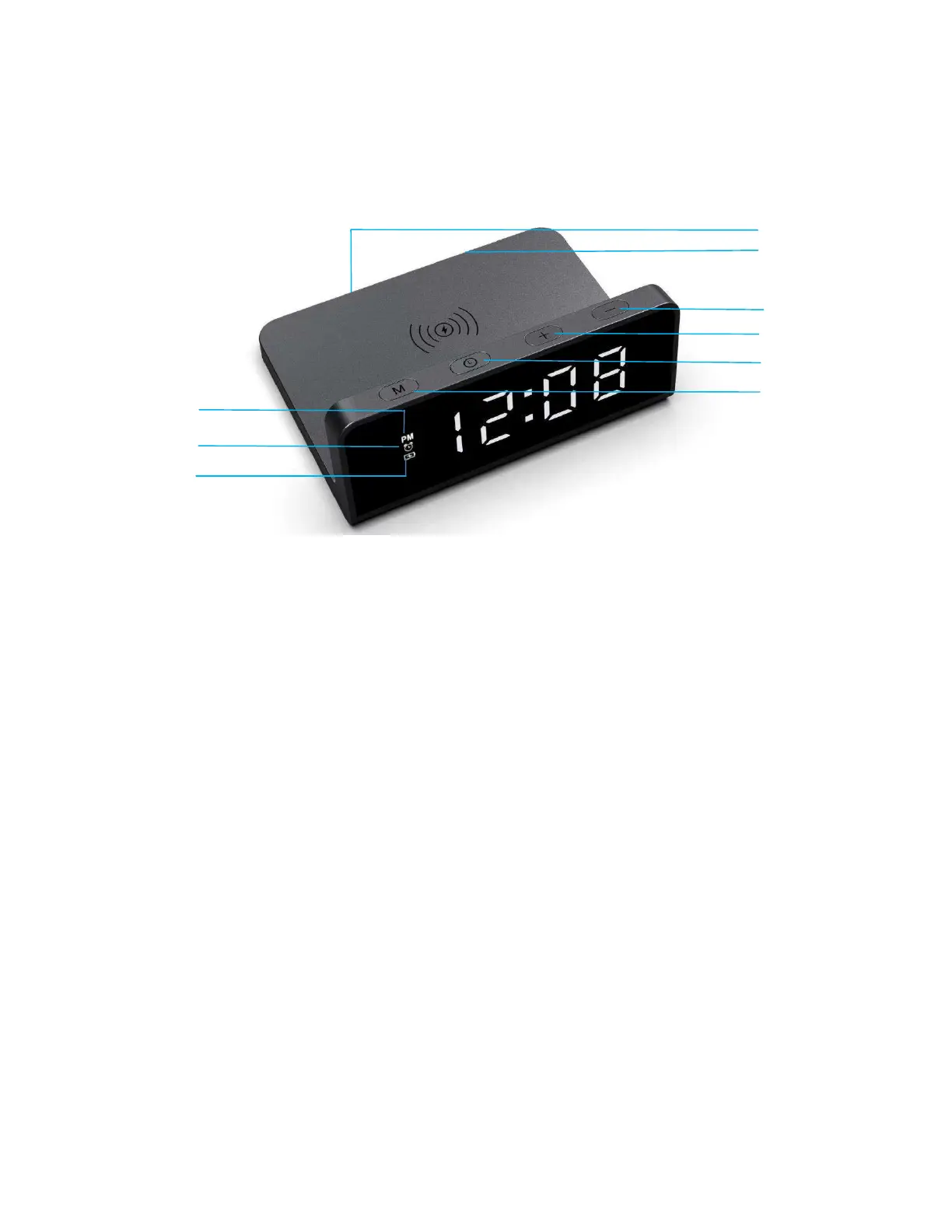
I. Function Buttons
II. Operation manual
1. Power connection
1.1 Connect the USB-A end of the cable to the power adapter and the Type-C end to the product,
then the product can operate normally.
2. Wireless charging & USB output
2.1 Wireless charging output power: 10W
2.2 Wireless charging status indicator:
Connected to power: flashes 2x
Standby: off
Charging: on
Fully charged: off
FOD (foreign-object detection): flashing
3. Button functions
3.1 Buttons: “M”, “Clock button”, “+”, “-”
3.2 Time format setting:
Double press the M button to set the 12-hour and 24-hour clocks; PM is displayed in the 12-hour
clock.
3.3 Clock time settings:
USB-A output
Charging indicator
PM (in the 12h time format)
Alarm
Clock button
M button
+ button
- button
USB-C input



 To Next Page