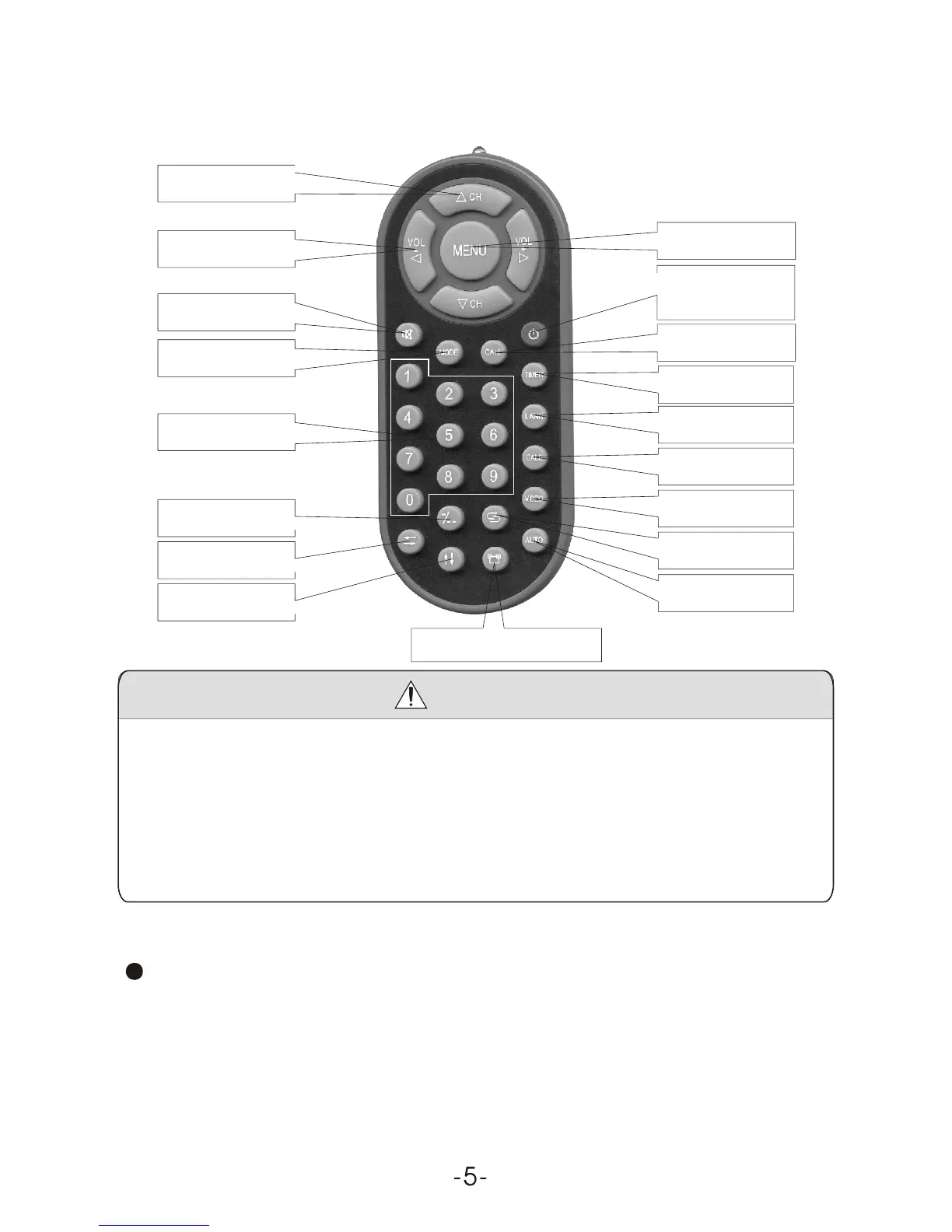
4. Remote Controller Operation
Mute
Channel Selection
Volume Adjust
Mode
Channel keys
Channel Shift
Return
Flip Vertical
Flip Horizontal
Power ON/OFF
Exit Game
Menu
Call
Timer
Language
Calendar
AV / TV Shift
Auto Search
Picture Mode
Caution
1) Please align the remote controller with the infrared-receiving
window on TV set in operation.
2) Never oppress, drop, wet or disassembly the remote controller.
3) Never press any button continuously and swiftly. Operation
interval is at least 2 seconds.
4) Press Power to turn on the machine before pressing CH+, CH- for
channel selection.
Channel keys (digit key (0-9) and - / - - ): There are 0 ~ 254 in total of
255channels available on the remote controller for your option by the 11
buttons of 0-9 and - / - - on the remote controller. When the channel is a
one-digit figure, just press the corresponding digit button. If the channel
is a two-digit figure, you should press - / - - first to show - / - - on the
display screen before further pressing the corresponding digit buttons.



 To Next Page