EasyManua.ls Logo

Denver DMP-389 - Page 4

Denver DMP-389
7 pages
Print Icon
To Next Page IconTo Next Page
To Previous Page IconTo Previous Page
Loading...
A
CAUTION--
To
reduce
the
risk
of
personal
injury:
«
Insert
the
batteries
observing
the
proper
polarity
(+/-)
as
indicated
inside
the
battery
compartment.
Parts
and
Controls
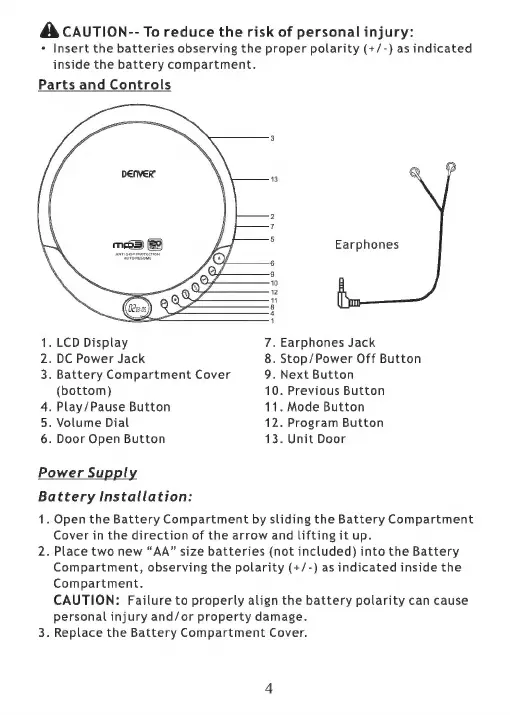
Earphones
1.
LCD
Display
7.
Earphones
Jack
2.
DC
Power
Jack
8.
Stop/Power
Off
Button
3.
Battery
Compartment
Cover
9.
Next
Button
(bottom)
10.
Previous
Button
4.
Play/Pause
Button
11.
Mode
Button
5.
Volume
Dial
12.
Program
Button
6.
Door
Open
Button
13.
Unit
Door
Power
Supply
Battery
Installation:
1.
Open
the
Battery
Compartment
by
sliding
the
Battery
Compartment
Cover
in
the
direction
of
the
arrow
and
lifting
it
up.
2.
Place
two
new
“AA”
size
batteries
(not
included)
into
the
Battery
Compartment,
observing
the
polarity
(+/-)
as
indicated
inside
the
Compartment.
CAUTION:
Failure
to
properly
align
the
battery
polarity
can
cause
personal
injury
and/or
property
damage.
3.
Replace
the
Battery
Compartment
Cover.

Related product manuals