6
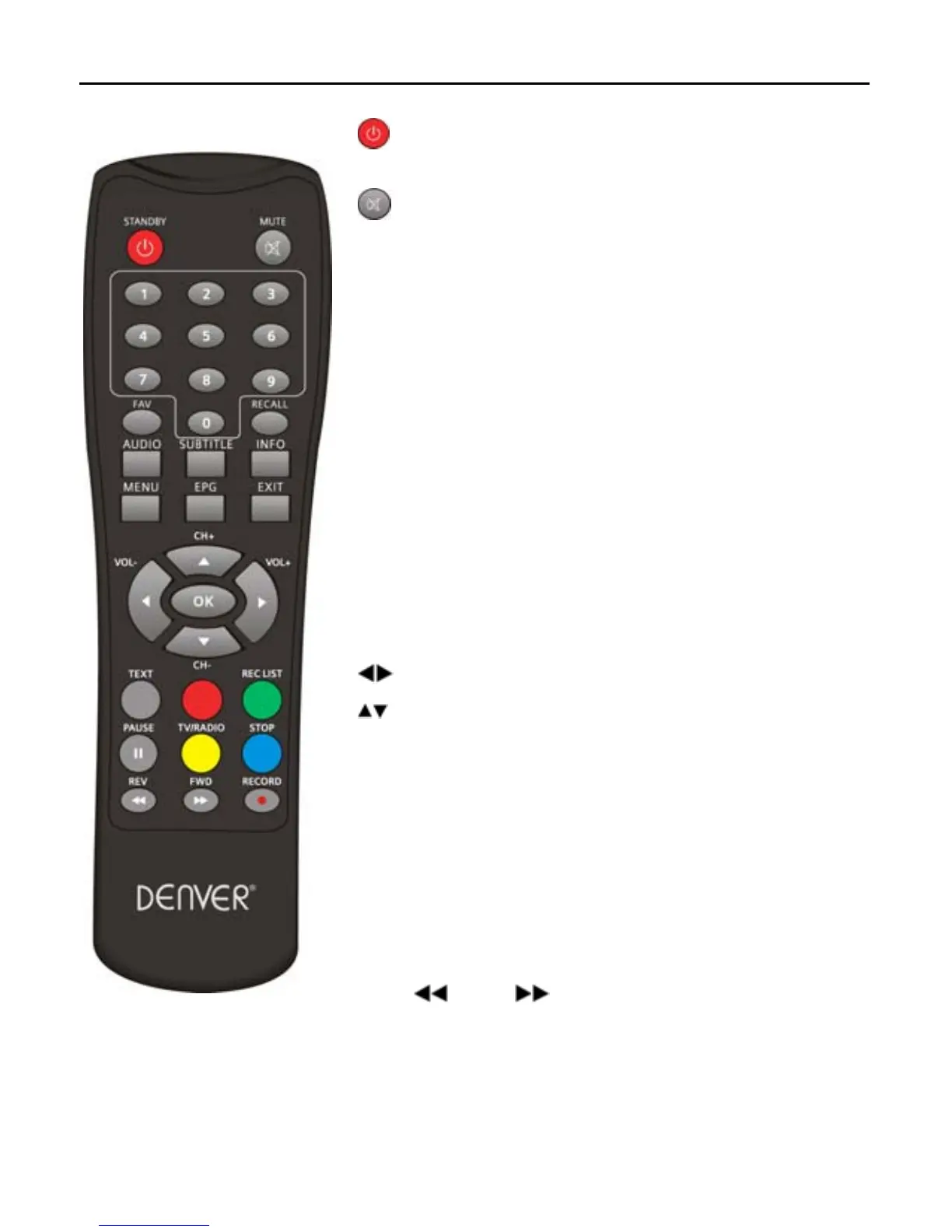
1.4 Remote
: Switch between peration and standby
modes.
: Press to temporarily cut off the sound.
0-9: nter number or elect a channel number to watch.
FAV: Press to display the TV favorite list.
RECALL: Go back to the previously viewed channel.
AUDIO: isplay the Audio Select window.
SUBTITLE: Show the list of subtitled languages the
current. channel supports.
INFO: Shows information of the current channel.
MENU: Displays the main menu.
EPG: Shows the PG(Electronic Program Guide) only
when menu is off.
EXIT: Return to the previous menu or escape from
the item
: Move cursor left/right or Volume +/-.
: Move up/down or CH+/CH-
OK: Confirm.
TEXT: Shows current service’s Teletext on OSD.
REC LIST: Show the menu of media that have been
recorded.
PAUSE‖: Freeze/Resume picture.
TV/RADIO: Switch between TV and Radio mode.
STOP: Stop playing Media.or stop recording.
REV
FED :Slow/Fast playing media or To
navigate in the menu environment.
RECORD●:Records a live program.
RED/GREEN/YELLOW /BLUE: Use to navigate between pages in teletext mode.



 To Next Page