6.2 Recording to computer disk
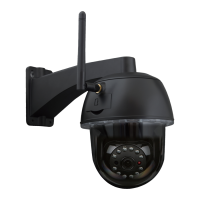
1) The main interface into the machine, as shown below;
2) Click on ,select the recording path;
3) Click on ,Start recording.
Note :If you can not change the recording path , please follow these steps:
First,please open search tool,Find the camera's ip address and copy it :


 To Next Page