14
Purpose
Use this application program to determine the specific gravity of a sample.
The result is displayed with one decimal place.
Beaker and wire not included with balance/scale.
Example: Determine the specific gravity of a solid.
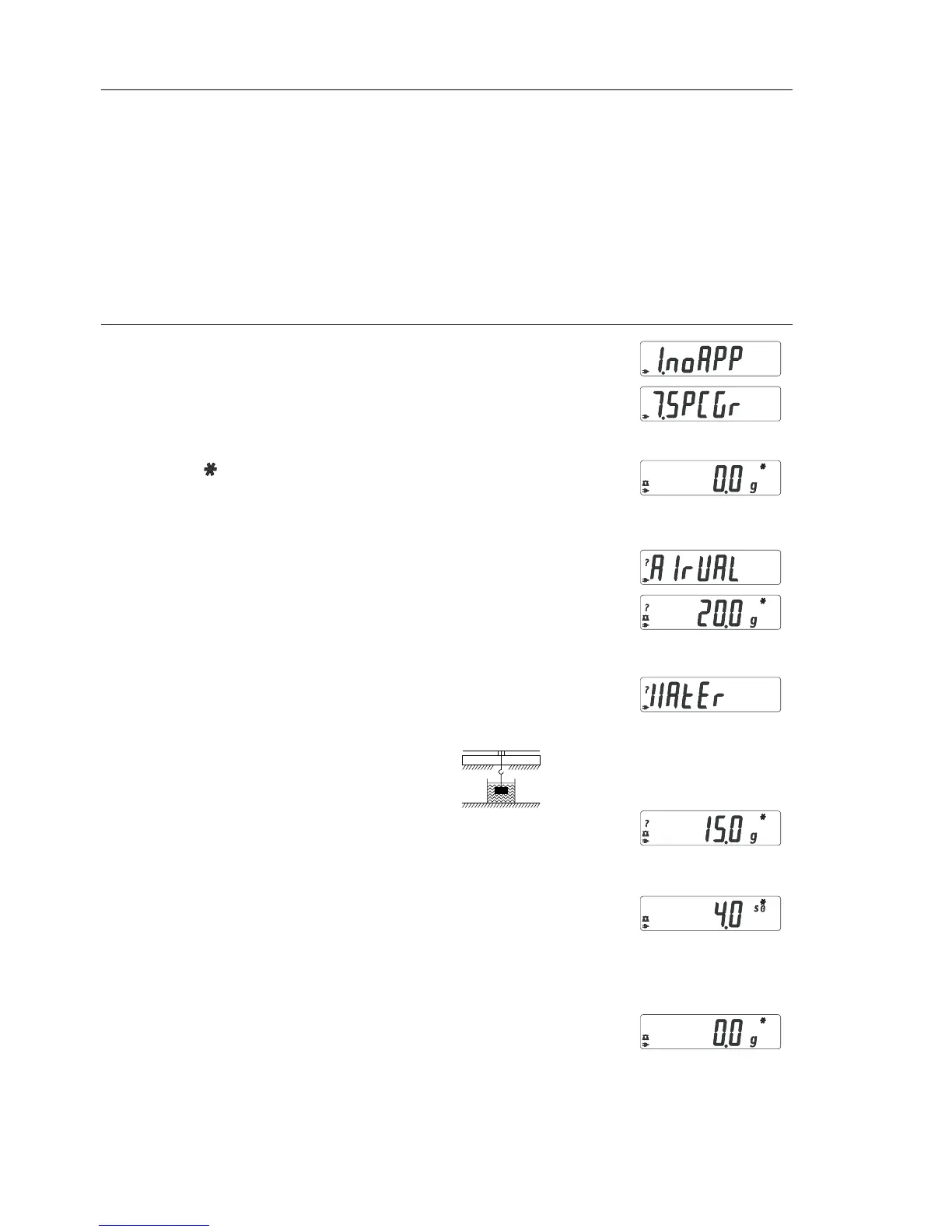
Step Key (or instruction) Display
1. Select application program (ZERO) ≥ 2 sec
2. Select Specific Gravity (F) repeatedly
3. Confirm setting (ENTER)
Symbol “ “ on the display:
application is active
4. If necessary, zero the balance/scale (ZERO)
5. Start application program (F)
6. Confirm the display, “
airval” (ENTER)
7. Determine weight of the sample in air:
place sample on the balance/scale
8. Store weight-in-air value (ENTER)
9. Remove sample from balance/scale
10. Determine weight of sample in liquid:
connect wire and set up beaker
11. Confirm the display “Water” (ENTER)
12. Place sample in liquid
13. Store the weight-in-liquid value
and view the result (ENTER)
14. Clear the display (ZERO)
15. Exit the Specific Gravity application (ENTER) ≥ 2 sec
16. Reactivate Specific Gravity (if no other (F)
application program has been selected)
17. Repeat procedure starting from Step 5.
Specific Gravity


 To Next Page