29
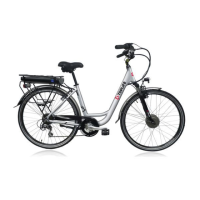
D. Press the “--” button after 10 seconds at the same time, LCD shows “ ” mode symbol blinking, and then,
you can press “+” or “--” choose kilometer (KM/H) or mile (M/H) as the speed unit showing in your LCD panel (Fig.
14).
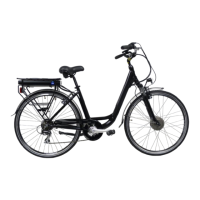
E. CLEARING: when setting modes and the specific mode symbol is blinking, press the ”--” button for 5 seconds, it
can make “Single Cycling Distance”, “Single Cycling Time” and “Top Speed” zero cleared (Note: the “Total
Distance” cannot be cleared out) (Fig. 15).
THIS PRODUCT MUST BE ASSEMBLED BY A PROFESSIONAL TECHNICIAN AND WHO IS NOT QUALIFIED TO DO SO MUST NOT TRY TO
ASSEMBLE IT.



 To Next Page