EasyManua.ls Logo

Denver TRC-1490 - User Manual

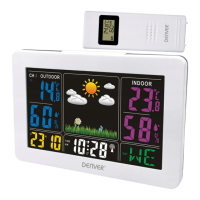
Denver TRC-1490
6 pages
Print Icon
To Next Page IconTo Next Page
Loading...
INSTRUCTION MANUAL TRC-1490
Wireless Indoor and Outdoor Weather Station
Question and Answer IconNeed help?

Do you have a question about the Denver TRC-1490 and is the answer not in the manual?

Summary

Front View Overview

Time and Date Display

Displays current time, date, and PM indicator.

Back View Overview

Battery Installation

Compartment and instructions for inserting AAA batteries.

Quick Start Guide

Battery Insertion

Instructions for sliding the battery cover and inserting batteries.

Setting the Time and Date

Year and Month Setting

Steps to set the year and month using SET/ALM SET and ▲/▼ buttons.

Date and Time Format

Setting the date and selecting between 12-hour or 24-hour format.

Time Zone and Hour;Minute

Selecting the time zone and setting the current hour and minute.

Setting the Alarm

Alarm and Snooze Functions

Troubleshooting Outdoor Sensor

Care and Maintenance

Environmental Disposal

Summary

Front View Overview

Time and Date Display

Displays current time, date, and PM indicator.

Back View Overview

Battery Installation

Compartment and instructions for inserting AAA batteries.

Quick Start Guide

Battery Insertion

Instructions for sliding the battery cover and inserting batteries.

Setting the Time and Date

Year and Month Setting

Steps to set the year and month using SET/ALM SET and ▲/▼ buttons.

Date and Time Format

Setting the date and selecting between 12-hour or 24-hour format.

Time Zone and Hour;Minute

Selecting the time zone and setting the current hour and minute.

Setting the Alarm

Alarm and Snooze Functions

Troubleshooting Outdoor Sensor

Care and Maintenance

Environmental Disposal

Denver TRC-1490 Specifications

General IconGeneral
BrandDenver
ModelTRC-1490
CategoryWeather Station
LanguageEnglish

Related product manuals