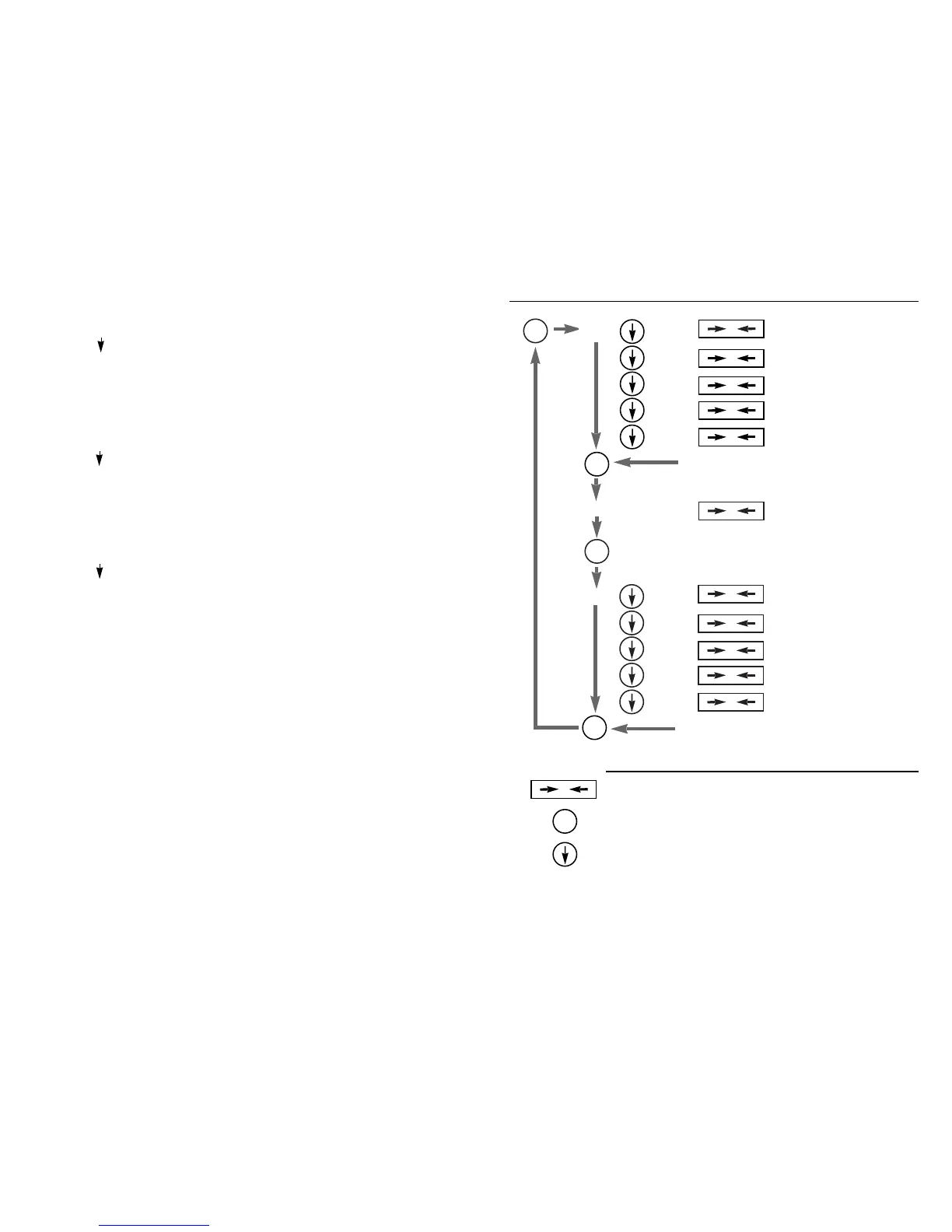
Menu Tree
0
unit lbs
“exit to weighing mode”
tael
“exit to weighing mode”
carat
“exit to weighing mode”
troy
“exit to weighing mode”
grain
“exit to weighing mode”
“advance to next option”
cal
“place
weight”
cal to applied weight
exit to weighing mode
count
“advance to next option”
Function in Function in
Weighing Mode Menu Mode
Zero’s the balance Exits from current point weighing
mode, saves last options
Pushed momentarily sends printer Advances mode select to next
string out optional serial port. Pushed menu option.
for 3 seconds enters menu mode.
Advances display options Cycles through selections at
to next clockwise option current menu level
0
0
0
0
*
*
0
*
0
10
“exit to weighing mode”
20
“exit to weighing mode”
50
“exit to weighing mode”
100
“exit to weighing mode”
P100.0
“exit to weighing mode”
0
0
0
0
*
0
*
Notes: 1. Text in quotes above indicates an action to occur (i.e., “place weight”)
2. Text not in quotes is the display message at that level (i.e., count or tael)
3. P100.0 is used to denote percentage weighing
Menu Level Functions:
unit selects the units to be displayed when in free units mode
cal calibrates the unit to the applied weight
count selects the reference quantity that the applied load will represent and
the mode to operate in
C. Calibration
1. To calibrate the balance, tare or zero the balance with no weight on pan,
press and hold down the
*
key for 3 seconds. The display will read “Unit”.
Press the
*
until the display reads “CAL”.
2. Press the key. The calibration weight of the balance in grams will be dis-
played.
3. Place the correct weight on the balance. After a few seconds the display
will flash indicating the value has been accepted.
D. Count or Percentage Mode Setup
1. Press and hold
*
key for 3 seconds. The display will read “Unit”. Press the
*
key until unit displays “Count”.
2. Press the key to correct number of pieces to be counted is displayed: 10,
20, 50, 100 or P100 for percentage mode.
3. Press the –0– key to enter correct count or percentage mode.
E. Set reference weight for Count or Percentage Mode
1. Tare unit by pressing –0–.
2. Place reference weight on balance.
3. Press the key until the stability icon goes to % of #.
4. Balance should display reference mode setup 10, 20, 50, 100.
Note: If balance power is removed or turned off, the reference weight must
be redone.
F. Auto-Shut Off
If a fully charged balance loses AC power, it will be able to use its battery
backup for 48 hours of weighing. When operating on battery backup the dis-
play will flash after 4 minutes if there is no weight change. If left in this mode,
the display will continue to flash for 2 additional minutes, after which the bal-
ance will shut itself off.


 To Next Page