RS232C Interface (Option)
The RS232C interface is an option added at the factory at the time of order-
ing your XP balance.
Data Input Format
You can connect a computer or printer to your balance to send commands
via the balance interface port to control balance functions and application.
A control command can have up to 4 characters. Each character must be
transmitted according to the communication port setting for data transmis-
sion.
Communications Port Settings
Baud Data Bits Parity Stop Bit
9600 7bit Space 1
Flow Control = None or Xon/Xoff
Line Delay 50ms
Character Delay 50 ms
Format for Control Commands
Format: Esc ! CR LF
Esc: Escape CR: Carriage Return (optional)
!: Command character LF: Line Feed (optional)
Command character: ! Meaning
K Very Stable Conditions
L Stable Conditions
M Unstable Conditions
N Very Unstable Conditions
O Disable Keypad
P Print Display
R Enable Keypad
S Reset Balance
T Tare and Zero (combined)
U Tare (tare only)
V Zero
W External Calibration/Adjustment
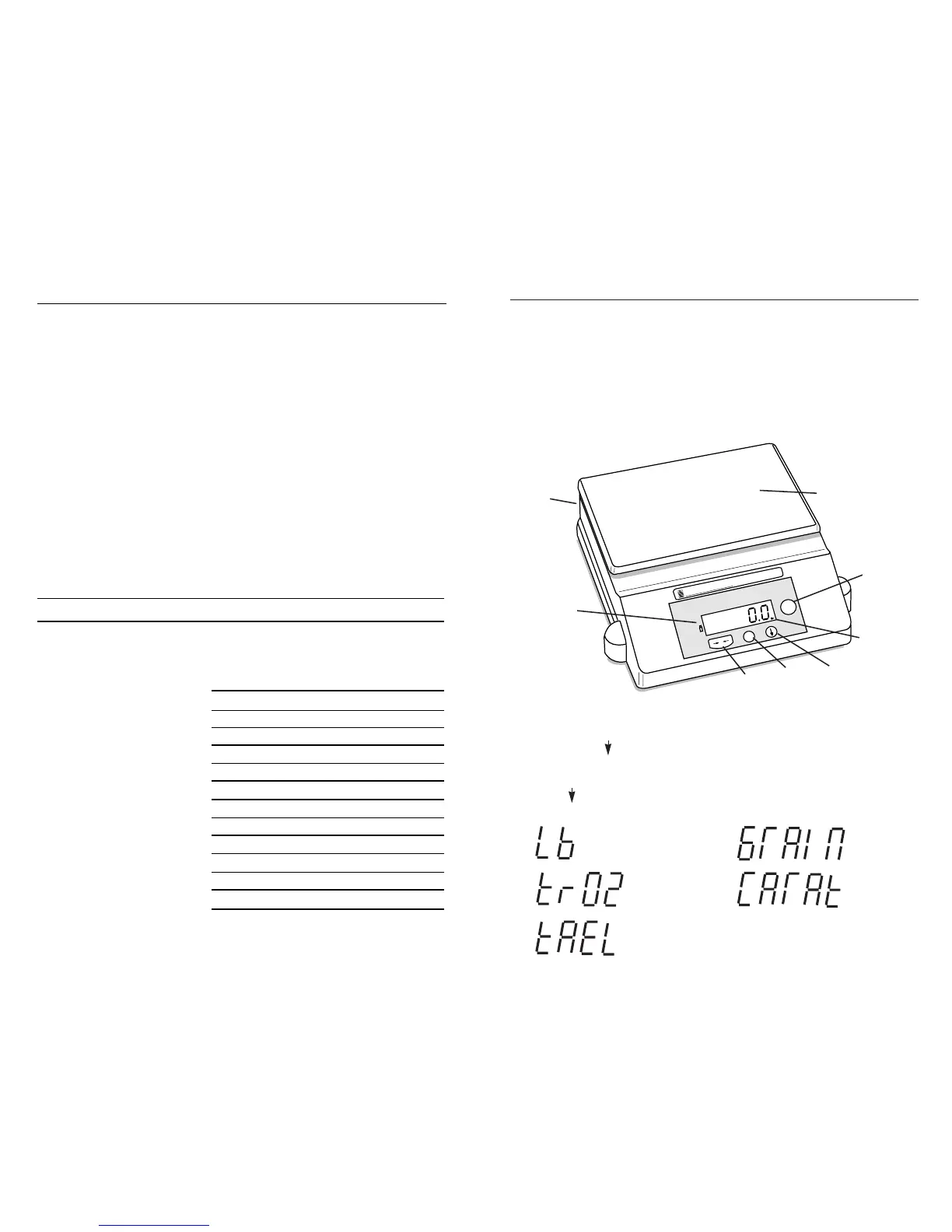
Weighing Pan
AC
Adapter
Port
(rear)
On/Off
Power
Standby
Key
Low Battery
Indicator
(flashing)
Grains
Scroll
Key
Print
Key
Zero
Key
Carats
Pounds
Troy Ounces
Tael, Hong Kong
B. Weigh Units
1. To toggle between pennyweight, ounces, grams, counting features (count
or percentage depending on which one is activated) and optional unit
(
***
), press the key.
2. To change the optional unit, press and hold down the
*
key for 3 seconds.
The display will read “Unit”.
3. Press the key to cycle through the different weight modes.
4. Press the –0– key when the desired mode appears.
Operation
Your new balance weighs in different units and can perform parts counting
and percent of weight functions.
A. Taring (Zeroing)
All models have taring capabilities up to their total weight capacity (varies with
each model).
1. Place sample container on pan.
2. Press the –0– key to zero the balance.
3. Add your sample, when the balance is stable the display is showing the
weight of the sample.
Stability/
Selection
Indicator


 To Previous Page