www.desatech.com
119303-01E
20
OPERATION
Continued
INSPECTING BURNERS
BLOWER
-
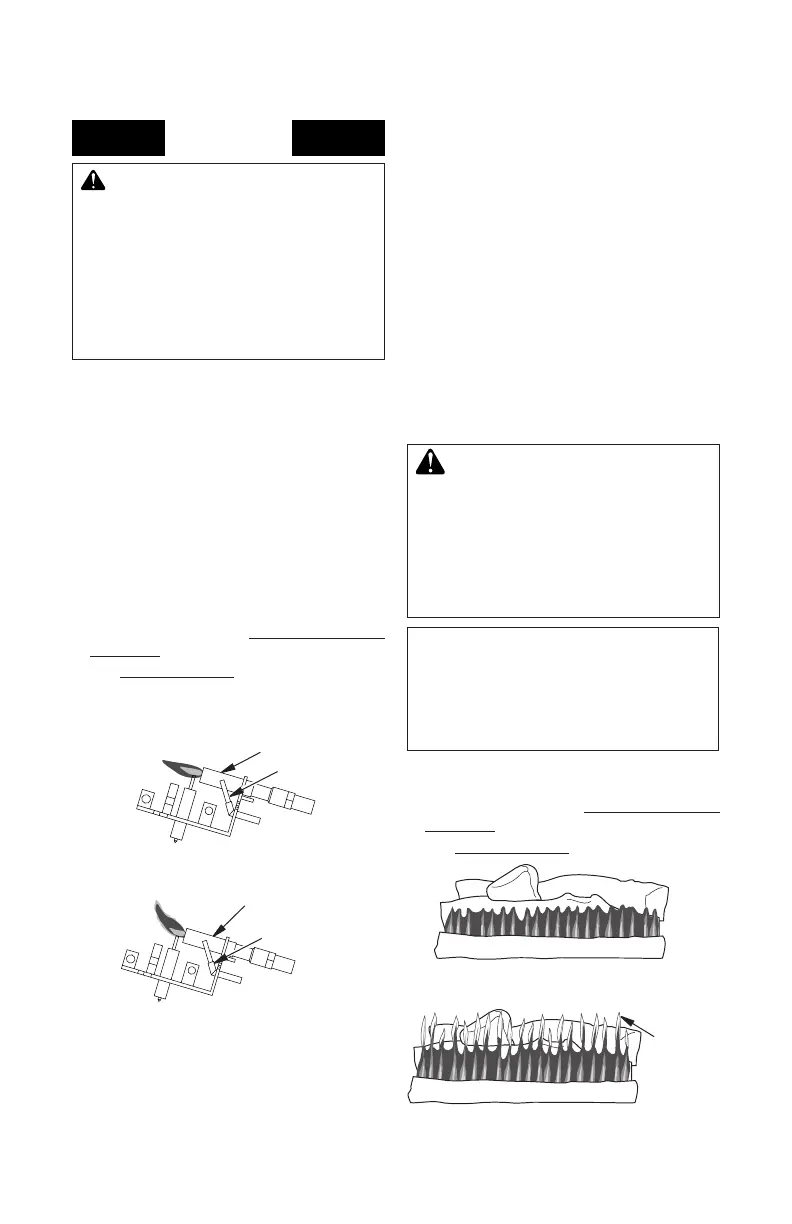
Figure 29 - Correct Pilot Flame Pattern
(Propane/LP Shown)
Figure 30 - Incorrect Pilot Flame Pattern
(Propane/LP Shown)
Pilot Burner
Thermocouple
Pilot Burner
Thermocouple
Check pilot ame pattern and burner ame
patterns often.
Figure 29 shows a correct pilot ame pattern.
Figure 30 shows an incorrect pilot ame pat-
tern. The incorrect pilot ame is not touching
the thermocouple. This will cause the thermo-
couple to cool. When the thermocouple cools,
the replace will shut down.
If pilot ame pattern is incorrect, as shown
in Figure 30
• turn replace off (see To Turn Off Gas to
Appliance, page 19)
• see Troubleshooting, page 23
Note: The pilot ame on natural gas units will
have a slight curve, but ame should be blue
and have no yellow or orange color.
ame pattern shows yellow tipping at top of
blue ame.
-
-
If front burner ame pattern is incorrect, as
shown in Figure 32
• turn replace off (see To Turn Off Gas to
Appliance, page 19)
• see Troubleshooting, page 23
CORRECT FLAME P ATTERN A T HIGH POSITION
INCORRECT FLAME P ATTERN A T HIGH POSITION
Figure 32 - Incorrect Front Burner Flame
Pattern
Figure 31 - Correct Front Burner Flame
Pattern
Yellow
Tipping
At Top
of Blue
Flame
CORRECT FLAME P ATTERN A T HIGH POSITION
INCORRECT FLAME P ATTERN A T HIGH POSITION
Locate the blower switch by opening lower
louver on replace. Blower switch is located
at lower left inside louver door.
This thermostat-controlled blower has a vari-
able speed control with an ON/OFF switch. The
blower will start when the thermostat senses a
sufcient increase in rebox temperature.
Note: It is safe to operate replace with blower
turned off. However, the blower helps distribute
heated air from the replace.
Note: Periodically check the louvers of the
rebox and remove any dust, dirt or other
obstructions.
Figure 31 shows correct front burner ame
pattern. Figure 32 shows incorrect front
burner ame pattern. The incorrect burner


 To Next Page