EN - 9A-DV6HH-HE
SYSTEM ASSEMBLY
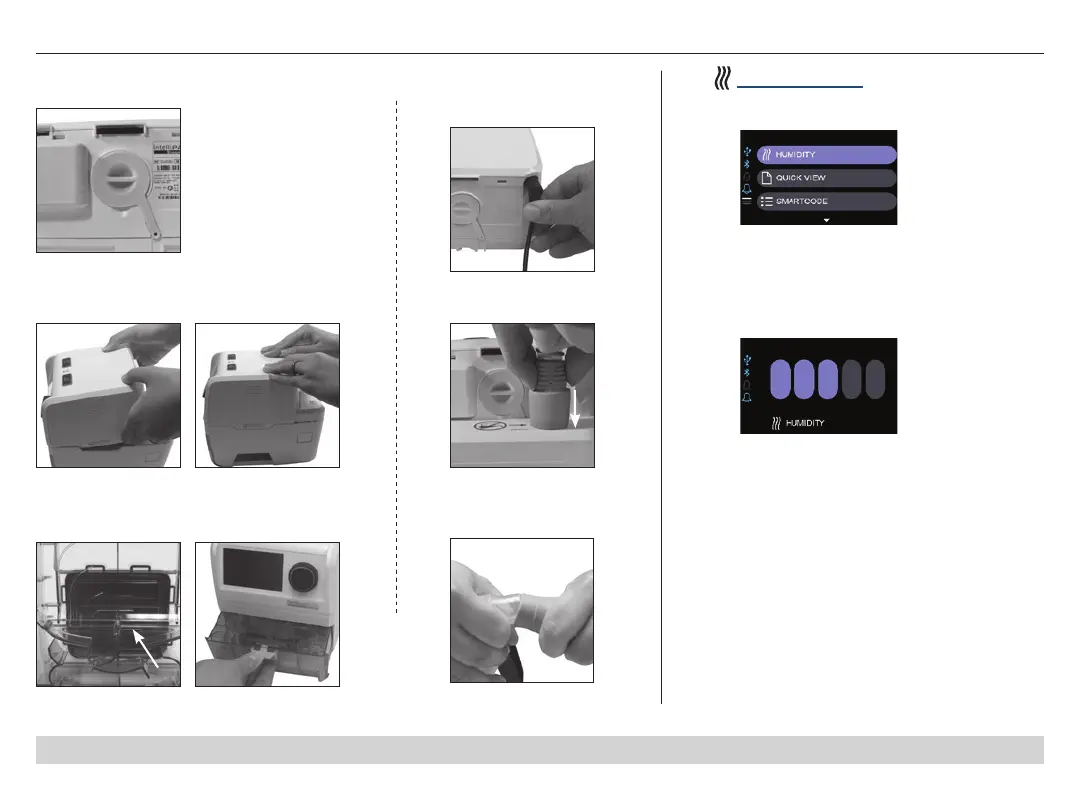
2. Place front of CPAP device on humidier cradle,
ensure locking tabs are engaged, and click into
place.
3. Fill clean chamber to ll line with distilled water
and insert into cradle. NOTE – Use distilled water
to avoid mineral buildup inside the chamber.
Chamber Fill Chamber in Cradle
5. Attach tubing to device.
4. Insert power cord
into back of device and
wall outlet.
6. Prepare mask and
connect to tubing.
Humidity Settings
1. Select Humidity
2. Choose humidity
setting of OFF or 1
through 5 bars. NOTE: 5
bars is the highest
humidity.
1. Check to be sure Air Supply Port Cover is
inserted into back of CPAP device.



 To Next Page