EasyManua.ls Logo

DeVilbiss DV5HH - User Manual

DeVilbiss DV5HH
108 pages
Print Icon
To Next Page IconTo Next Page
Loading...
DV54 AUTOADJUST CPAP SERIES
EN
DeVilbiss® SleepCube® Positive Airway Pressure Device
CAUTION–USA Federal law restricts this device to sale by, or on the order of a physician.
Assembled in USA of US & Imported Parts. Instruction Guide.
ES
Dispositivo de presión positiva en las vías respiratorias SleepCube® de
DeVilbiss®
PRECAUCIÓN–La ley federal de EE. UU. limita la venta de este dispositivo a médicos o a personas que dispongan de la corre-
spondiente orden médica.
Montaje efectuado en EE. UU. con piezas fabricadas en EE. UU. e importadas. Guía de instrucciones.
FR
Appareil de ventilation spontanée en pression positive SleepCube® de
DeVilbiss®
ATTENTIONCet appareil ne peut être vendu que par un médecin ou sur ordonnance de ce dernier.
Assemblé aux États-Unis avec des pièces des États-Unis et des pièces importées. Guide d’instructions.
ZH
DeVilbiss® SleepCube®󰉀󰂄
注意:美国联邦法律规定本设备只限医师购买或订购
󰋨󰊯󰅊󰋶󰉙
EL
DeVilbiss® SleepCube® συσκευή θετική πίεση των αεραγωγών
ΠΡΟΣΟΧΗ–Η Ομοσπονδιακή Νομοθεσία των Η.Π.Α. περιορίζει την πώληση αυτής της συσκευής μόνο από ιατρό ή με εντολή
ιατρού.
Συναρμολογείται στις Η.Π.Α. από αμερικανικά και εισαγόμενα εξαρτήματα. Οδηγός λειτουργίας
0044

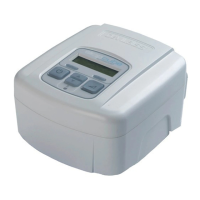
Table of Contents

Other manuals for DeVilbiss DV5HH

Questions and Answers

Summary

Key Features

Symbol Definitions

Important Safeguards

Dangers and Warnings

Critical safety hazards and precautions to prevent harm.

Introduction

Intended Use and Indications

Specifies the purpose and conditions for using the device.

System Assembly

Without Heated Humidification

Steps for setting up the device without the humidifier.

Operation

Start-up Procedures

Guide on how to turn on and begin using the device.

Using Comfort Delay Feature

Explanation of the feature to ease falling asleep.

Using The SmartFlex Feature

Details on the pressure relief feature for exhalation.

Controlling Humidity

Instructions for adjusting the humidifier's temperature setting.

Shut Down Procedure

Steps to safely turn off the device.

Keypad and Display

Basic CPAP Controls

Description of essential buttons and their functions.

Enable Menu List

Patient Messages

Reminders and Notifications

Explains system alerts for maintenance and status updates.

SmartCode and Adherence Score Information

SleepCube Travel and DC Operation

International Power and Altitude

Information on using the device in different regions and altitudes.

Battery Power Usage

How to power the device using a DC source or battery.

Supplemental Oxygen

Oxygen Use Precautions

Safety guidelines for using oxygen with the device.

Accessories and Replacement Items

Maintenance

General Maintenance and Filter Care

Guidance on routine checks and cleaning of filters.

Cleaning

Device Cabinet and Filter Cleaning

Instructions for cleaning the device exterior and air filters.

Optional Heated Humidifier Cleaning

Steps for cleaning the water chamber and humidifier cradle.

Troubleshooting

Common Issues and Solutions

Addresses frequent problems and their remedies.

Airflow and Mask Issues

Solutions for airflow interruptions and mask leak detections.

Device Faults and Skin Irritation

Guidance on device errors and skin contact problems.

Respiratory Symptoms and Humidity

Tips for recurring apnea symptoms and dryness.

Humidifier and Airflow Temperature Issues

Resolving gurgling sounds and warm airflow complaints.

Nasal;Sinus Issues and Heater Display

Addressing sinus pain and non-visible heater settings.

Specifications

CPAP Unit Specifications

Technical data for the CPAP device itself.

Humidifier Specifications

Technical data for the optional humidifier unit.

Filter Specifications

Details on particle filtration size for standard and optional filters.

Pressure Accuracy and Flow Rate

Technical performance data related to pressure and airflow.

Additional Device Specifications

Classification, protection degrees, and operation mode details.

Guidance and Manufacturers Declaration

Electromagnetic Compatibility (EMC) Guidance

Precautions for EMC compliance and installation.

Immunity Test and RF Separation Distances

Guidelines on immunity tests and RF equipment separation.

Advanced Menu Controls

Patient Menu Navigation

How to navigate and use the device's menu system.

SmartFlex Menu List

SmartFlex Settings Explained

Details on pressure relief, mode, and waveform adjustments.

Blower Off Menus

Compliance Data Access

How to view compliance information when the blower is off.

Quick View Menu Layout

CPAP Display Summaries

Overview of data presented in the Quick View menu.

SmartCode Data and Adherence Score Information

Definitions and Data Access

Explanation of SmartCode data and how to access it.

Summary

Key Features

Symbol Definitions

Important Safeguards

Dangers and Warnings

Critical safety hazards and precautions to prevent harm.

Introduction

Intended Use and Indications

Specifies the purpose and conditions for using the device.

System Assembly

Without Heated Humidification

Steps for setting up the device without the humidifier.

Operation

Start-up Procedures

Guide on how to turn on and begin using the device.

Using Comfort Delay Feature

Explanation of the feature to ease falling asleep.

Using The SmartFlex Feature

Details on the pressure relief feature for exhalation.

Controlling Humidity

Instructions for adjusting the humidifier's temperature setting.

Shut Down Procedure

Steps to safely turn off the device.

Keypad and Display

Basic CPAP Controls

Description of essential buttons and their functions.

Enable Menu List

Patient Messages

Reminders and Notifications

Explains system alerts for maintenance and status updates.

SmartCode and Adherence Score Information

SleepCube Travel and DC Operation

International Power and Altitude

Information on using the device in different regions and altitudes.

Battery Power Usage

How to power the device using a DC source or battery.

Supplemental Oxygen

Oxygen Use Precautions

Safety guidelines for using oxygen with the device.

Accessories and Replacement Items

Maintenance

General Maintenance and Filter Care

Guidance on routine checks and cleaning of filters.

Cleaning

Device Cabinet and Filter Cleaning

Instructions for cleaning the device exterior and air filters.

Optional Heated Humidifier Cleaning

Steps for cleaning the water chamber and humidifier cradle.

Troubleshooting

Common Issues and Solutions

Addresses frequent problems and their remedies.

Airflow and Mask Issues

Solutions for airflow interruptions and mask leak detections.

Device Faults and Skin Irritation

Guidance on device errors and skin contact problems.

Respiratory Symptoms and Humidity

Tips for recurring apnea symptoms and dryness.

Humidifier and Airflow Temperature Issues

Resolving gurgling sounds and warm airflow complaints.

Nasal;Sinus Issues and Heater Display

Addressing sinus pain and non-visible heater settings.

Specifications

CPAP Unit Specifications

Technical data for the CPAP device itself.

Humidifier Specifications

Technical data for the optional humidifier unit.

Filter Specifications

Details on particle filtration size for standard and optional filters.

Pressure Accuracy and Flow Rate

Technical performance data related to pressure and airflow.

Additional Device Specifications

Classification, protection degrees, and operation mode details.

Guidance and Manufacturers Declaration

Electromagnetic Compatibility (EMC) Guidance

Precautions for EMC compliance and installation.

Immunity Test and RF Separation Distances

Guidelines on immunity tests and RF equipment separation.

Advanced Menu Controls

Patient Menu Navigation

How to navigate and use the device's menu system.

SmartFlex Menu List

SmartFlex Settings Explained

Details on pressure relief, mode, and waveform adjustments.

Blower Off Menus

Compliance Data Access

How to view compliance information when the blower is off.

Quick View Menu Layout

CPAP Display Summaries

Overview of data presented in the Quick View menu.

SmartCode Data and Adherence Score Information

Definitions and Data Access

Explanation of SmartCode data and how to access it.

DeVilbiss DV5HH Specifications

General IconGeneral
BrandDeVilbiss
ModelDV5HH
CategoryHumidifier
LanguageEnglish

Related product manuals


