EasyManua.ls Logo

Devon CircuFlow 5200 - User Manual

Devon CircuFlow 5200
16 pages
Print Icon
To Next Page IconTo Next Page
Loading...
CircuFlow
5200
Quick Setup Guide
www.devonmedicalproducts.com • 1100 First Avenue, Suite 202 King of Prussia, PA 19406 • 866.446.0092
LB014 Rev B DRAFT 20121002
Question and Answer IconNeed help?

Do you have a question about the Devon CircuFlow 5200 and is the answer not in the manual?

Summary

Setup

Unboxing and Initial Placement

Steps for unboxing the device, checking contents, and placing it correctly on a stable surface.

Power Connection

Instructions for connecting the device's power cord to a safe and properly grounded outlet.

Therapy Setup

Connecting Garments

How to attach the garment quick connectors to the device front panel ports.

Applying Garments

Guide on how to properly put on leg or arm garments for treatment.

Powering On Device

Procedure for turning the device on using the main power switch.

Starting Default Treatment

How to initiate a treatment session using the device's factory default settings.

Gradient Mode Setup

Accessing Gradient Mode

Steps to navigate to and select Gradient Mode from the therapy settings menu.

Setting Pressure Parameter

How to set the desired pressure level for the Gradient Mode treatment.

Gradient Mode Configuration

Setting Gradient Parameter

How to adjust the gradient percentage drop between chambers in Gradient Mode.

Setting Gradient Mode Treatment and Cycle Times

Procedure to set treatment duration and cycle time for Gradient Mode.

Gradient Mode Operation

Adjusting Cycle Time

How to modify the cycle time, in seconds, within Gradient Mode.

Gradient Mode Skipping Chambers

Instructions for selecting specific chambers to exclude from filling in Gradient Mode.

Exiting Gradient Mode and Starting Treatment

Steps to exit Gradient Mode setup and begin a custom treatment session.

Pressure Mode Setup

Accessing Pressure Mode

Steps to navigate to and select Pressure Mode from the therapy settings menu.

Setting Chamber Pressures

How to set specific pressure levels for each of the four chambers in Pressure Mode.

Pressure Mode Configuration

Exiting Pressure Mode Setup

How to exit the Pressure Mode setup sequence and return to the main menu.

Setting Pressure Mode Treatment and Cycle Times

Procedure to set treatment duration and cycle time for Pressure Mode.

Pressure Mode Operation

Pressure Mode Skipping Chambers

Instructions for selecting specific chambers to exclude from filling in Pressure Mode.

Exiting Pressure Mode and Starting Treatment

Steps to exit Pressure Mode setup and begin a custom treatment session.

Lock Device

Accessing Lock Device Feature

Steps to navigate to and select the device lock function from therapy settings.

Confirming and Notifying Device Lock

Procedure for verifying the lock and understanding the device's locked status.

Unlock Device

Initiating Unlock Procedure

How to start the process of unlocking the device by holding the shuttle knob.

Entering and Verifying Password

Steps for inputting the password and confirming successful device unlock.

Treatment Process

Prefilling and Treatment Cycle

Details on the initial prefill stage and the main treatment cycle duration.

Post-Treatment Vacuuming

Information about the vacuuming process that occurs after treatment completion.

Powering Off and Removal

Steps to safely power off the device and remove the garment after use.

Overview

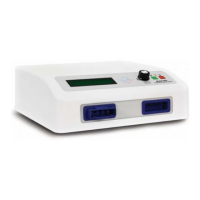
The CircuFlow™ 5200 is a medical device designed for compression therapy, offering various modes of operation to suit different treatment needs. It is a compact, white unit with a digital display, a shuttle knob for navigation, and quick-connect ports for garment attachment.

Function Description:

The CircuFlow™ 5200 provides intermittent pneumatic compression (IPC) therapy, primarily for conditions requiring improved circulation or lymphatic drainage. It operates by inflating and deflating multi-chambered garments (sleeves) around the patient's limb (leg or arm) to apply pressure. The device offers three main operating modes:

  • Factory Default Mode: This is the pre-set mode, providing 45 mmHg pressure on the distal chamber, a 7% gradient pressure, a 30-minute treatment time, and a 30-second cycle time, with no chambers skipped. This mode is ideal for quick, standard treatments without requiring extensive setup.
  • Gradient Mode: This mode allows for customization of the starting pressure and the percentage drop of pressure gradient between the chambers. This is beneficial for patients who require specific pressure profiles to optimize therapy effectiveness and comfort.
  • Pressure Mode: In this mode, users can individually set the pressure for each of the four chambers in the sleeve. This offers the highest level of customization, allowing for precise pressure application tailored to the patient's specific anatomical needs or medical condition.

The device is designed to be user-friendly, with settings that can be modified or restored before or in between treatments. It also includes a locking feature to prevent unauthorized changes to therapy settings, ensuring patient safety and adherence to prescribed treatment protocols.

Important Technical Specifications:

  • Power: 120 Volts AC, 60Hz, 100 VA Max.
  • Fuse Rating: 1.0 Amp 250V AC (SLO-BLO).
  • Pressure Range (Gradient Mode): 25 – 120 mmHg (increments of 1 mmHg).
  • Gradient Range (Gradient Mode): 5 – 15% (increments of 1%).
  • Treatment Time Range: 15 – 180 minutes (increments of 15 minutes).
  • Cycle Time Range: 20 – 80 seconds (increments of 10 seconds).
  • Chambers: The device supports garments with four chambers.
  • Safety Features: Requires connection to a safe and properly grounded outlet.

Usage Features:

  • Setup:
    • Unboxing: The device is shipped with protective foam covers, a power cord, an air blocker, and a user manual.
    • Placement: It should be placed on a flat and stable surface near the patient.
    • Power Connection: Plug the power cord into the back of the machine and into a grounded outlet.
  • Garment Connection: Quick connectors on the garment attach to ports on the front panel. For single-garment sessions, an air blocker must be inserted into the unused port.
  • Garment Application:
    • Leg Garments: Unzip, place foot at the bottom, pull up, and zip while supporting the garment around the leg.
    • Arm Garments: Slide the arm through the internal cavity.
  • Power On: Press the main POWER SWITCH up to the ON position. The green power indicator will illuminate.
  • Navigation and Setting Adjustment: The SHUTTLE KNOB (circular button) is used to navigate through menus, select modes, and adjust parameters (pressure, gradient, treatment time, cycle time, skip chamber). Turning the knob right increases values or moves to the next parameter, while turning left decreases values or moves to previous parameters. Pushing the knob confirms selections.
  • Skipping Chambers: In both Gradient and Pressure modes, specific chambers can be selected to be skipped. Note that skipping a chamber does not mean it won't fill with air, but rather with less air.
  • Starting Treatment: After setting parameters or selecting the Factory Default mode, press the green START button.
  • Prefill Stage: The pump undergoes an initial prefill stage, typically reaching 10 mmHg.
  • Ending Treatment: Treatment automatically ends after the set time. It can also be manually stopped by pressing the red STOP button on the front panel. If stopped manually, the treatment will not resume from where it left off.
  • Air Vacuum: After treatment, the device vacuums air from the garment for 1 minute to facilitate removal. For larger sleeves, an additional 1-minute vacuum cycle can be initiated by pressing STOP if all air is not removed initially.
  • Lock/Unlock Device:
    • Locking: After setting desired treatment parameters, navigate to "Lock Device" using the SHUTTLE KNOB and confirm. A verification screen will appear; select "Yes." The device will then display "Device locked" and the password "DM."
    • Unlocking: Hold down the SHUTTLE KNOB. An "Input Password" screen will appear. Use the SHUTTLE KNOB to select characters for the password "DM" and press the knob to input each character. If correct, the device will unlock and return to the menu. If incorrect, it will display "Password Incorrect" and return to the start menu.

Maintenance Features:

  • Post-Treatment: Once the sleeve is deflated, turn the power switch to OFF and unplug the power cord.
  • Garment Removal: After the power indicator light is off, the garment can be safely removed. The garment should be loose enough to unzip and remove.
  • Cleaning: While not explicitly detailed in the provided excerpts, typical medical device maintenance would involve cleaning the exterior of the device and the garments according to manufacturer guidelines to ensure hygiene and longevity.
  • Troubleshooting: The device has an "Error" indicator, suggesting built-in diagnostics for potential issues. The manual would contain specific troubleshooting steps for error conditions.
  • Service: The back panel of the device includes a "CAUTION: ELEC" warning, advising to refer service to qualified personnel to reduce the risk of electric shock and to ensure proper grounding.

Devon CircuFlow 5200 Specifications

General IconGeneral
BrandDevon
ModelCircuFlow 5200
CategoryMedical Equipment
LanguageEnglish