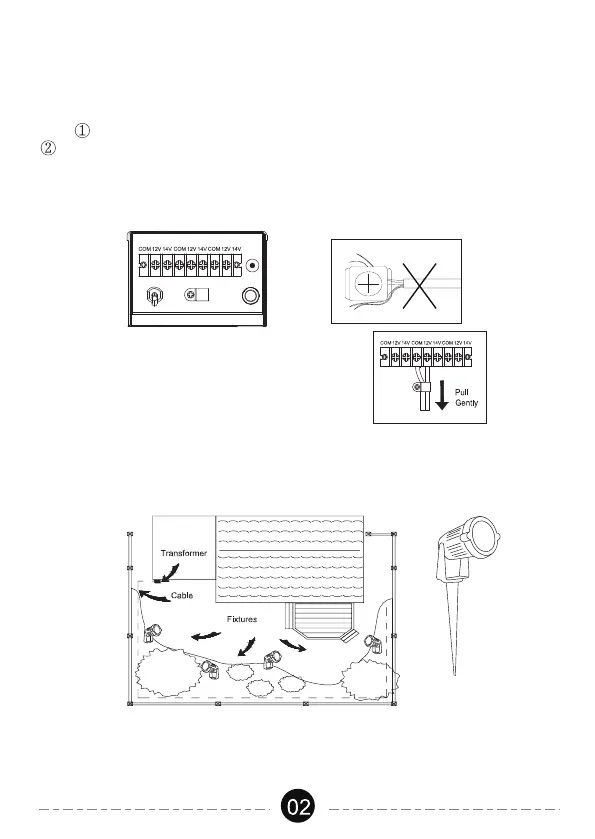
Lay the transformer on a flat, stable surface and use screwdriver to connect
the stripped ends of the cable under the terminal clamping plate.
Tips: Thread your cable through the white plastic loop to reduce its gravity.
As the following image shows, there are 3 group wiring ports(COM/12V/
14V for each group), you can choose any group of them to connect your
cable. For each group, there are 2 terminal output ends- 12V/14V, select
the appropriate terminal according to your lamp voltage.
2.Connecting the cable to the Transformer
Lay your fixtures (not included) to your desired location. Be sure they do not
exceed the 120-watt rating of the transformer. Coil the rest of the cable after
the last fixture. Transformer Cable Fixtures.
3.Placing Your Fixtures and Routing the cable
Note: Gently pull on the landscape
cable to verify if the connection is strong.
Use the cable connectors to attach your fixtures with the cable. Plug the
transformer in the GFCI outlet and enter the ON mode. Then the lamps
will light up.
4.Attaching Your Fixtures



 To Next Page