

EasyManua.ls Logo

Dexin DSM2500C - User Manual

Dexin DSM2500C
17 pages
Print Icon
To Next Page IconTo Next Page
Loading...
Add: No. 10&No. 12, Wuxing Fourth Road, Wuhou District Chengdu Sichuan, China
www.dsdvb.com/english Tel:+86-028-85550524 Fax: +86-028-85585255 Email:sunyu@dsdvb.com
DSM2500C IP to Analog Modulator
User Manual
20142014
DEXIN DIGITAL TECHNOLOGY CORP. LTD.
Question and Answer IconNeed help?

Do you have a question about the Dexin DSM2500C and is the answer not in the manual?

Summary

About This Manual

Intended Audience

Describes the target users and the prerequisite knowledge needed for understanding the manual's content.

Disclaimer

Legal notice stating that the document content is subject to revision and DEXIN is not liable for errors or damages from its use.

Copy Warning

Informs that the document contains confidential information and its usage is limited to product owners without prior authorization.

Chapter 1 Product Overview

Key Features

Highlights the main functionalities and capabilities of the DSM2500C IP to Analog Modulator.

Specifications

Details the technical specifications of the device, covering input, output, video, audio, and data parameters.

Appearance and Illustration

Provides descriptions and visual representations of the device's front and rear panels.

Chapter 2 Installation Guide

Acquisition Check

Instructions for verifying that all items are present in the package upon receiving the device.

Installation Preparation

Steps and considerations required before proceeding with the physical installation of the device.

Environment Requirement

Specifies the necessary environmental conditions for installing and operating the device.

Grounding Requirement

Details the importance and methods for proper grounding to ensure device reliability and safety.

Wires Connection

Covers the procedures for connecting the power cord and signal/NMS cables to the device.

Chapter 3 Web NMS Management

Login

Explains how to access and log into the device's web-based Network Management System (NMS).

Operation

Details the device's operation through the web NMS, including summary and parameter configuration.

System Network Settings

Describes how to configure network parameters for the NMS, Data, and Data-2 interfaces.

System Account Settings

Instructions for changing the login username and password for the web NMS.

System Configuration

Guide on how to save, restore, or reset device configurations via the web interface.

System Firmware Update

Steps and warnings for updating the device's firmware through the web NMS interface.

System Log Check

Instructions on how to view the system logs, including kernel and system logs, for troubleshooting.

System Reboot

Information on how to reboot the device, noting that some configurations take effect after a reboot.

Chapter 4 Troubleshooting

Prevention Measure

Provides preventative measures to avoid potential hazards and ensure proper device operation.

Conditions Requiring Power Cord Unplug

Lists specific conditions or events that necessitate unplugging the device's power cord.

Chapter 5 Packing list

Included Items

Lists the items that should be included in the product package.

Overview

The DSM2500C IP to Analog Modulator is a high-density device designed for converting IP-based MPEG Transport Streams into standard PAL, NTSC, or SECAM TV programs. It is primarily intended for use in broadcast and electronics environments, requiring users to have some prerequisite knowledge in these fields for installation and operation. The device supports a wide range of input and output configurations, making it versatile for various applications in digital television broadcasting.

Function Description:

The core function of the DSM2500C is to receive IP inputs, decapsulate the HEVC/H.265, H.264/AVC, or MPEG-2 TS, and then modulate these into analog TV programs. It features two Gigabit Ethernet (GE) ports, capable of handling a maximum of 64 IP inputs over MPTS/SPTS, with each GE input supporting up to 840Mbps. This allows for the processing of up to 32 IP multicast groups into a corresponding number of analog TV programs. The modulator can output up to 32 non-adjacent and adjacent carriers within a 400MHz bandwidth. Network management is facilitated through a web-based interface, providing convenient remote control and configuration.

Important Technical Specifications:

  • Input:
    • Interface/Rate: 2 GE ports (max 64 IP input), Max 840Mbps for each GE input.
    • Stream: UDP, UDP/RTP, 1-7 packets, FEC, SPTS, MPTS.
    • Transport Protocol: UDP/RTP, unicast and multicast, IGMP V2/V3.
    • Packet Length: 188 / 204 Bytes.
  • Decoding Parameters:
    • Video: HEVC/H.265, H.264/AVC Level 4.1 HP, MPEG-2 MP@HL.
    • Audio: MPEG-1/2 Layer 1/2, (HE-)AAC, AC3.
    • Data: Teletext, Teletext subtitles, DVB Subtitling.
    • Resolutions:
      • HEVC/H.265: 1080@60P, 1080@60I, 1080@50P, 1080@50I, 720@60P, 720@50P.
      • H.264/AVC: 1080@60I, 1080@50P, 1080@50I, 1080@30P, 1080@25P, 720@60P, 720@50P, 576@50I, 480@60I.
      • MPEG2: 1080@60I, 1080@50I, 720@60P, 720@50P, 576@50I, 480@60I.
    • Aspect Ratio: 4:3/16:9.
  • Modulation Parameters:
    • Number of Channels: Up to 32.
    • Connectors: 75Ω, F-jack.
    • Frequency Range: 47 – 862MHz, digital modulation process.
    • Output Bandwidth: 400MHz.
    • Output Level: Maximum 112dBμV.
    • Return Loss: ≥ 14dB.
    • Spurious Frequency Dist.: ≥ 60dB.
    • Stereo Cross Talk: > 55dB.
    • Residual Carrier Accuracy: 1%.
    • TV Standard: PAL B/G/D/K/M/N, NTSC M/J/4.43, SECAM (under development).
    • Video-signal to Noise Ratio: ≥ 60dB.
  • Network Interface:
    • Management: 1 x 100 Base-T Ethernet (RJ 45).
    • Data: 2 x 1000 Base-T Ethernet (RJ 45).
    • Protocol: IEEE802.3 Ethernet, RTP, ARP, IPv4, TCP/UDP, HTTP, IGMPv2/v3.
  • Other Specifications:
    • Image Resolution: Up to 1080i.
    • CNR: 60 dB (after internal combining).
    • SNR: > 53 dB (after internal combining).
    • Sampling Frequency: 48, 44.1, 32.
    • Output Volume Adjustment: 0-100%.
  • General:
    • Dimensions: 420mm×440mm×44.5mm (WxLxH).
    • Temperature: 0~45°C (operation), -20~80°C (storage).
    • Power Supply: AC100V±10%, 50/60Hz or AC 220V±10%, 50/60Hz.

Usage Features:

The DSM2500C is designed for ease of use through its web-based Network Management System (NMS).

  • Login and Access: Users can access the NMS by connecting a PC to the device via a network cable and entering the default IP address (192.168.0.136) in a web browser. The default username and password are "admin".
  • IP Input Configuration: The "IP Input" section allows users to add and manage input channels from Data1, Data2, or a Data Module. Users can select specific programs from the input stream to be outputted. Features include adding, editing, and deleting input channels, as well as selecting all input or output programs. A "Parse program" function with a timeout setting is available for processing input streams.
  • Modulator Settings: The "Modulator" section enables configuration of RF output parameters, including the center frequency, channel level, audio gain, and modulation enable status for each of the 32 channels. Users must ensure that the difference between the starting and ending frequencies does not exceed the 400MHz output bandwidth.
  • Decoder Monitoring: The "Decoder" section provides a monitoring interface to check the status of decoding for each program, displaying program name, decode version, and decode status.
  • System Network Settings: The "Network" section allows users to configure network parameters such as IP address, subnet mask, gateway, and web management port for NMS, Data1, and Data2 interfaces.
  • Account Management: The "Account" section is used to set and modify the login username and password for the web NMS, enhancing security.
  • Configuration Management: The "Configuration" section offers options to save, restore, factory reset, backup, and load device configurations, along with the ability to select specific areas for configuration. Changes require saving to take effect and will be lost after a reboot if not saved.
  • Firmware Updates: The "Firmware" section facilitates firmware updates for the CPU, decoding, and FPGA components. Users are cautioned to choose the correct firmware file, avoid power interruptions during the update, and reboot the device manually after the process.
  • Log Viewing: The "Log" section provides access to system and kernel logs, which can be helpful for troubleshooting and monitoring device activity.
  • Reboot Functionality: A "Reboot" option is available in the system menu, which is necessary after certain configuration changes or firmware updates.

Maintenance Features:

DEXIN emphasizes the reliability and stability of its products, backed by ISO9001 quality assurance. Proper installation and adherence to operational conditions are crucial for device longevity and performance.

  • Environmental Requirements: The device should be installed in an environment with a temperature between 0 to 45°C. Good ventilation is essential, especially for the heat sinks on the rear panel.
  • Grounding: All function modules require proper grounding for reliability, stability, lightning arrest, and interference rejection. Coaxial cables' outer conductor and isolation layer should be electrically connected to the device's metal housing. Grounding conductors should be thick, short copper wires to reduce high-frequency impedance, with good electrical conduction and anti-rust properties at both ends. The area of conduction between the grounding wire and the device frame should be at least 25mm².
  • Power Connection: The device requires an independent AC power supply (220V ±10% or 110V ±10%, 50/60Hz). Users must ensure the power cord is correctly connected and the input AC voltage is within the specified range before switching on.
  • Signal Cable Connection: All signal cables, including input and output, must be properly connected.
  • Operational Best Practices: Frequent switching on/off is prohibited; an interval of at least 10 seconds is recommended between operations.
  • Troubleshooting and Safety:
    • Unplug the power cord immediately if the power cord or socket is damaged, liquid has entered the device, circuit shorting occurs, the device is in a damp environment, or physical damage has occurred.
    • If the device remains idle for a long time or fails to work properly after a factory reset, maintenance is required.
    • Regular checks of RF output level variations within tolerant ranges are advised.

The DSM2500C is a robust and feature-rich modulator designed for professional broadcasting applications, offering comprehensive control and monitoring capabilities through its intuitive web interface.
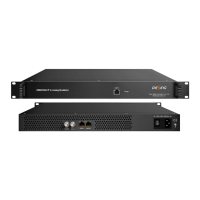
Dexin DSM2500C Specifications

General IconGeneral
BrandDexin
ModelDSM2500C
CategoryModulator
LanguageEnglish