EN
5
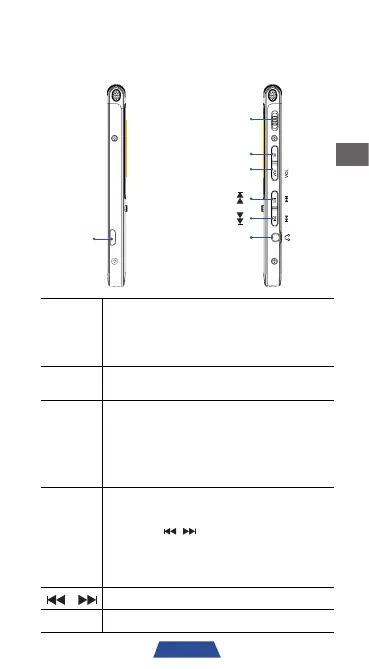
Layout
Micro
USB
ONOFFMENU
Power
On/Off
MENU
Volume
Headphone
Micro
USB
y
Connect to a PC via USB cable to
transfer recording data and files.
y
Connect to a compatible power
source to charge battery power.
Power
On/Off
Slide up to turn on and slide down to
turn off the recorder.
MENU
y
Press to return to previous menu.
y
Press and hold to return to home
screen.
y
During time/clock setting, press to
navigate to next setting.
VOL
y
During playback, press to enter the
volume adjustment interface, then
press ' ' to adjust.
y
In recording file list, press and hold
to enter file management mode to
select delete files.
Volume Up / Down / Previous / Next
Earphone Headphones connection input.


 To Next Page