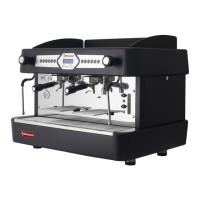
This document is an operating manual for the Diamond COMPACT/2PB espresso coffee machine, production code CARAVEL 2 BLACK, dated 10/2019. It provides instructions for installation, operation, and maintenance in Portuguese, English, German, French, and Spanish.
Function Description
The Diamond COMPACT/2PB is a commercial espresso coffee machine designed to prepare espresso coffee and other hot beverages. It features steam wands for frothing milk and heating liquids, and a hot water tap for dispensing hot water. The machine is available in different configurations (CARAVEL 1, CARAVEL 2, CARAVEL 3) which vary in the number of porta-filters and groups.
The machine's control panel, for automatic (CV models), includes an electronic keyboard with dedicated buttons for different coffee portions (espresso, double espresso, 2 espressos, 2 double espressos) and a continuous/programming key. Semi-automatic models feature a switch button above each group instead of a keyboard.
Important Technical Specifications
The main technical characteristics, including electrical specifications (voltage and frequency), are engraved on the machine's data plate.
Necessary connections include:
- Water tap with a G3/8 nut for the water supply tube.
- Drain pipe with a drain hose of minimum 16/17 mm diameter.
- Earthed electric mains supply with 30mA protection and a circuit breaker (20 A for 2-group machines, 25 A for 3-group machines) with a 3 mm contact separation.
The ideal ambient temperature for operation is between 15ºC and 25ºC.
The weighted sound pressure level A is 83.6 dB, with an uncertainty of 2 dB.
Usage Features
- Getting Started:
- Connect the water supply before switching on the machine.
- For initial filling, heating starts only after the water reaches the minimum level. In normal operation, heating is continuously active unless the water level drops below minimum.
- Check boiler pressure (approx. +/- 1 bar) and pump pressure (approx. +/- 9 bar) using the manometers. Pump pressure can be adjusted via a screw on the pump head.
- Clean steam wands by opening them for a few seconds before use.
- Programming Portions (CV Models):
- The CV models allow volumetric control of coffee doses. Programming is initiated on the leftmost group and settings are automatically transferred to other groups, though individual programming is possible.
- To program, fill a porta-filter with ground coffee, press and hold key 5 for 3 seconds until it blinks. Select the desired coffee key (1-4) within 5 seconds. Once the desired coffee volume is dispensed, press any coffee key (1-4) to stop.
- If no key is pressed within 5 seconds during programming mode, the machine exits programming (TIME-OUT).
- Preparing Espresso Coffee:
- Fill the porta-filter with 6.5-7g of freshly ground coffee per espresso.
- Press the ground coffee uniformly with an espresso tamper.
- Insert the porta-filter into the group by winding it left until it locks.
- Place a cup(s) under the porta-filter's coffee outlet.
- For automatic models, press the desired portion button. For semi-automatic models, press the switch button above the group.
- The machine automatically stops dispensing when the pre-programmed volume is reached (automatic models) or when the switch button is pressed again (semi-automatic models).
- Grind Regulation: Ideal espresso extraction time is 18-25 seconds. If extraction is longer than 25 seconds, adjust the grinder for a coarser grind. If shorter than 18 seconds, adjust for a finer grind.
- Extracting Hot Water: Turn the water control knob (12) to the right to dispense hot water, and to the left to close.
- Extracting Steam: Turn the steam control knob (1) to the right to release steam, and to the left to close. The machine has two steam wands. Open the steam wand for 2-3 seconds before and after each use to clean residues.
Maintenance Features
- Safety: All maintenance and repair operations must be carried out by qualified and authorized personnel. The power cable, if damaged, must be replaced by specialized personnel.
- Regular Cleaning: The equipment must be cleaned regularly.
- Daily Cleaning:
- Groups: For automatic models, use the self-cleaning program by inserting a blind filter with a spoonful of detergent into a porta-filter, attaching it to the group, and pressing keys 1 and 5 simultaneously. For semi-automatic models, insert a blind filter, activate the group for 30 seconds, then stop. Repeat until water runs clear.
- Filters and Porta-filters: Rinse with hot water and specific detergent to dissolve coffee grease.
- Machine Exterior: Disconnect from power and let cool. Clean guides, joints, water taps, and steam wands with a humid cloth to prevent residue buildup.
- Weekly Cleaning:
- Groups: Similar to daily cleaning, but with a spoonful of specific detergent in the blind filter. Repeat until water runs clear.
- Grids and Trays: Remove plastic grids from the cup warming area and metal grids from the tray under the groups. Wash with a humid cloth and specific detergent.
- Residue Tank: Clean the tank and its drain with a brush to remove debris.
- Machine Body: Clean with a humid soft cloth and appropriate detergent. Avoid abrasive cleaners or solvents.
- Water Purifier: Clean regularly (at least every two weeks) according to the purifier's instructions.
- Alerts (CV Models):
- Time-out during water filling: If the boiler water level sensor doesn't detect water, the machine attempts to refill. If refilling takes longer than 120 seconds, it stops, and all keyboard LEDs blink as an alarm. Reset by switching the machine off and on. For semi-automatic models, the red signal light blinks during filling and turns solid red if the maximum level isn't reached within 180 seconds.
- Time-out during drink production: If the volumetric counter doesn't receive impulses for more than 5 seconds during drink production, the selected key's LED blinks. If no impulses are received for 1 minute, production stops automatically.

 Need help?
 General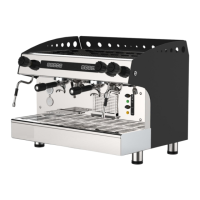

 To Next Page