Inter Pentium4 1.4G CPU, recommended Pentium4 2.0G or higher
Windows 7, 8, 8.1 and 10
Memory 128M min, recommend 256M or higher
A high speed USB2.0 interface
VGA card supports DirectX9.0 CD/DVD-ROM (for installation) Note: The full installation disk can be
downloaded at:
http://www.dmmdownload.com/downloads/CURRENT/PVR/VC500W10PD_Complete_install.zip
300MB HD space (install driver and applications, like EZ Grabber), 600MB to 3GB per hour for recording
Contents
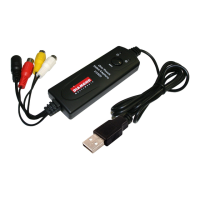
VC500
AV cable (Composite RCA cable)
Software Installation Disk (Includes the following)
• Windows Driver
• Power Director 12 for Video capture, Video editing and creating/burning videos to DVD
• Ez Grabber for Video or Audio Capture (This is an optional video capture utility as Power Director 12 has the
same features plus much more)
VC500 Connection Diagram
Note:
make sure you connect the V500 inputs to your video source (VHS or Camcorder) outputs. The device source
example; your VCR will be labeled Video out. Connect the Yellow cable to the Yellow video out of the source.
Connect the Red and White cable to the audio out of the source. You also have the option to use the S-Video input
but note you still need to connect the red and white audio cables. In some cases, your VHS or Camcorder only has
one output (Mono) in this case you can connect the one audio output to either the red or white audio inputs on the
VC500.



 To Next Page