

EasyManua.ls Logo

Diamond vc500 - User Manual

Diamond vc500
14 pages
Print Icon
To Next Page IconTo Next Page
Loading...

Other manuals for Diamond vc500

Question and Answer IconNeed help?

Do you have a question about the Diamond vc500 and is the answer not in the manual?

Summary

Introduction and Product Overview

Features and Product Usage

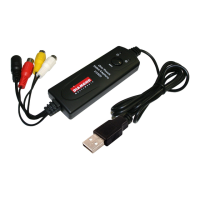
Details the device's features, including form factor, USB 2.0 support, and included software.

System Requirements

Lists the necessary hardware and software specifications for installation, such as CPU, RAM, and OS.

Contents

Outlines the items included in the package, such as the capture device, cables, and software CD.

Video Capture Connection Guide

Driver and Application Installation

Initial Connection and Driver Setup

Steps for connecting the VC500 to a PC and initiating driver installation via USB.

Software Installation Prompts

Details Windows security prompts during installation and handling of logo testing warnings.

ShowBiz Capture and Editing Software

ShowBiz Installation Process

Instructions for installing the ShowBiz editing software, including license key entry.

EZ Grabber Application Usage

Overview of using the EZ Grabber application for video capture and its main interface controls.

Technical Support and Warranty Information

Technical Support Requirements

Information needed for contacting technical support, including model and system details.

One Year Limited Warranty

Details the product's warranty coverage, exclusions, and claims process.
Summary

Introduction and Product Overview

Features and Product Usage

Details the device's features, including form factor, USB 2.0 support, and included software.

System Requirements

Lists the necessary hardware and software specifications for installation, such as CPU, RAM, and OS.

Contents

Outlines the items included in the package, such as the capture device, cables, and software CD.

Video Capture Connection Guide

Driver and Application Installation

Initial Connection and Driver Setup

Steps for connecting the VC500 to a PC and initiating driver installation via USB.

Software Installation Prompts

Details Windows security prompts during installation and handling of logo testing warnings.

ShowBiz Capture and Editing Software

ShowBiz Installation Process

Instructions for installing the ShowBiz editing software, including license key entry.

EZ Grabber Application Usage

Overview of using the EZ Grabber application for video capture and its main interface controls.

Technical Support and Warranty Information

Technical Support Requirements

Information needed for contacting technical support, including model and system details.

One Year Limited Warranty

Details the product's warranty coverage, exclusions, and claims process.

Diamond vc500 Specifications

General IconGeneral
BrandDiamond
Modelvc500
CategoryPCI Card
LanguageEnglish

Related product manuals
