image 1 image 2 image 3 image 4 image 5
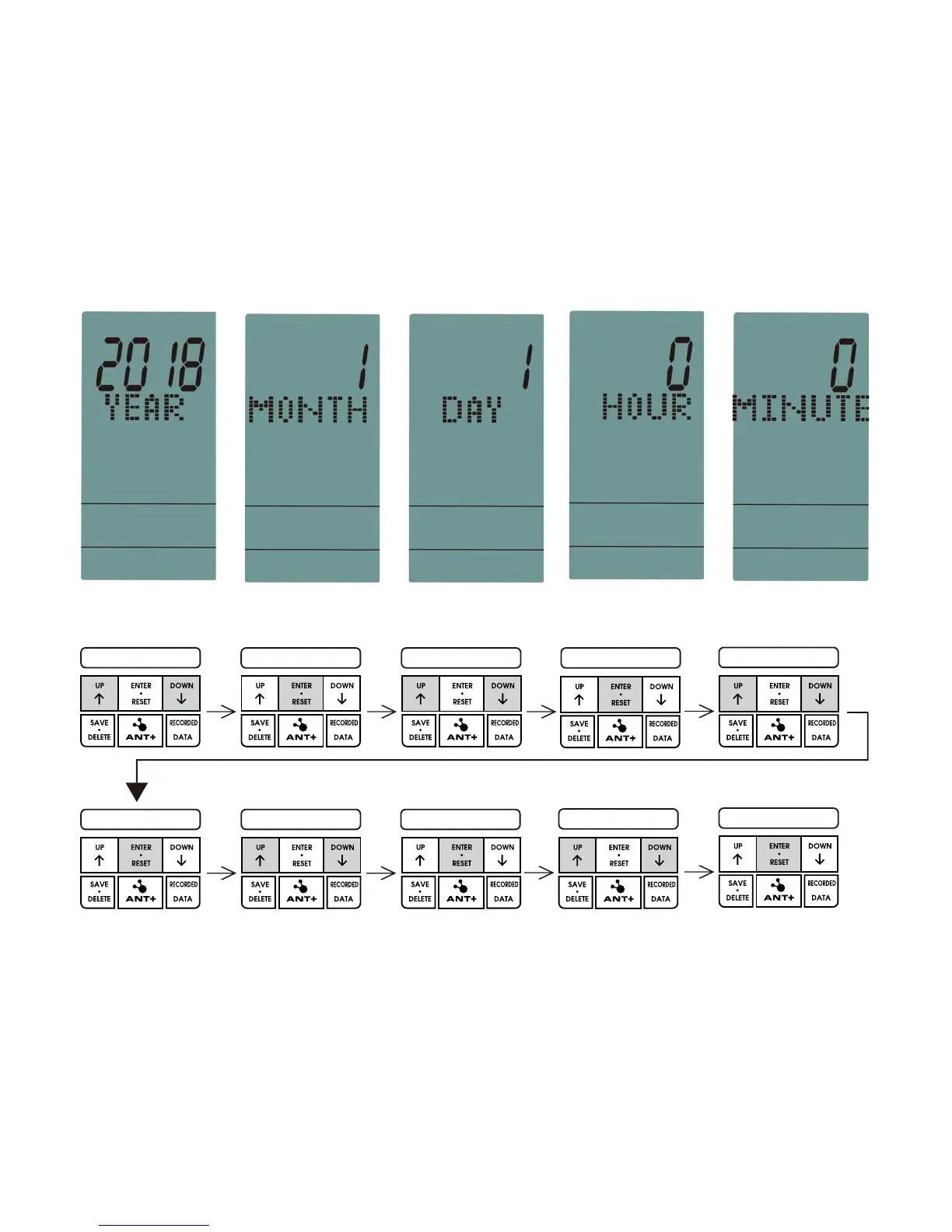
YEAR SELECT PRESS ENTER MONTH SELECT PRESS ENTER
DAY SELECT
PRESS ENTER HOUR SELECT PRESS ENTER
PRESS ENTER
MINUTE SELECT
NOTE:
the date and time should be set up again while batteries replaced.
Operating Instructions
After the power is on, the LCD enters the time setting mode after 1 second.
(After this setting, the setting mode will no longer be displayed the next time the power is
turned on, unless the batteries are removed or replaced.)
YEAR: Ran
ge from 2018 to 2099. Default value: 2018 (image1)
MONTH: Range from 1 to 12. Default value: 1 (image2)
DAY: Ran
ge from 1 to 31. Default value: 1 (image3)
HOUR: Range from 0 to 23. Default value: 0 (image4)
MINUTE: Range from 0 to59. Default value: 0 (image5)
A.Time setting mode:


 To Next Page