Work out data storage function
A.After starting up, you need to set the perpetual calendar.
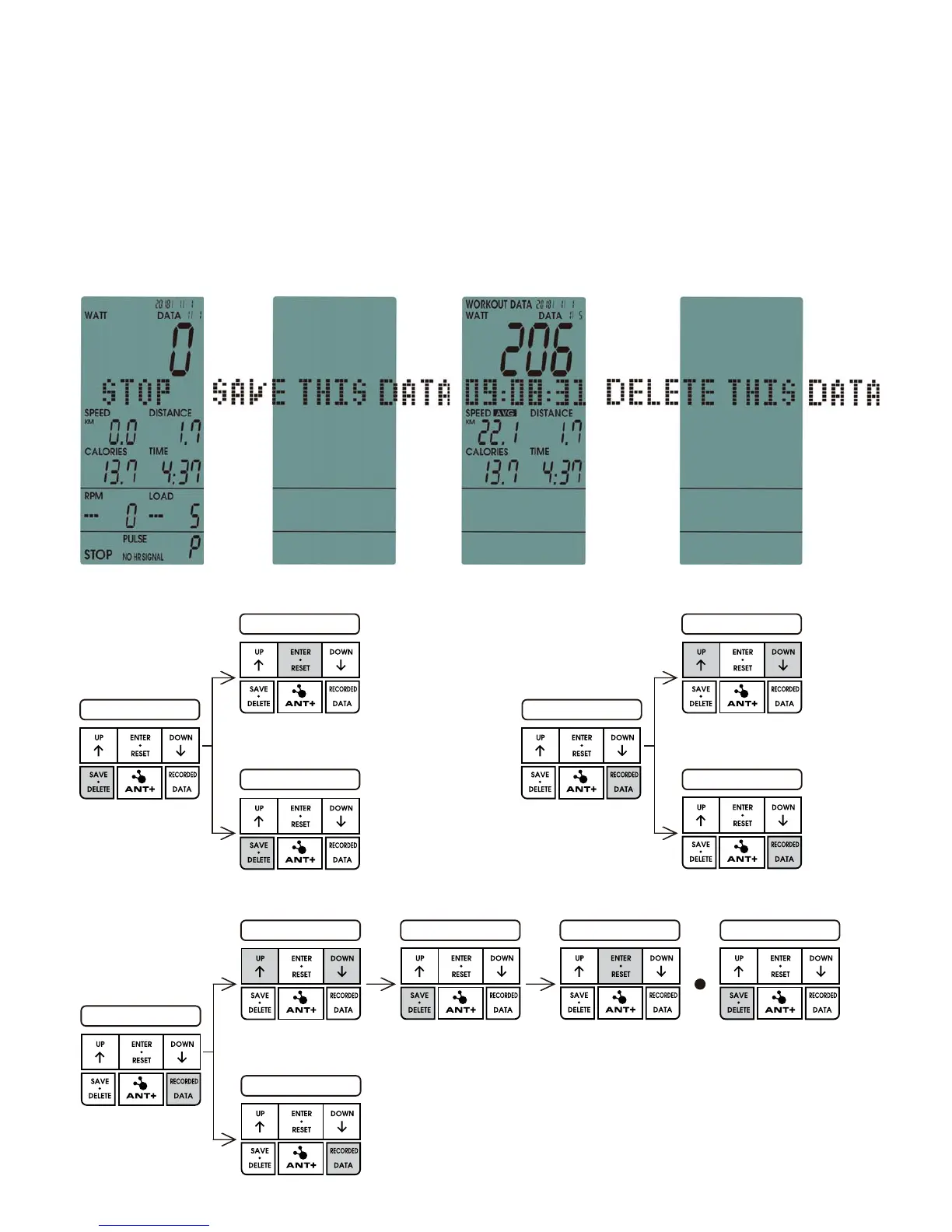
B.When the console is paused (image13), press SAVE.DELETE key, the LCD will display SAVE
THIS DATA and press ENTER to save the work out data & time & the number of said work out.
C.When the console is paused, press RECORDED DATA to pull the work out data.
Press UP&DOWN to select the stored data (image15)
D.Under RECORDED data display, press SAVE.DELETE key, the display will show DELETE THIS
DATA, press ENTER key to delete the selected data (image16).
E.Under RECORDED data display, press SAVE.DELETE for 6 seconds to delete all stored data
and return to STAND BY mode.
image 13 image 14 image 15 image 16
PRESS SAVE & DELETE
PRESS ENTER
PRESS SAVE & DELETE
Confirm the saving
Give up the saving
DATA SELECT
PRESS RECORDED DATA
PRESS RECORDED DATA
Return to main menu
PRESS ENTER
DATA SELECT
PRESS RECORDED DATA
PRESS RECORDED DATA
PRESS SAVE & DELETE
PRESS SAVE & DELETE 3 SEC
Delete ALL the
recorded data
Return to main menu


 To Next Page