= NORMAL CHARACTER
= INVERSE CHARACTER
0
= ALPHANUMERIC CHARACTER
6. VIDEO DISPLAY MODES
The VZ-200 has a total of 2K bytes of video display RAM, located
in memory addresses
7000 -
77FF hex (28672 - 30719 decimal)
inclusive. When the video display controller (VDC) chip is
operating in its text/lo-res mode (mode
0),
only the first 512
bytes of this video RAM are used. This is the default mode,
entered on power-up. When the VDC is switched to its hi-res
graphics mode (mode 1), all of the video RAM is used.
A. TEXT/LO-RES GRAPHICS MODE (MODE
0)
In this mode the video screen is organised as 16 lines of 32
characters. Each character displayed on the screen corresponds
to a single byte in the first 512 addresses of video RAM
(7000 -
71FF hex, or 28672 - 29183 decimal).
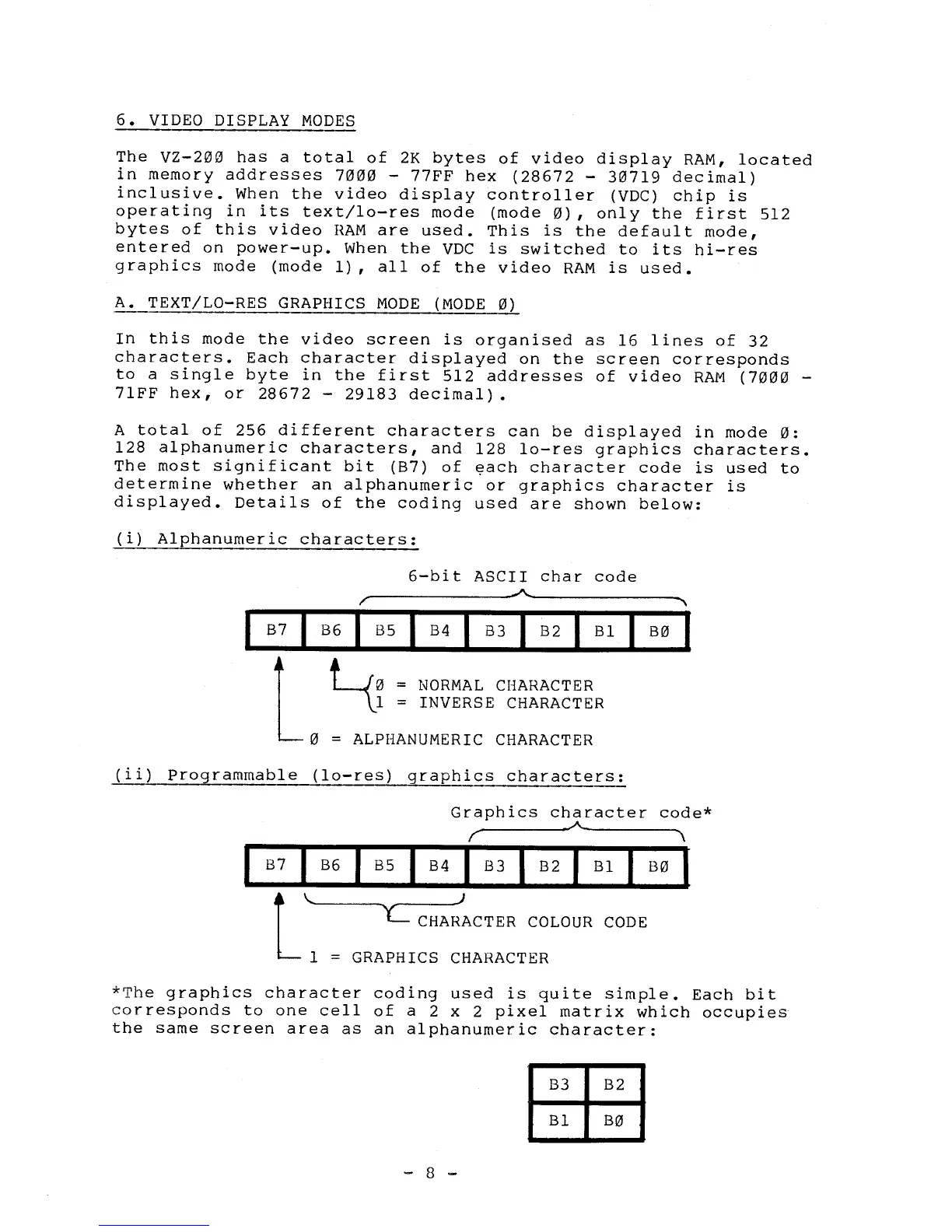
A total of 256 different characters can be displayed in mode
0:
128 alphanumeric characters, and 128 lo-res graphics characters.
The most significant bit (B7) of each character code is used to
determine whether an alphanumeric or graphics character is
displayed. Details of the coding used are shown below:
(i)
Alphanumeric characters:
6-bit ASCII char code
B7
I
B6
I
B5
I
B4
I
B3
I
B2
B1
I
B0
(ii)
Programmable (lo-res) graphics characters:
Graphics character code*
I
B7
I
B6
B5
I
B4
I
B3
B2
Bl
B0
I
CHARACTER COLOUR CODE
1 = GRAPHICS CHARACTER
*The graphics character coding used is quite simple. Each bit
corresponds to one cell of a 2 x 2 pixel matrix which occupies
the same screen area as an alphanumeric character:
B3
B2
B1
B0
- 8 -



 To Next Page