Keypad Locks
Shared & Assigned Use Functionality
Product Guide
M
PG-LUP-DB-DEN
121217
Phone: 707 766 6000
www.digilock.com | sales@digilock.com
Battery Replacement
Support
Sleep Mode
After three consecutive incorrect User Code entries to unlock, the lock will go into Sleep Mode for one minute and
for an additional minute for each subsequent incorrect entry. The keypad is disabled while in Sleep Mode.
Error Condition Indicator
10 rapid beeps:
The lock is binding which means that either door alignment or items in the locker are preventing the lock from operating.
Press on the door while operating the lock. If error condition persists, contact Digilock support for assistance.
2 sets of three beeps:
The batteries are low. Replace the batteries.
1 beep:
The lock does not recognize the User Code, User Key, Programming Key, or Manager Key.
Does not Unlock with the User Code or User Key
The lock does not recognize the User Code or User Key. For immediate access, operate with a registered Manager Key. If in
assigned use functionality, follow Assign User Credential instructions to assign a new User Code or User Key to the lock.
Does not operate with a Manager Key
The lock does not recognize the Manager Key. Follow Register/Add Manager Key(s) instructions to register the Manager
Key to the lock. For immediate access, operate with another registered Manager Key or with the Programming Key.
Does not operate with the Programming Key
The lock does not recognize the Programming Key. Contact Digilock support.
No Audible Feedback when = is Pressed
▪ The lock may be in Sleep Mode. For immediate access, operate with a registered Manager Key.
▪ The batteries may need to be replaced. Operate with the Manager Key to unlock then replace the batteries.
▪ The front unit may not be properly connected to the rear unit. Remove the lock from the door and check the cable connection.
▪ If error condition persists, contact Digilock support.
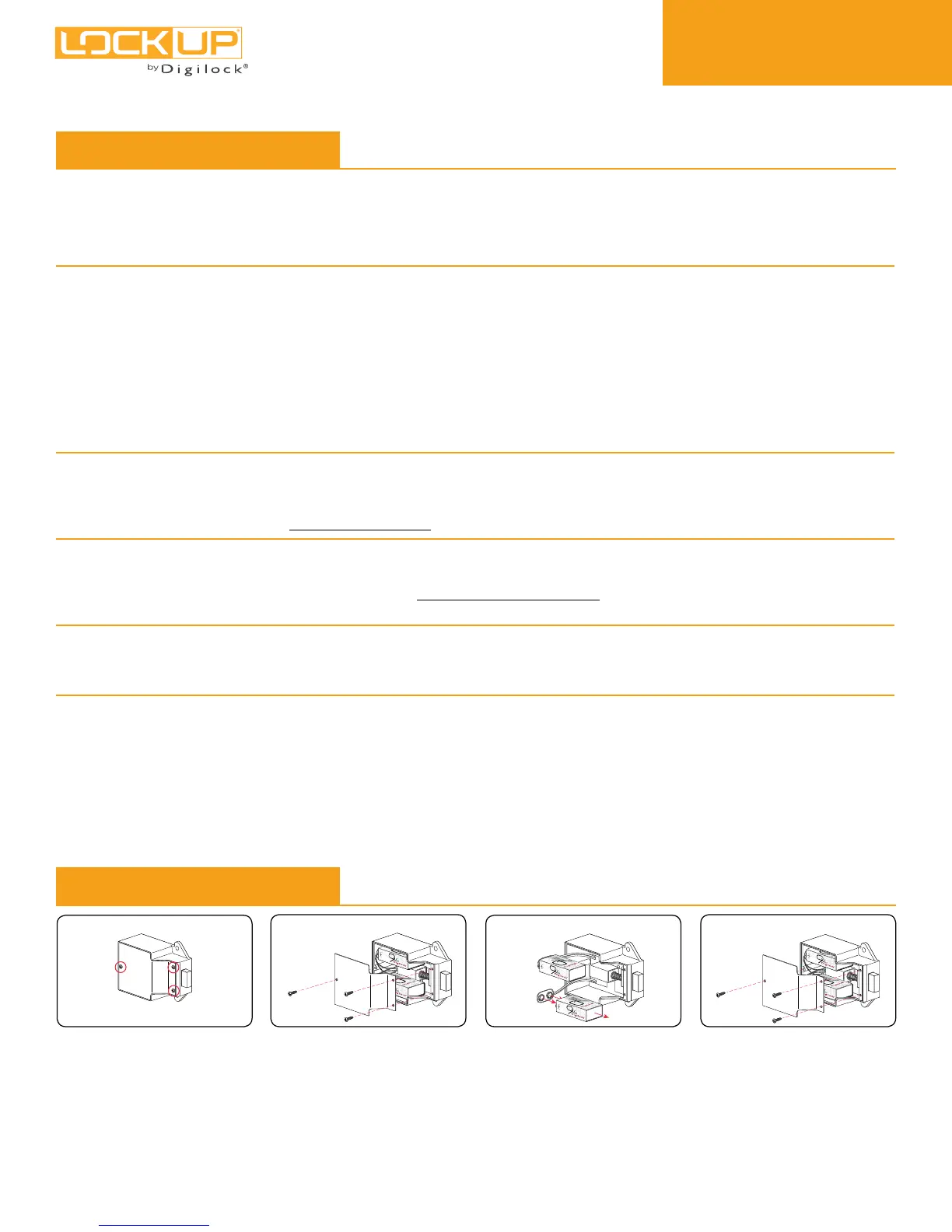
The batteries are located in the
rear unit of the lock.
1
Remove the screws and the
cover plate.
2
Pull the batteries from the rear
housing and gently pull from the
connector snaps.
Replace the two 9V batteries.
3
Reinstall the batteries and screw
the cover plate in place.
4



 To Previous Page