Phone: +852 2776 0800
www.digilock.com | sales@digilock.asiaPG-NLMD-AP-AEN
Support
Mounting screws
Screw type
M3X10
✓
0 - 5
✓
M3X145 - 8
M3X108 - 12
M3X1412 - 16
M3X1816 - 20
Mounting plate
Accommodates door thickness up to 20mm
Through hole dimensions
Spacer required for
door thickness less than 8mm
Factory default code 0-0-0-0
Removal keyManager key
Door thickness (mm) Spacer required
77
31.50
R3
Programming Key
Does not Unlock with Assigned Combination
The previously assigned combination has not been cleared, follow instructions to Assign a User Combination to set a new combination. If the
currently assigned combination is unknown, see instructions to “Reset Combination”.
Dials do not stop when Using the Reset Tool
The Reset Tool must be inserted firmly while simultaneously turning the dials. If the dials do not stop try pushing the Reset Tool with more force.
Note “P” for
Programming
on key
Dial Combo
Assigned Use
Product Guide
092419
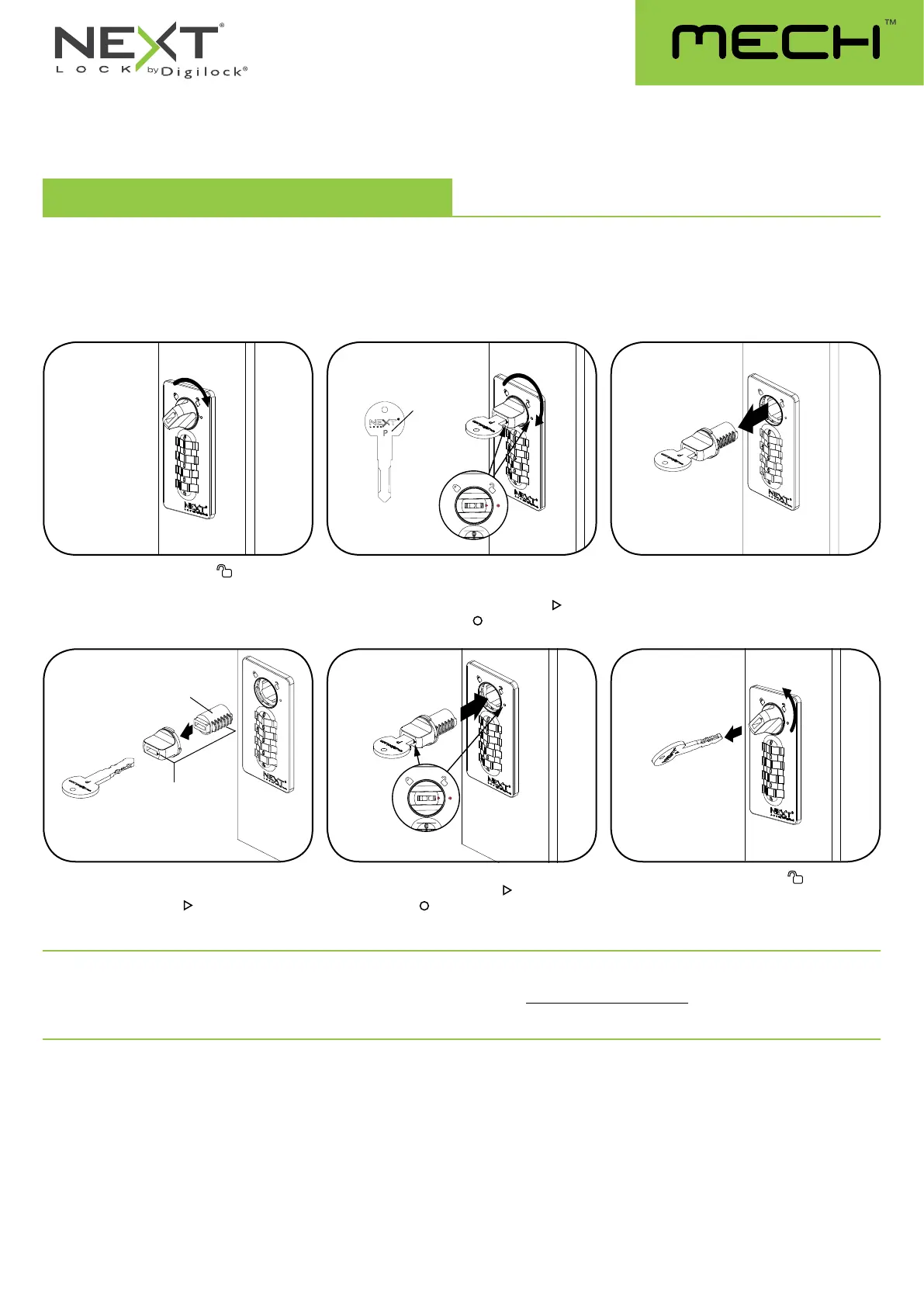
Replace Key Set and Core
Please contact support@digilock.com if your Manager or Programming key(s) are lost or stolen to purchase a new set of keys and replacement
cores for all locks.
If your Manager Key was lost or stolen, you can remove lock cores with your existing Programming key. Once you remove the lock cores, contact
support@digilock.com to purchase a new set of keys and lock cores.
Turn the knob to the unlocked position.
Insert the old Programming Key.
Turn the Knob to the Core Programming
Position. The triangle mark on the Knob
will
align with the circle mark
on the face.
Pull the Programming Key to remove the old
Knob and Core.
Insert the replacement Programming Key into
the old Knob and place the NEW Core on the
Knob. The triangle mark
on the knob should
be aligned with the Raised Wafers.
Insert the new Core subassembly into the lock.
The triangle mark on the Knob
will align with
the circle mark
on the face.
Turn the knob to the unlocked
position.
Remove the Replacement Programming Key.
New Core
Triangle Mark
aligned with
Raised Wafers
21
5
3
64



 To Previous Page