User’s Manual
25
Connection
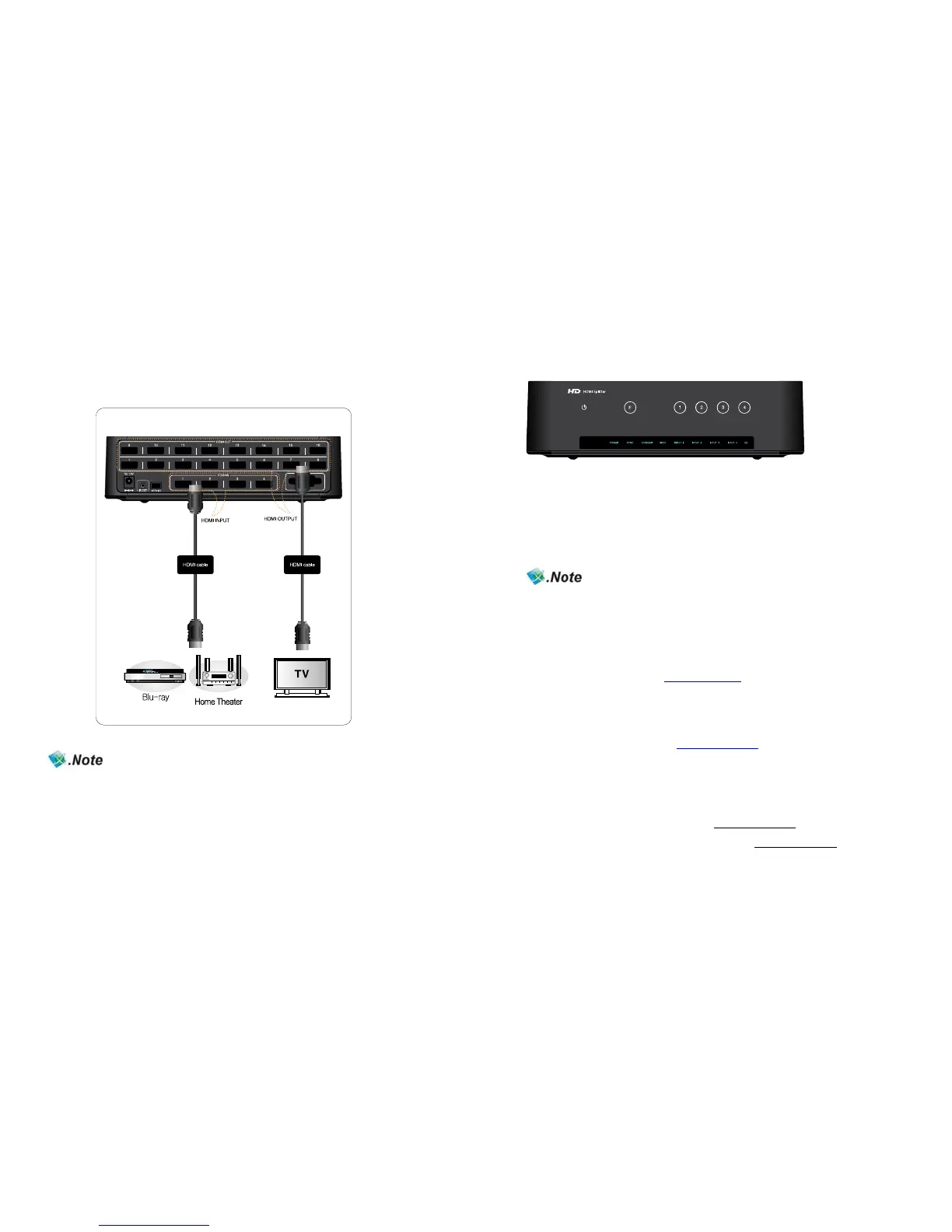
How to connect devices with splitter
(- Input: Blu-ray Player, HD Stream Generator -Output: PDP, LCD TV)
※ You must use High Speed HDMI cable supporting HDMI 1.3 if you like to use Deep
Color, High refresh rate and resolution above 1080p50~60hz.
(720p/1080i/50~60Hz/Deep Color, 720p/1080i/1080p/100~120Hz High Refresh Rate)
※ Please ask manufacturer or store you purchased, if you need additional HDMI cables
for more connection.
NEXD HDMI Splitter
2
How to use NEXD HDMI Splitter
1. Power ON NEXD HDMI splitter.
2. Power on source players to use such as Blu-ray Player or HD Set-top box, etc
3. Power on display devices
4. Choose one of the input no. for the source player to use.
It’s possible to select the input number by touching the number button
in the front panel or by pressing the button in the remote control unit.
You must connect Full HD TV to use HD player supporting
1080p ( Blu-ray player, HD set top box)
Troubleshooting for no power
- Check if LED light on the front is turned on.
- Make sure the power cord connectors on both ends are firmly attached.
Please refer to the webpage, www.dzonei.com
for more detailed information
for the troubleshooting
CEC, USB (Firmware upgrade) & RS-232 (Remote Control)
1. CEC : Refer to the webpage, www.dzonei.com for the information
of CEC function.
2. USB : You can upgrade firmware by USB easily when new firmware
is released.
3. RS-232 : RS-232 is capable of external control via serial port provided
control protocol by DigitalZone.
4. Remark: The SDK will be released in www.dzonei.com
.
Please check more detailed information in www.dzonei.com
regarding download and how to use.



 To Next Page