UHD Stream Generator
User’s Manual
01. Summary
6
UHD Stream Generator
User’s Manual
01. Summary
7
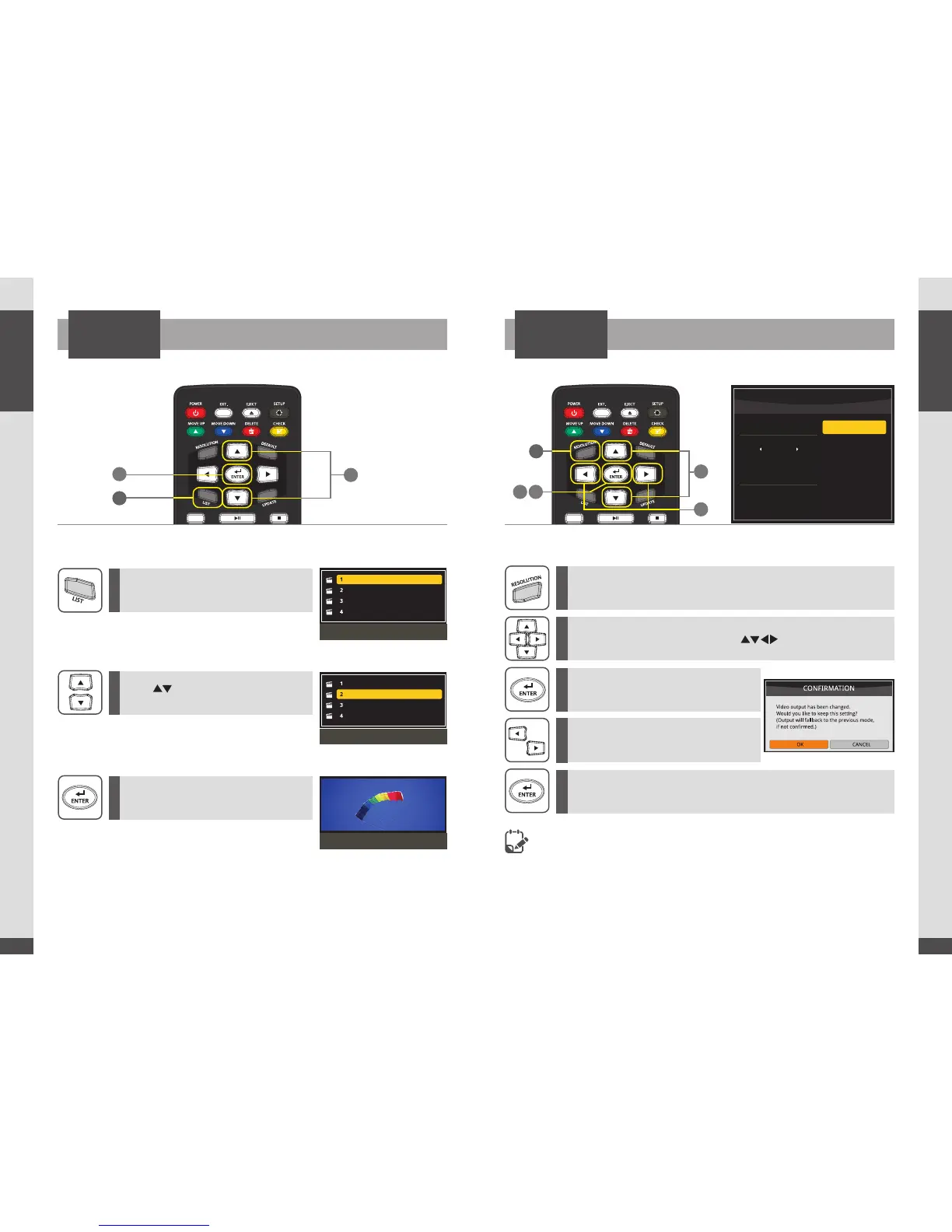
How to Change ResolutionHow to Playback Files
PLAYPLAY
- If no image is displayed when resolution is changed,
press the [DEFAULT] button in the remote. (HDMI output will be changed into 1080p60)
-
Refer to the page 32 in SETTINGS menu.
1
3
3 5
2
2
4
Digital-01.m2ts
Digital-02.m2ts
Digital-03.m2ts
Digital-04.m2ts
Playlist window
Digital-01.m2ts
Digital-02.m2ts
Digital-03.m2ts
Digital-04.m2ts
Select a file
Playback the selected file
1
1
2
2
3
3
4
5
Press [LIST] button.
Press [RESOLUTION] to open Resolution menu while Playing back
files or in PLAYLIST menu.
Use [ ]buttons to move to
desired file.
Select desired sub-resolution with [ ] direction buttons.
Press [ENTER] after moving the cursor to
the desired le.
Press [ENTER] button to set the output
resolution.
Conrmation pop-up menu will be
opened to get the conrmation.
Resolution change executed by pressing [ENTER] button.
RESOLUTION
2160p60
2160p50
2160p30
2160p25
2160p24
MENU
CURRENT
2160p60
4K
1


 To Next Page