UHD Stream Generator
User’s Manual
01. Summary
8
UHD Stream Generator
User’s Manual
01. Summary
9
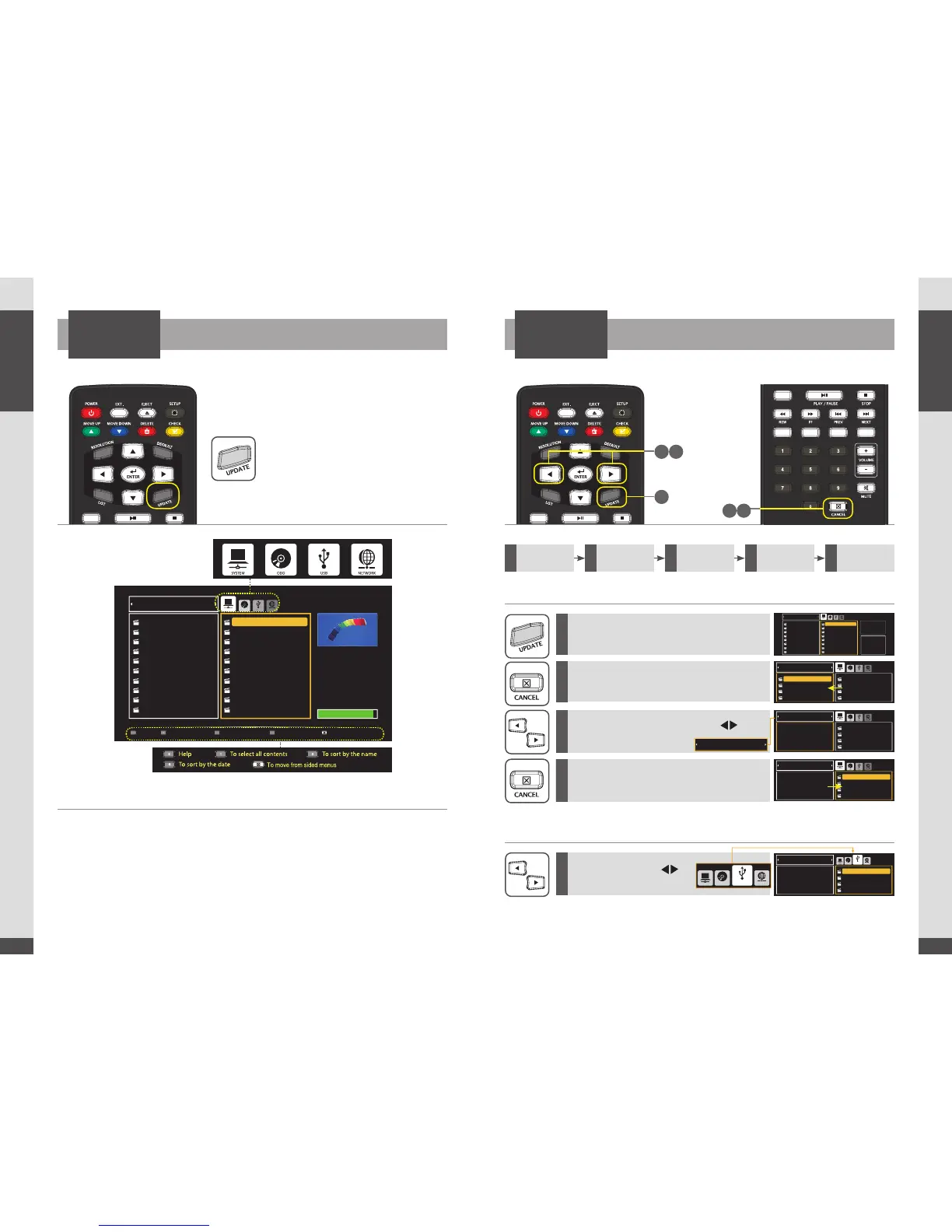
UPDATE Menu
UPDATE
Press [UPDATE] button.
How to Select MEDIA
Select one of MEDIA (SYSTEM/ODD/USB/NETWORK) using Direction button.
Press Number 1 : Select all files
Press [ENTER] : Proceed uploading all selected files.
How to Select PLAYLIST
You can select PLAYLIST number from the update menu.
Press [CANCEL] : Possible to switch menus between UPDATE and PLAYLIST.
How to Update Contents by USB
UPDATE
File(s) stored in USB Storage Device can be updated to UHD Stream Generator.
How to Select PLAYLIST Number
How to Select Media to USB
1
5
2
3
4
Press [UPDATE] button.
(Move to UPDATE Menu)
Press [CANCEL] button.
(Move to PLAYLIST Menu)
Select PLAYLIST NUMBER using [ ]
direction buttons.
Select USB using [ ]
direction buttons.
Press [CANCEL] button.
(Move to UPDATE Menu)
1
Select Playlist
number
2
Select USB
from media
3
Select files
4
Updating
files
5
Check
Updated files


 To Next Page