Common Setups ....................................................................................................9
Guitar and Microphone In/P.A. Out (Mono or Stereo) ........................9
Guitar and Microphone In/Guitar Amp and P.A. Out (Mono) ............ 9
Guitar and Microphone In/P.A. and Powered Monitor Out (Mono) . 10
Guitar and Mixer or Preamp in/P.A. Out (Stereo) ................................ 10
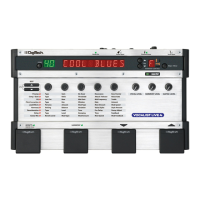
Using the Vocalist
®
Live 4 ....................................................................................11
Editing, Storing and Copying User Presets .............................................. 11
Level Knobs ....................................................................................................12
Effects Matrix ................................................................................................. 12
musIQ
TM
Button ............................................................................................12
Key Display, Key Up/Down Buttons, and Major/Minor Button...........12
Effects Footswitch ......................................................................................... 12
Harmony Footswitch ...................................................................................12
Guitar Tuner ...................................................................................................12
Mono and Stereo ..........................................................................................13
Regarding External Effects Pedals ..............................................................13
Setting Levels on the Vocalist Live 4 .........................................................13
Effects and Parameter Descriptions .................................................................14
Preamp ............................................................................................................ 14
Comp/Gate ....................................................................................................15
EQ .................................................................................................................... 15
Pitch Correction ........................................................................................... 16
Lead Effects .................................................................................................... 18
Harmony .........................................................................................................19
Reverberation ................................................................................................21
Delay ................................................................................................................ 21
Guitar Mix ......................................................................................................22
Utility Parameters .........................................................................................23
Factory Reset ......................................................................................................... 24
Troubleshooting .....................................................................................................25
Preset List ...............................................................................................................25
Specifications ..........................................................................................................29



 To Next Page