3
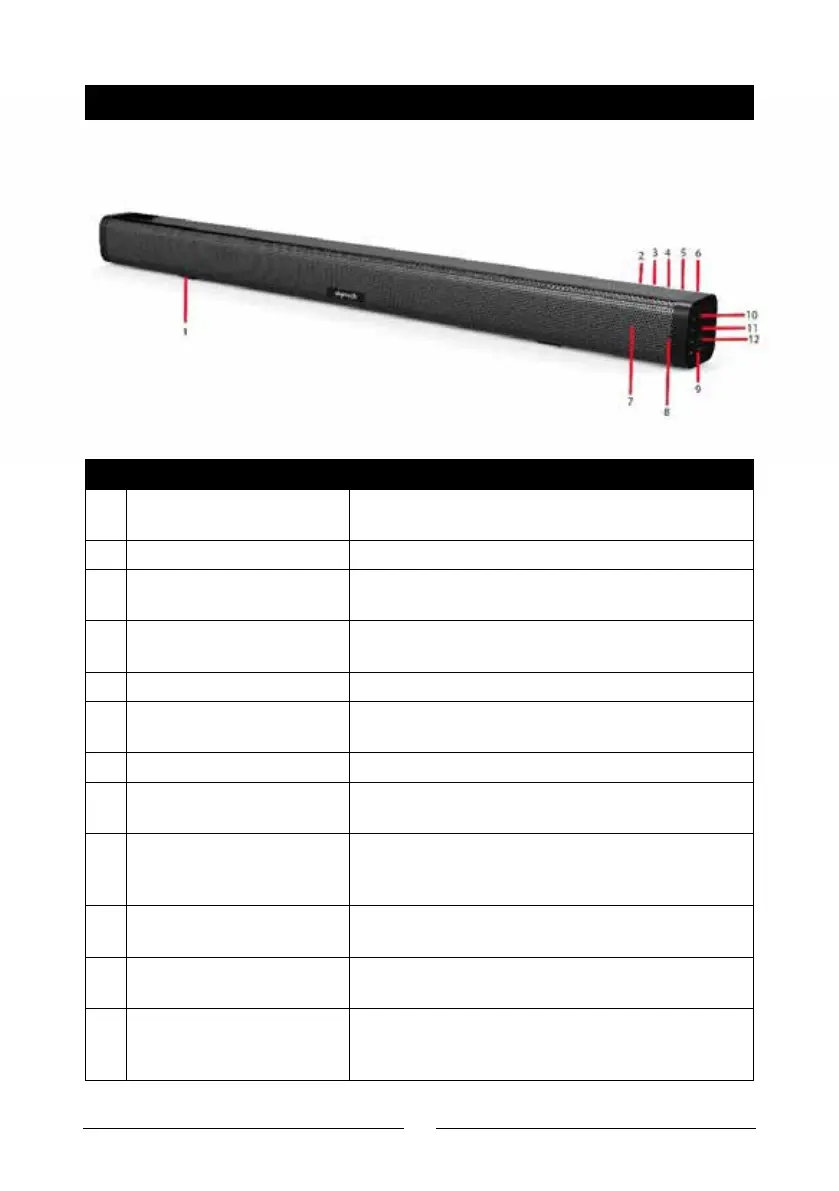
PRODUCT DIAGRAM
# Feature Description
1 Mounting Bracket/Feet Used to mount the soundbar on a wall or place
on a flat surface
2 DC Power Socket Connect to the 15VDC mains power adaptor
3 3.5mm Audio Input 2 Connect to an audio device such as a smart-
phone using the 3.5mm audio cable
4 3.5mm Audio Input 1 Connect to an audio device such as a smart-
phone using the 3.5mm audio cable
5 Optical TOSLINK Input Connect to a TV or monitor
6 HDMI ARC Input Connect to a TV or monitor using a HDMI ARC
Input
7 Infrared Port Used to operate the remote control
8 LED Status Indicator Displays the current mode and Bluetooth®
status
9 Power/Play/Pause
Button
Press and hold to power the soundbar on and
o
Press once to play or pause the current audio
10 Previous Track/Volume
Down
Press and hold to skip to the previous track
Press to adjust the volume down
11 Next Track/Volume Up Press and hold to skip to the next track
Press to adjust the volume up
12 Mode Button Switch between Bluetooth®, HDMI ARC, TOS-
LINK optical and aux in modes
Press and hold to disconnect the paired device


 To Next Page