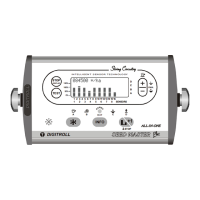
The DIGITROLL DMS 08 LCD is a seeding control system designed for planters with 1-8 rows, featuring an integrated area counter. This system is engineered for intelligent sensor technology, utilizing a "String Circuitry" for reliable operation.
Function Description:
The DMS 08 LCD monitor provides real-time seeding control and monitoring. Its primary function is to detect seeding continuity across all rows simultaneously. It identifies missing seed drops for longer than a preset limit value, indicating a potential blockage or malfunction in a specific row. The system also includes an area counter, measuring and storing both total and partial seeded areas up to 999.99 hectares.
The system employs infrared sensation for seed detection, connecting in a linear string system that supports up to 8 rows. The modules are exchangeable, and their sequence is automatically determined when connected, simplifying setup. A harness-free network ensures easy cabling and mounting.
System Test:
The DMS 08 LCD features a comprehensive system test, performed automatically upon switch-on, by pressing the "TEST" button, or by changing seed sensor settings. During the test, the monitor detects:
- Which modules (seed sensors, speed module) are connected to the system.
- The operational readiness of connected seed sensors, including operability and dust level checks.
- Sends data to adjustable modules (DS2000).
After the test, the display shows the status of each module:
----: Operating sensor---: Dusty sensor---: Seeding blockageNo Photosensors!: Unsuccessful test result
The "TEST" function is specifically recommended when no seeding is in progress.
Seeding Control:
The monitor continuously checks for seeding continuity. If a seed drop is missing for longer than a preset limit, a seed symbol for that row disappears from the display, and an audible alarm sounds. During turns at landmarks, the alarm is automatically disabled.
Hectare Counting:
The system measures and stores total and partial seeded area, up to 999.99 hectares. Measurement is initiated and stopped by signals from the photosensors.
Important Technical Specifications:
- Display: Illuminated LCD display.
- Housing: Massive aluminum housing.
- Alarms: Audible and visual alarms.
- Languages: 5 selectable languages (Hungarian, Slovakian, Ukrainian, English, German).
- Memory: Nonvolatile memory for safe storage of measured and adjusted data.
- Power Supply: 12VDC (minimum 8.5V). The monitor has an auto-reset fuse.
- Speed Sensor: Inductive sensor detecting bolt heads of a driven wheel. It should provide at least one signal every 30-60 cm of distance traveled, not exceeding 100 cm. Readiness is indicated by a flashing SPEED SENSOR LED.
- Seed Sensors: DS 1000 (for seed tube) and DS 2000 (for coulter) are custom-designed for specific seeder types. DS 2000 sensors allow for more precise seed detection by entering seed characteristics like size and shape, improving recognition of double or triple seed drops.
Usage Features:
- Mounting: The monitor should be placed in a clearly visible location in the tractor cabin, fixed with a U-bracket. It should be positioned to avoid direct sunlight on the LCD. The display is illuminated for nighttime use.
- Connectivity: Connects to the tractor's 12VDC power supply via a fuse (max. 3A). The extension cable connects to the modules. Welding works are only allowed when both power cables of the monitor are disconnected from the tractor's electronic system.
- Speed Sensor Adjustment: Crucial for accurate hectare counting. The sensor should be adjusted to detect 4-6 mm from the bolt head. A red LED on the sensor indicates operation. A blinking symbol on the monitor confirms the sensor is working.
- Missing Time Interval Adjustment: The interval for detecting missing seeds can be set between 0.25 and 2.00 seconds in 6 steps. This setting influences the sensitivity of blockage detection.
- Cancel Hectare Data: Hectare data can be reset by pressing the "TEST" button for at least 2 seconds.
- Seed Size Selection: For DS 2000 seed sensors, users can enter main seed characteristics (size, shape) to improve detection accuracy, especially for double or triple seed drops.
- 100 Speed Signal Count: A function to calibrate the distance traveled per 100 speed signals. Users pull the seeding machine, count 100 signals, measure the distance, and enter it into the monitor in centimeters.
- Setting Distance Traveled in 100 Speed Sensor Signal: This distance can be determined by direct measurement (more accurate, includes average slip) or by calculation (100 / number of bolt heads * wheel perimeter (cm)).
- Entry of Working Width: The seeding machine's working width (0.75-30 meters) can be entered. It can be calculated as row number multiplied by row spacing.
- Language Selection: Users can choose from 5 available languages.
Troubleshooting:
- Monitor Not Functioning (No Lights): Check 12VDC power supply (min. 8.5V), correct battery lead polarity, ON button on the back, and for a defected main switch or electronic part. The auto-reset fuse in the monitor does not require replacement.
- "POWER OUT" LED Not Lighting or Blinking: This LED indicates power supply and turns off when overloaded.
- LED lights: Normal function.
- LED blinks: Partial overload.
- LED off: Total external short circuit.
- Troubleshooting: Disconnect modules one by one from the monitor. If the LED lights (after a short pause), there's an external short circuit. If it remains dark, the monitor is defective. Possible causes of short circuit include cable pinch-in or a defected seed module.
- Monitor Functions, "POWER OUT" Lights, But Sensor Signals Partially or Totally Missing:
- Caused by mistaken switch-off of row detection. Check and reset row detection.
- Hurt cable or connector, or defected module. Push "TEST" button and note the number of the last detected seed module. If LEDs do not light from a certain module upwards, battery leads might be hurt, a connector is defected, or a module is defected. If LEDs light but communication is missing, communication cables or connectors are hurt. The easiest way to find a defect is to disconnect and bridge the suspected module.
- Monitor Indicates Blockage After Test and Cleaning: Defected seed module. Insert a stick into the sensor; if the LED darkens, it works. If not, the sensor is defected.
- Monitor Indicates Irregular Seed Drops When Seeder Stopped: Seeds or fragments picked up by airflow, or sensitivity set too high (adjust time limit), or a defected sensor.
- No Seed Detection at Properly Working Seeder, Test Finds Modules, No Dust: Small seeds at low seeding rates (adjust to small seed size and higher missing seed time interval), or a defected module (check by blinking LED with a stick).
Maintenance, Storage:
- Cables and Connectors: Keep them unhurt and check regularly.
- Sensors: Clean at the end of the seeding season. Close the extension cable end with the waterproof seal.
- Monitor Exposure: Do not expose to direct water. Store between -20°C and +40°C. Protect from excessive heat and dust.
- Winter Storage: Remove the monitor from the cabin for winter and store in a dry, vapor-free place.
- Physical Protection: Protect the monitor front, display, and buttons from strong mechanical impacts. Clean with a slightly wet wipe.
- Internal Components: No battery or other parts requiring maintenance are present.

 Need help?
 General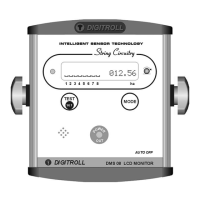

 To Next Page