This document describes the DWP-PC Series Price Computing Scale, a device designed for accurate weighing and price calculation.
Function Description
The DWP-PC Series scale is primarily used for price computing, allowing users to weigh items and calculate their total price based on a set unit price. It supports various weight units (lb, kg, g) and offers features for storing and recalling unit prices, calculating total price by quantity, and accumulating transactions in memory. The scale also includes a tare function to deduct the weight of containers, ensuring net weight accuracy. It has RS232 data output for connecting to computers or printers, enabling data transmission and printing of transaction details.
Important Technical Specifications
Models:
- DWP-30PC: Max Capacity 30lb, Readability 0.005lb
- DWP-60PC: Max Capacity 60lb, Readability 0.01lb
Common Specifications:
- Stabilisation time: 2 seconds typical
- Operating temperature: 5°C - 35°C
- Power supply: AC 110V 60Hz, built-in rechargeable battery 6V4AH
- Display: 3 windows 6 digits 0.8" LCD display, with 11 status indications. Double-sided display.
- Zero range: 0mV~8mV
- Housing: ABS housing and Stainless steel pan (230*290mm)
- ADC: Σ-Δ
- External Resolution: 1/6000
- Interface: RS-232 Output
Battery Power / Level Indicator:
- Full Battery: ≥ 6.3V
- 2 Blocks: ≥6.0V
- 1 Block: ≥5.7V
- Frame only: <5.7V
Battery Operation Time (fully charged new rechargeable battery):
- Around 200 hours of continuous operation without backlight
- Around 70 hours of continuous operation with backlight on
RS232 Data Output Parameters:
- Data Bit = 8
- Parity = None
- Stop Bit = 1
- Baud Rate options: 1200, 2400, 4800, 9600 (default), 19200
- Serial Mode options: PC (Output to Computer) or Prt (Output to Printer)
Usage Features
Keys:
- CH KEY: Changes status, used for entering payment.
- WEIGHT UNIT KEY: Shifts among various weight units (kg, g, lb).
- STORE KEY: Stores unit prices (up to 200 unit prices can be stored using numeric keys 0-9).
- TARE KEY: Tares off container weight, also used to enter parameters during self-checking after power-on.
- QTY KEY: Enters quantity for total price calculation.
- PRINT KEY: Sends print data to a printer, also used as "next parameter" during setting.
- RECALL KEY: Calls out previously stored unit prices, also used as "previous parameter" during setting.
- ZERO KEY: Sets displayed weight to zero when an empty scale has drifted from true zero.
- CE KEY: Clears entered values.
- NUMERIC KEYS (0-9 and decimal key): For numerical input.
Display:
- Three windows on front and rear panels: Weight Panel, Unit Price Panel, Total Price Panel.
- 11 status indications: Battery Power/Level, Zero, Net, Stable, Weight Unit (kg, g, lb), Unit Price, CH, QTY, Total.
Getting Started:
- Place the instrument on a strong, level surface.
- Avoid environments with excessive wind, vibration, or extreme temperature changes.
- Keep away from excessive electrical noise.
- Built-in Rechargeable Battery: Recharge for at least 8 hours before first use for optimal performance.
- Power Adaptor: Ensure input voltage matches output voltage of the electricity outlet.
- Connecting Other Devices: Turn off the instrument before making connections. RS232 comport pinout: 2 = RXD; 3 = TXD; 5 = GND.
Initial Setup (Internal Functions):
- Turn the instrument off and on, then press [TARE] during self-checking to enter internal function mode (F1 displayed).
- Key functions during setting: [TARE] = Enter, save, return; [ZERO] = Quit without saving; [PRINT] = Go next; [RECALL] = Go previous; [CE] = Clear.
- Internal functions (F1-F10) allow setting time, date format, keypad buzzer, price decimal, backlight mode, auto power off time, RS232 output parameters (baud rate, serial mode), printer form, ACC mode, weight unit, and calibration parameters.
Operation:
- Power On: Displays software version, calibration/parameter counts, and all LCD segments before countdown and readiness.
- Start Weighing: Press [ZERO] if unloaded weight is not zero. Place objects gently on the platter. Weight is displayed automatically. Remove loads after weighing to prolong sensor life.
- Weight Unit Conversion: Press [UNIT] to switch between kg, g, and lb. Unit price can be entered per /1LB, /g, /100g, or /kg.
- Tare Function: Used to deduct container weight. Can be enabled/disabled for repeat (multiple) tare operations (Mode 1 or Mode 2).
- Price Computing:
- Entering Unit Price: Place load, enter unit price via keypad. Total amount is displayed.
- Quantity Price Computing: Enter unit price per quantity, press [QTY], enter quantity via keypad. Total amount is displayed.
- Change Paid Back: Press [CH], enter total payment value, and the change will be displayed.
- Store and Recall Unit Price: Store up to 200 unit prices (0-9 numeric keys). Press [STORE], select number, press [TARE]. To recall, press [RECALL], select number, press [TARE].
- Memory Accumulation: When amount is displayed, press [PRINT] to accumulate transaction data. "ACC" on Weight Panel and "n" (number of transactions) on Unit Price Panel indicate accumulation. Total accumulated value is shown on Amount Panel. Memory is cleared after printing all accumulated amounts or powering off.
- RS232 Data Output: Supports PC (continuous data) and Prt (single/manual data) modes.
Maintenance Features
- Cleaning: Use a soft, damp cloth with a mild detergent. Avoid harsh, abrasive materials, acetone, volatile solvents, thinners, or alcohol.
- Accuracy Verification: Periodically verify and re-calibrate the unit if necessary. Contact your dealer for calibration services if required by local regulations.
- Storage: Store in a dry and clean place.
- Battery Recharge: Recharge the battery before and every 2 months during long-term storage.
- Low Battery Warning: When "000" appears (battery < 5.7V), recharge immediately. The instrument will automatically power off at extremely low voltage (around 5.4V) to protect the battery. Do not attempt to power on when the battery is critically low.
- Overcharge Protection: Built-in circuit prevents battery damage from overcharging.
- Heat during Recharging: It is normal to feel minor heat at the front panel during recharging.
General Warnings:
- Not an explosion-proof device.
- Not a waterproof device.
- Do not open the instrument; no user-serviceable parts inside. Contact your dealer for service.
- Avoid subjecting the instrument to shock, excessive vibration, or temperature extremes.
- Metrological parameter settings are restricted to authorized personnel. Do not attempt to change built-in metrological parameters.

 Need help?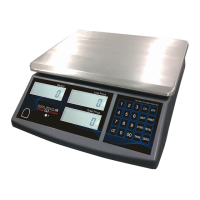

 To Next Page
 General