Continuous Heat Modes
A Continuous Heat mode is e ectively a constant heat control period. The heater will
maintain a predetermined room temperature indefi nitely irrespective of time until the
mode is changed by the User.
Available Continuous Heat Modes
Each continuous heat profi le is preloaded with a default Target Temperature value but
is fully adjustable.
• Manual mode
- Default temperature 21°C
- Can be changed from the Home Screen to any value within the Heater’s
Temperature Range.
• Frost Protection
- Default 7°C
- Can be changed from the Home Screen to any value, however once the
temperature is changed the unit will revert to a standard Manual mode.
• Comfort O
- Heating OFF, no temperature control.
Activating a Continuous Heat Mode
Manual Mode (Comfort On)
This mode ignores the User Timer and maintains the displayed temperature.
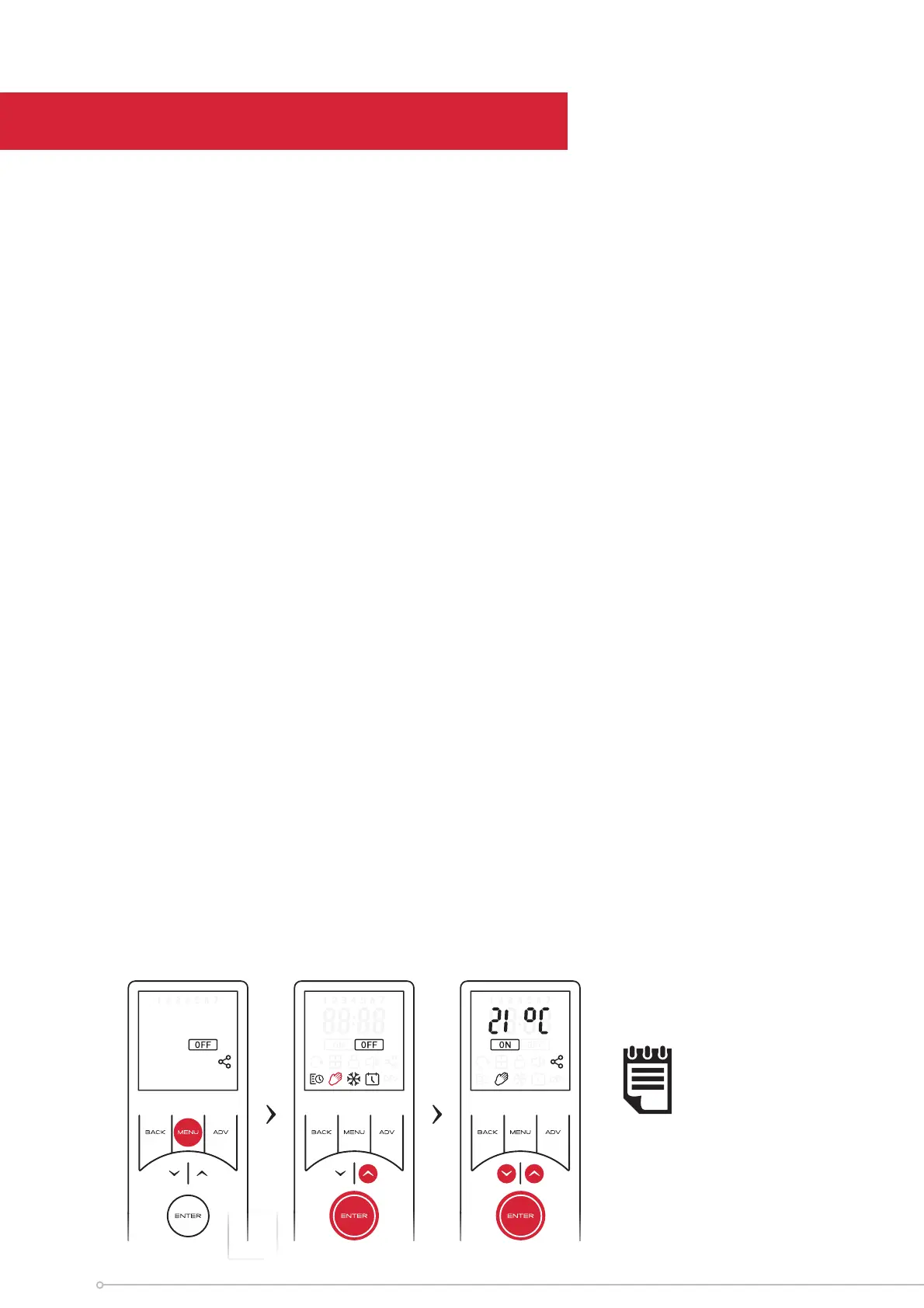
To activate manual mode:
• Press the MENU button,
• Use the arrow keys to highlight the Hand Icon, then press ENTER to confi rm.
• Use the arrow keys to adjust the target temperature.
NOTE:
If the temperature is
set to 7ºC, the mode
will automatically
change to Frost
Protect
24




 To Next Page