EN-9 1810/C www.dimplex.de/en
English PLX 050E - PLX 300E
10. Options
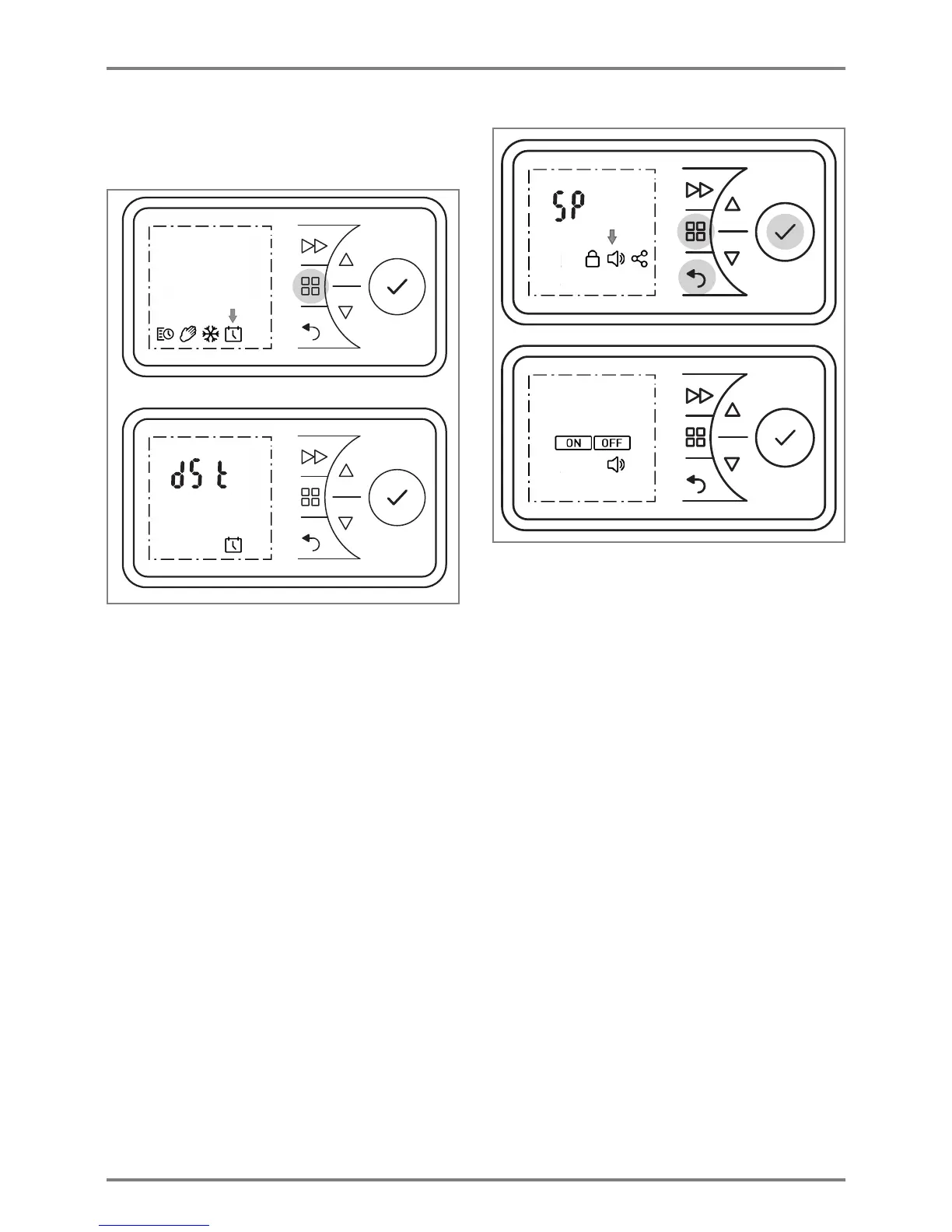
10.1 Switching summer/winter time
The clock switches between summer and winter time
automatically. This function can be deactivated or
activated manually.
Press the MENU key. The TIMER symbol flashes.
Press or to select the DATE & TIME symbol.
The symbol flashes.
Press the ENTER key. The current time flashes.
Press the key The display dSt flashes.
Press the ENTER key. The ON symbol flashes.
Press or to select ON or OFF to switch the
function on or off.
Confirm with ENTER.
Confirm the BACK key to return to the standard
display.
10.2 Audio key
Feedback tone when a key is confirmed.
Press and hold the MENU key, the BACK key and
the ENTER key for five seconds.
SP display flashes.
Press or to select the SOUND symbol. The
symbol flashes.
Press the ENTER key.
Press or to select ON or OFF to switch the
function on or off.
Confirm the BACK key to return to the standard
display.




 To Next Page