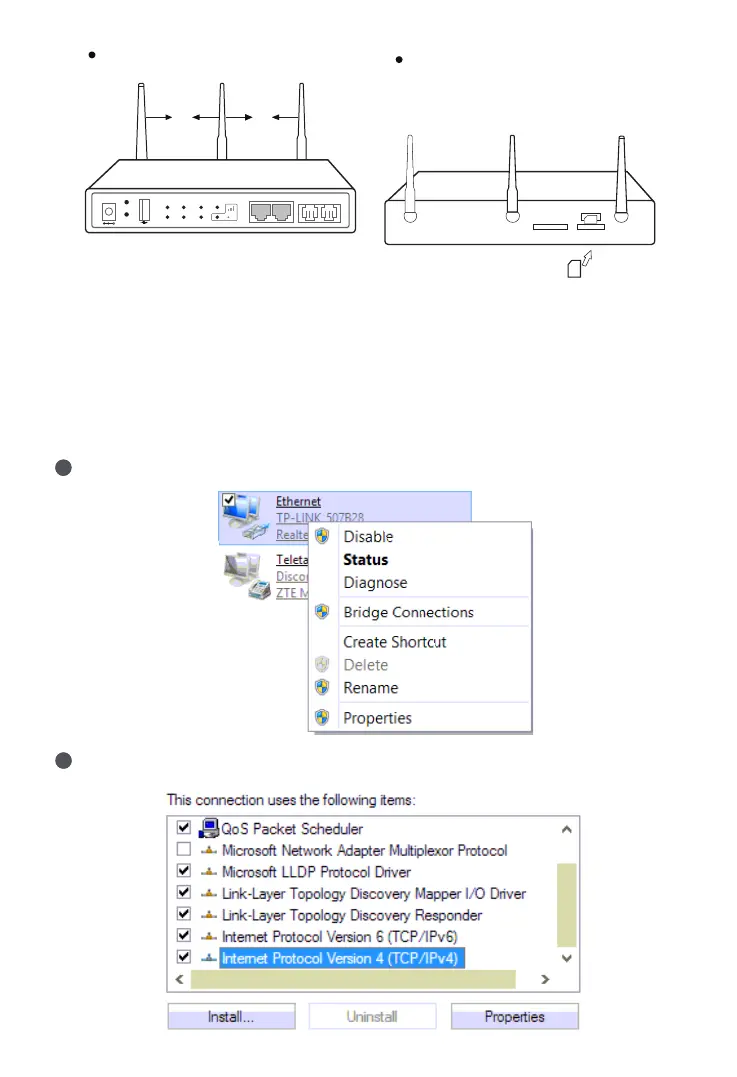
LTE Antenna
Wi-Fi Antenna
Install Wi-Fi antenna (foldable antenna)
and install LTE antenna (flat paddle
antenna) on the rear panel.
WPS
UC120
DC12V
Port 0
Port 1
RST
PWR WAN Port 0 WiFi
RUN LAN Port 1 LTE WAN LAN
Insert SIM card to SIM slot
(UC120-1V1S1O /UC120-1V2S/
UC120-1V2O)
SD
Insert (with the chip facing downwards)
SIM
Antenna Installation (UC120)
6
Modify PC’s IP Address
To log in the Web Management System of the device, firstly, you need to modify the
IP address of PC which is used to access the device and to make it at the same
network segment with the device.
1
On the PC, click ‘Network (or Ethernet) → Properties’.
2
Double-click ‘Internet Protocol Version 4 (TCP/IPv4)’.


 To Next Page