Installation Attentions
4
UC120 and UC200 are equipped with 12VDC power adapter, while UC350
accepts AC input voltage of 100-240V 50/60Hz. Please ensure safe and
stable power supply.
Please ensure there is enough network bandwidth to guarantee stabilized
running of the device.
To guarantee device works normally and to lengthen the service life of the
device, the humidity of the equipment room where device is installed in
temperature should be 0 ℃~ 45 ℃.
5
Installation Instruction
To reduce the interference with telephone calls, it's highly recommended that
telephone lines connected to the gateway should be placed away from power
cables.
Because of differences between product models, some parameters or
supported ports may be different. Please contact technical support if they are
not clearly stated or if they differ from the current parameters or ports.
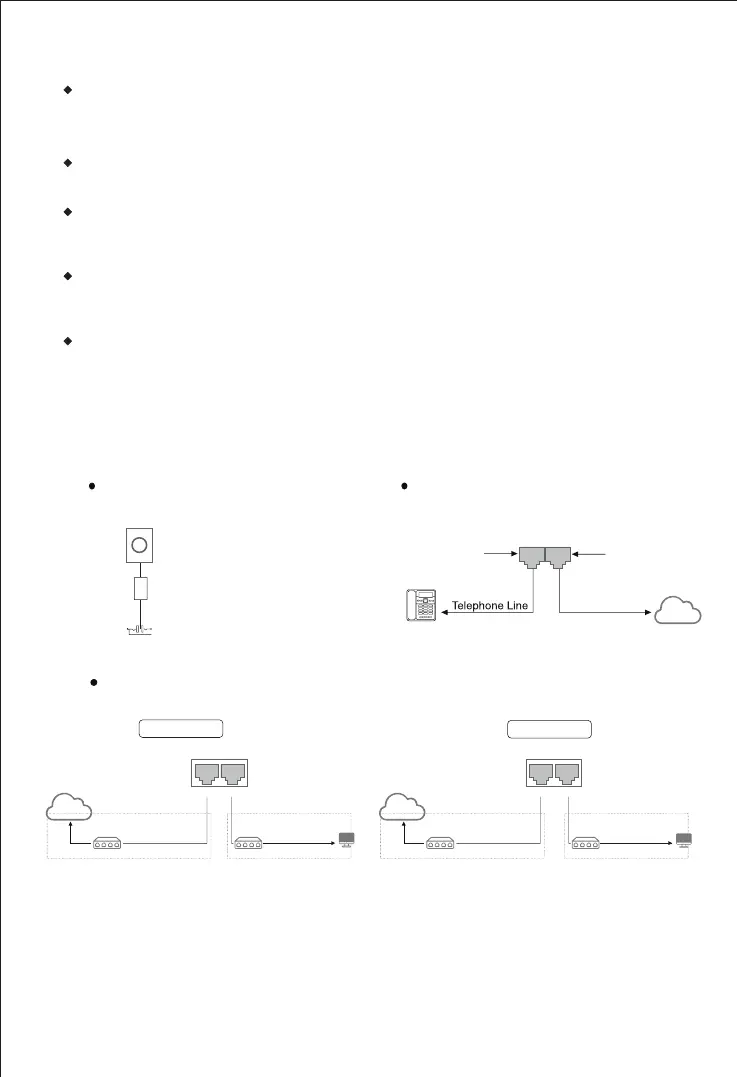
Connect analog phone to FXS
or connect PSTN line to FXO
PSTN Line
PSTN
Analog Phone
FXO
FXS
Power Connection
DC12V Power Adapter
WAN LAN
Network Connection
PC
SwitchRouter/Switch
PC
SwitchRouter/Switch
T h e a bo ve fi gu re s h o w s t he ne tw or k
connection in bridge mode. In bridge mode,
WAN a nd LA N po rt u se t he s am e IP
a d d r e s s . T h e d e f a u l t I P a d d r e s s i s
192.168.11.1.
Note: UC120 can also be connected through Wi-Fi. The default SSID of the device is
"domain_ [last 6 digits of MAC address] “without password.
Network cable
192.168.1.XXX
TCP/IP
Network cable
192.168.11.1
192.168.11.XXX
Network cable
192.168.11.1
192.168.11.XXX
TCP/IP
Network cable
192.168.11.1
The same IP segment
Router mode
UC120/UC200 supports router
mode and
bridge mode. The above figure shows the
network connection in router mode. In router
mode, the default IP of WAN port is DHCP,
and the default IP of LAN port is 192.168.11.1.
WAN LAN
The different IP segment
Bridge mode


 To Next Page