The Dio Node is a compact, square-shaped audio speaker designed for a hassle-free audio experience, primarily with Apple devices. It supports Apple AirPlay for seamless streaming and offers a range of features for home audio integration.
Function Description:
The Dio Node is a wireless speaker that allows users to stream audio from their Apple devices (iPhone, iPad, Apple TV) over a Wi-Fi network. Its core function is to provide high-quality audio playback within a home environment. The speaker is designed to be easy to set up and use, emphasizing a "plug and play" approach. While primarily designed for Apple AirPlay, it can also be integrated with other devices and systems, though some functionalities might require third-party applications for non-Apple platforms. The Dio Node can be used individually or linked with multiple Dio Nodes to create a multi-room audio system. It also offers optional voice assistant integration and extra features through the Apple Home app, enhancing its utility within a smart home ecosystem.
Important Technical Specifications:
- Connectivity: Wi-Fi 802.11 a/b/g/n. This indicates support for common Wi-Fi standards, ensuring broad compatibility with home networks.
- Wi-Fi Frequency: 2.412-2.483 GHz, maximum power ≤ 20 dBm (EIRP). This specifies the operating frequency band and maximum output power for Wi-Fi, adhering to regulatory limits.
- Power: 5V 2A DC input, 5.5mm barrel connector (no battery). This means the Dio Node is a wired speaker and requires continuous power from an external adapter, indicating it's not portable.
- Accessories: Power adapter included. 100-240V input. 1.5m (59 in.) cable length. The included power adapter is universal, supporting various international power standards, and the cable length provides some flexibility for placement.
- Stereo Separation: Mono. This indicates that a single Dio Node unit produces mono sound. For stereo sound, two Dio Nodes would likely be required and configured as a stereo pair.
- Minimum Requirements:
- iPhone: iOS 11.4 or later
- iPad: iPadOS 13.0 or later
- Apple TV: tvOS 11.4 or later
- Mac (limited): 2011 model or later
- Android & other: Not compatible (Note: While the manual states "Not compatible," it also mentions that third-party apps may expand functionality for Mac, Windows, or Android, suggesting limited functionality without these apps).
Usage Features:
- Easy Setup: The Dio Node is designed for quick setup using an iPhone or iPad. Users plug in the speaker, wait for a blinking red light, and then set it up via the Wi-Fi settings on their iOS device, following on-screen instructions to connect it to their home Wi-Fi network and name the speaker. A QR code is provided for detailed setup instructions, or printed instructions are available.
- AirPlay Integration: The primary method of use is through Apple AirPlay. Users can open Control Center on their iOS device, tap the AirPlay icon, select the desired Dio Node speaker(s), and play audio.
- Multi-Speaker Support: Multiple Dio Nodes can be linked together for a multi-room audio experience. There is no limit to the number of Dio Nodes that can be linked.
- Button Controls: The speaker features three physical buttons on its top panel:
- Pause/Play: The middle button with a "D" logo.
- Volume Down: The left button with a "-" symbol.
- Volume Up: The right button with a "+" symbol.
- Voice Assistant & Extra Features (Optional): While Dio Node speakers do not have built-in microphones, they can be added to the Apple Home app to enable several features:
- Use Siri on Apple devices to control the Dio Node.
- Send Intercom messages from a phone to Nodes across the home.
- Set up home automations for the Dio Node.
- Create speaker group presets.
- Create shortcuts in Control Center for the Dio Node.
- Setup involves opening the Home app, clicking the "+" sign, selecting "Add Accessory," and following on-screen instructions.
- Compatibility with Other Speakers: Dio Node can be used with other Apple AirPlay 2-enabled speakers from various brands (e.g., Sonos, Bose, Bang & Olufsen) via the AirPlay menu.
- Limited Mac/Windows/Android Compatibility: Direct functionality is limited. Users may need third-party apps like Airfoil (Mac) or TuneBlade (Windows) to expand functionality on these platforms. The manual explicitly states "Not compatible" for Android and other systems in the minimum requirements, but then mentions that third-party apps may expand functionality, creating a slight ambiguity.
Maintenance Features:
- Firmware Updates: Users can check for firmware updates by pressing and holding all three buttons on the speaker simultaneously. A flashing light on the back panel indicates a check for updates. If the light turns green, an update is being installed. Updates are opt-in and designed to improve performance and add new features while protecting network security.
- Reset Wi-Fi Connection: To reset the Wi-Fi connection, users press and hold the "+" and "-" buttons simultaneously until the indicator light flashes. This prepares the speaker for re-setup on a Wi-Fi network.
- Factory Reset: A factory reset can be performed by pressing and holding the middle and "+" buttons simultaneously. This will completely reset the speaker to its original factory conditions.
- Indicator Light Understanding:
- Blinking White: Speaker booting up.
- Steady White: Wi-Fi setup complete.
- Steady Red: Not connected to Wi-Fi.
- Blinking Red: Ready for Wi-Fi setup.
- Steady Green: Firmware updating.
- Steady Blue: Speaker in use.
- Troubleshooting: The manual provides guidance on troubleshooting common issues, such as changing the Wi-Fi connection or understanding the indicator light. It also addresses FAQs like linking multiple Nodes, audio buffering, phone call handling, and compatibility with TVs.
- Support: Users can request additional support or provide feedback by emailing
support@dioconnect.com or visiting dioconnect.com/support. They can also tweet @DioTechnologies. Return policy and warranty information are available at dioconnect.com/legal/terms.
The manual includes important safety instructions covering proper usage, placement, power connection, cleaning, and handling to prevent damage or injury. It also details regulatory and legal information, including FCC compliance, Canadian regulatory statements, and disposal instructions for electronic waste. The device is certified by TÜV SÜD and carries the Wi-Fi CERTIFIED™ logo, indicating adherence to industry standards.

 Need help?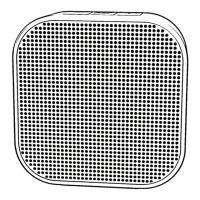

 To Next Page
 General