EasyManua.ls Logo

Direct Supply Attendant A5LC-1 - User Manual

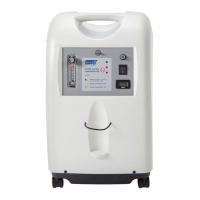
Direct Supply Attendant A5LC-1
24 pages
Print Icon
To Next Page IconTo Next Page
Loading...
Attendant
®
5-LITER OXYGEN
CONCENTRATOR
A5LC-1
Please keep and refer to this Owner’s Manual.
Owners Manual
Thank you for purchasing an Attendant
®
Oxygen Concentrator from Direct Supply
Equipment & Furnishings
®
. Please read this entire guide carefully and keep it for future
reference. This guide will provide you with instructions, warnings, warranty information
and other important information about your oxygen concentrator. Share this information
with your housekeeping, nursing and maintenance staff to help ensure the oxygen
concentrator is cared for properly.
1-800-634-7328 DirectSupply.com

Questions and Answers

  • M
    Mark KaiserAug 2, 2025
    What to do if my Direct Supply Attendant A5LC-1 concentrator stops working, red status light illuminates, and an audible alarm sounds continuously?
    • X
      xolsonAug 2, 2025
      If your Direct Supply Medical Equipment concentrator stops working, the red status light comes on, and an audible alarm sounds continuously, first try cleaning or replacing the filters. If the problem continues, stop using the concentrator immediately and contact Direct Supply for service.
  • J
    jensenjeffreyAug 6, 2025
    What should I do if my Direct Supply Medical Equipment concentrator stops working and a continuous audible alarm sounds?
    • T
      Tina YoderAug 6, 2025
      If your Direct Supply Medical Equipment concentrator stops working and a continuous audible alarm sounds, this indicates a compressor short circuit alarm. Stop using the concentrator immediately and contact Direct Supply for service.
  • N
    Nancy WadeAug 10, 2025
    What to do if my Direct Supply Medical Equipment concentrator stops working and an audible alarm sounds continuously?
    • S
      Sharon JohnstonAug 10, 2025
      If your Direct Supply Medical Equipment concentrator stops working and an audible alarm sounds continuously, it means there is a compressor open circuit alarm. Stop using the concentrator immediately and contact Direct Supply for service.
  • H
    Heather BowersAug 15, 2025
    What to do if my Direct Supply Attendant A5LC-1 concentrator stops working, red status light illuminates, and an audible alarm sounds?
    • R
      roberto24Aug 15, 2025
      If your Direct Supply Medical Equipment concentrator stops working, the red status light comes on, and an audible alarm sounds, this indicates a high-pressure alarm. Stop using the concentrator immediately and contact Direct Supply for service.
  • T
    tomjohnsonAug 19, 2025
    Why is the yellow light on my Direct Supply Attendant A5LC-1 Medical Equipment concentrator illuminated?
    • M
      Michael MartinezSep 12, 2025
      If your Direct Supply Medical Equipment concentrator is working, but the yellow light is on, it indicates that the oxygen purity is between 75% and 85%. Try cleaning or replacing the filters. Also, ensure the unit is at least 4" (10 cm) away from walls, draperies, furniture, or similar objects, as a blocked air intake can cause overheating.
  • N
    nathanmitchellAug 23, 2025
    What to do if green and yellow status lights are lit, oxygen concentrator stops running, continuous buzzer sounding in Direct Supply Attendant A5LC-1?
    • R
      Ryan BradshawAug 23, 2025
      If the green and yellow status lights are lit, the oxygen concentrator stops running, and a continuous buzzer is sounding, stop using the concentrator immediately and contact Direct Supply for repairs. This may be caused by a valve plug that is not properly connected, exhaust sound buffer box jammed, can’t open the valve, or failure of the main electronic control circuit board.
  • C
    Christina PatrickAug 27, 2025
    How to fix condensation in the nasal cannula of Direct Supply Medical Equipment?
    • J
      jwalkerAug 27, 2025
      If you notice condensation or water droplets in the nasal cannula of your Direct Supply Medical Equipment, here are some steps you can take: * Make sure the machine is at least 4" (10 cm) away from the walls, draperies, furniture, or similar objects. * Add cold water to the humidifier bottle if the water is too warm. * Remove water from the humidifier bottle until the level is between the maximum and minimum indicators if there is too much water.

Summary

Introduction to the Oxygen Concentrator

Definitions and Symbols

Key terms and symbols used throughout the manual for clarity and safety communication.

Intended Use for the A5 LC-1

Defines the approved applications and environments for the oxygen concentrator.

Contraindications for Use

Lists medical conditions or situations where the concentrator should not be used.

Key Features of the A5 LC-1

Details the physical and electrical characteristics of the oxygen concentrator unit.

General Safety Information

Provides essential safety guidelines for the general use of the A5LC-1 concentrator.

Warnings and Cautions for Safe Operation

General Product Warnings

Crucial safety warnings for operation, handling, and potential hazards of the concentrator.

Specific Usage Warnings

Further warnings regarding placement, environment, and user interaction to prevent harm.

Operational Cautions

Precautions for operating the device, focusing on equipment protection and safe usage practices.

Description of the Oxygen Concentrator

Oxygen Concentrator Components Overview

Identifies and describes the main parts and functions of the oxygen concentrator unit.

Humidifier Bottle Components

Details the parts and assembly of the optional humidifier bottle for oxygen delivery.

Symbols and Their Meanings

Explains the various symbols used in the manual and on the device for clear understanding.

Unpacking and Initial Handling

Inspection and Storage Procedures

Steps for checking the device upon arrival and recommendations for proper storage.

Initial Setup of the Concentrator

Setup Without Humidifier Bottle

Step-by-step guide for connecting and powering on the concentrator without a humidifier.

Optional Setup With Humidifier Bottle

Guide for connecting and using the concentrator with an optional humidifier bottle.

Using the Oxygen Concentrator

Operating Procedures and Flow Rate Adjustment

Instructions on turning on, adjusting flow, and monitoring the concentrator during use.

Safety Feature Testing Procedures

Methods for verifying the proper functioning of critical safety features like alarms.

Maintenance and Care

Cabinet and Filter Cleaning

Procedures for cleaning the concentrator cabinet and its filters for optimal performance.

Intake Filter Replacement

Instructions for removing and installing the intake filter to maintain air quality.

Humidifier Bottle Maintenance

Guidelines for daily replacement, weekly cleaning, and disinfection of the humidifier bottle.

Nasal Cannula Care

Follow manufacturer's instructions for the care and maintenance of the oxygen nasal cannula.

Troubleshooting Common Issues

Common Symptoms and Solutions

Addresses frequent problems with the concentrator and provides step-by-step solutions.

Product Specifications

Technical Specifications

Detailed technical data including power, dimensions, flow rates, and oxygen concentration.

Operating and Storage Conditions

Defines the environmental parameters for operation, storage, and transportation.

Compliance Information

Electromagnetic Emission Compliance

Details the device's compliance with standards regarding electromagnetic emissions.

Electromagnetic Immunity Compliance

Outlines the device's resistance to electromagnetic interference and environmental factors.

Limited Warranty Details

Warranty Terms and Usable Device Life

Explains the warranty coverage period, conditions, and anticipated device lifespan.

Customer Service and Support

Contact and Support Information

Provides contact details for inquiries, ordering, and warranty service support.

Direct Supply Attendant A5LC-1 Specifications

General IconGeneral
CategoryMedical Equipment
ModelA5LC-1
Storage Temperature-4°F to 140°F (-20°C to 60°C)
Humidity10% to 90% non-condensing
ComplianceFCC Part 15

Related product manuals