11
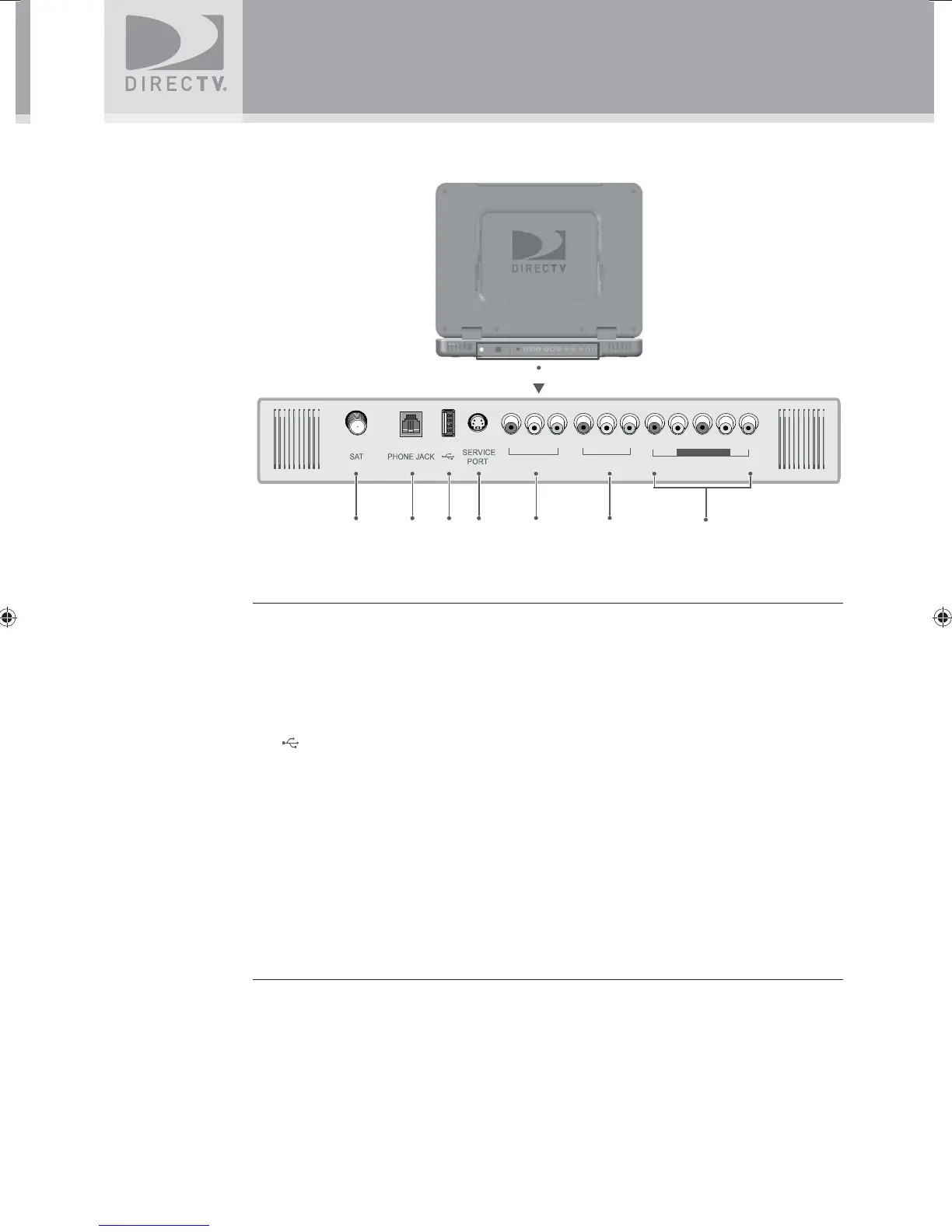
TV Rear Connector Panel
1. SAT
Connects the DIRECTV Sat-Go TV to the DIRECTV Sat-Go antenna or a residential
DIRECTV antenna.
2. PHONE JACK
Connects the TV to a telephone wall jack. We require a land-based telephone connection
to communicate periodically with your TV.
3.
(USB Port)
For future use.
4. SERVICE PORT (RS232)
Used as a service port for upgrading the DIRECTV Sat-Go software.
5 AV OUT (Composite video and audio output)
Connects the TV to equipment with a composite AV input, such as a VCR or DVD player.
6. AV IN 1 (Composite video and audio input)
Connects the TV to equipment with a composite AV output, such as a VCR or DVD player.
7. COMPONENT AV IN 2 (Component video and audio input)
Connects the TV to equipment with a component AV output, such as a DVD player.
Before Using Your DIRECTV
®
Sat-Go
AV IN 1
AV IN 2
COMPONENT
234 5 6
7
1
AV OUT
SatGo_03-30-07(converted).indd 11SatGo_03-30-07(converted).indd 11 5/18/07 4:48:15 PM5/18/07 4:48:15 PM



 To Next Page