10
Before Using Your DIRECTV
®
Sat-Go
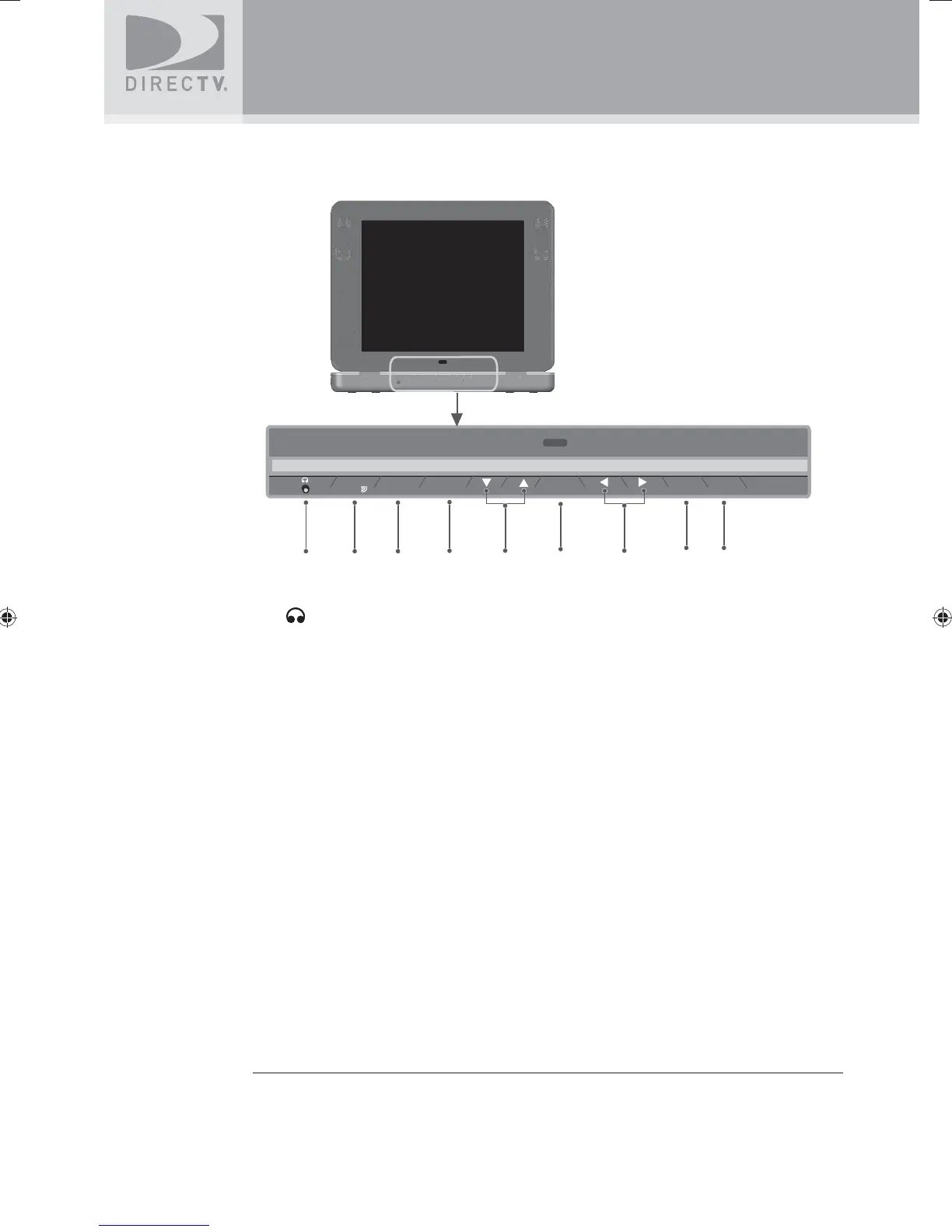
TV Receiver Panel
1. (Earphones)
Connects personal earphones to the TV for personal listening.
2. SIGNAL
Displays the Signal Strength Meter. This is used for pointing the antenna for the strongest
possible signal. Press and hold this key for 1 second to exit the Signal Strength Meter
display.
3. GUIDE
Displays the onscreen program guide.
4. MENU
Displays the DIRECTV Menu, a compact menu of settings and services.
5. ▼ ARROW ▲ / - CH +
Moves the highlight bar up or down to move through the onscreen menus.
In live TV, changes the channel up or down; in the Menu or Guide, scrolls up or down.
6. SELECT
Selects the item highlighted.
7. ◀ ARROW ▶
Moves the highlight bar left or right to move through the onscreen menus.
8. ACTIVE
Displays the DIRECTV Interactive Home Page—local weather and more!
9. INFO
Displays the channel banner or info to a highlighted program or channel cell.
2
34
SIGNAL
1
GUIDE
MENU
7
SELECT
ACTIVE
INFO
8 9
6
5
SatGo_03-30-07(converted).indd 10SatGo_03-30-07(converted).indd 10 5/18/07 4:48:12 PM5/18/07 4:48:12 PM



 To Next Page