25
Setting Up Your DIRECTV
®
Sat-Go
Connecting DIRECTV Sat-Go to a VCR, DVD player or PMP
(personal media player)
Depending on the connections on the back of your VCR or DVD player, you have the following
options:
• Component Connection (Best Quality)
• A/V Connection (Better Quality)
These connections are described on the following.
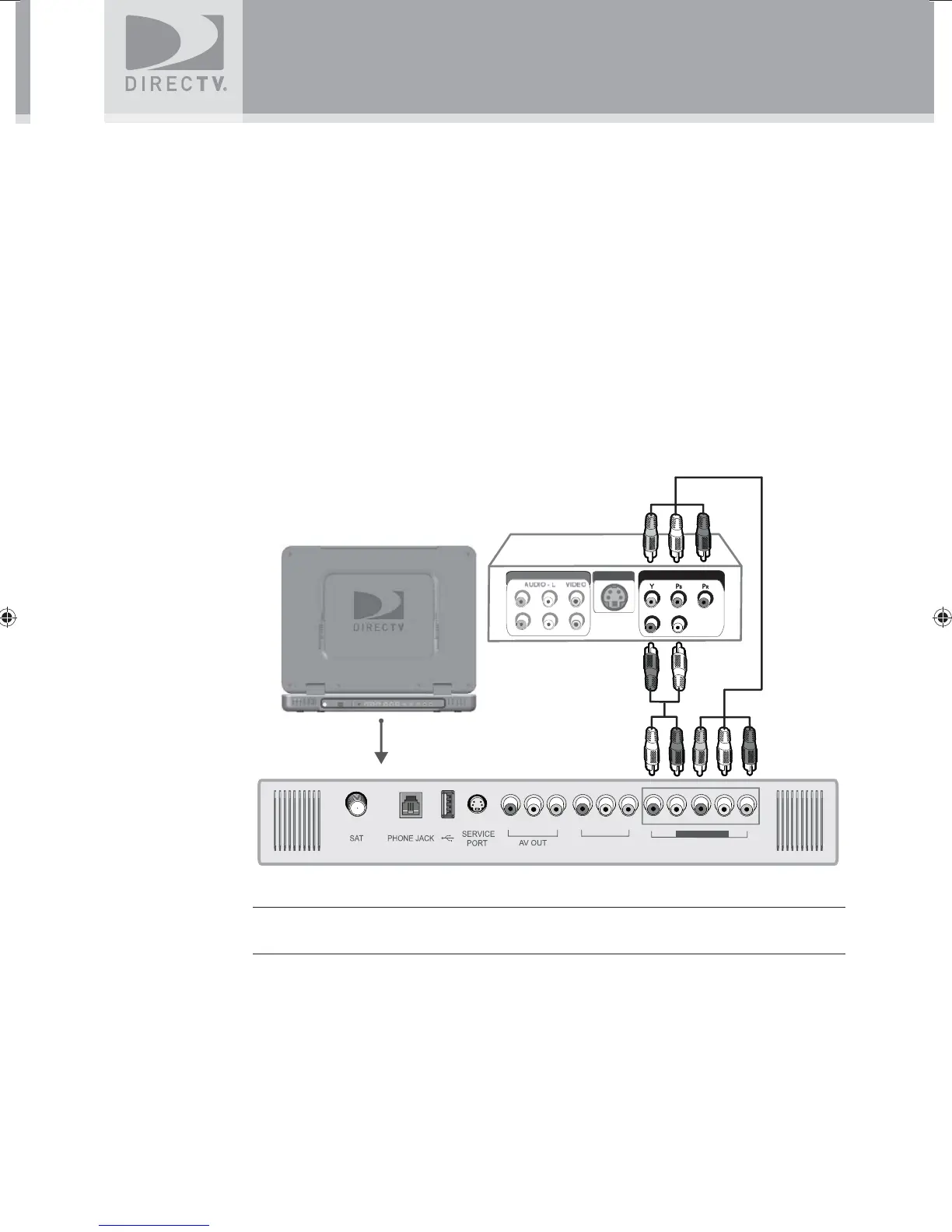
Component Connection (Best Quality)
1. Connect the Component video cable to the component video output jacks (Y/Pb/Pr) on the
VCR or DVD Player and to the component video input jacks (COMPONENT AV IN 2) on
the DIRECTV Sat-Go TV rear connector panel.
2. Connect the audio cable to the audio output jacks (L/R) on the VCR or DVD Player and to
the COMPONENT AV IN 2 jacks (L/R) on the DIRECTV Sat-Go TV rear connector panel.
UNIT IMAGE
COMPONENT OUT
LINE
UT
R - AUDIO - L
S-VIDEO OUT
LINE OUT
AV IN 1
AV IN 2
COMPONENT
NOTE: Depending on the manufacturer, the Y/Pb/Pr jacks may be identifi ed as Y/PB/PR,
Y/B-Y/R-Y, or Y/CB/CR.
SatGo_03-30-07(converted).indd 25SatGo_03-30-07(converted).indd 25 5/18/07 4:48:38 PM5/18/07 4:48:38 PM



 To Next Page