UNIT SET-UP
ADDING DEVICE
NETWORK CONNECTION
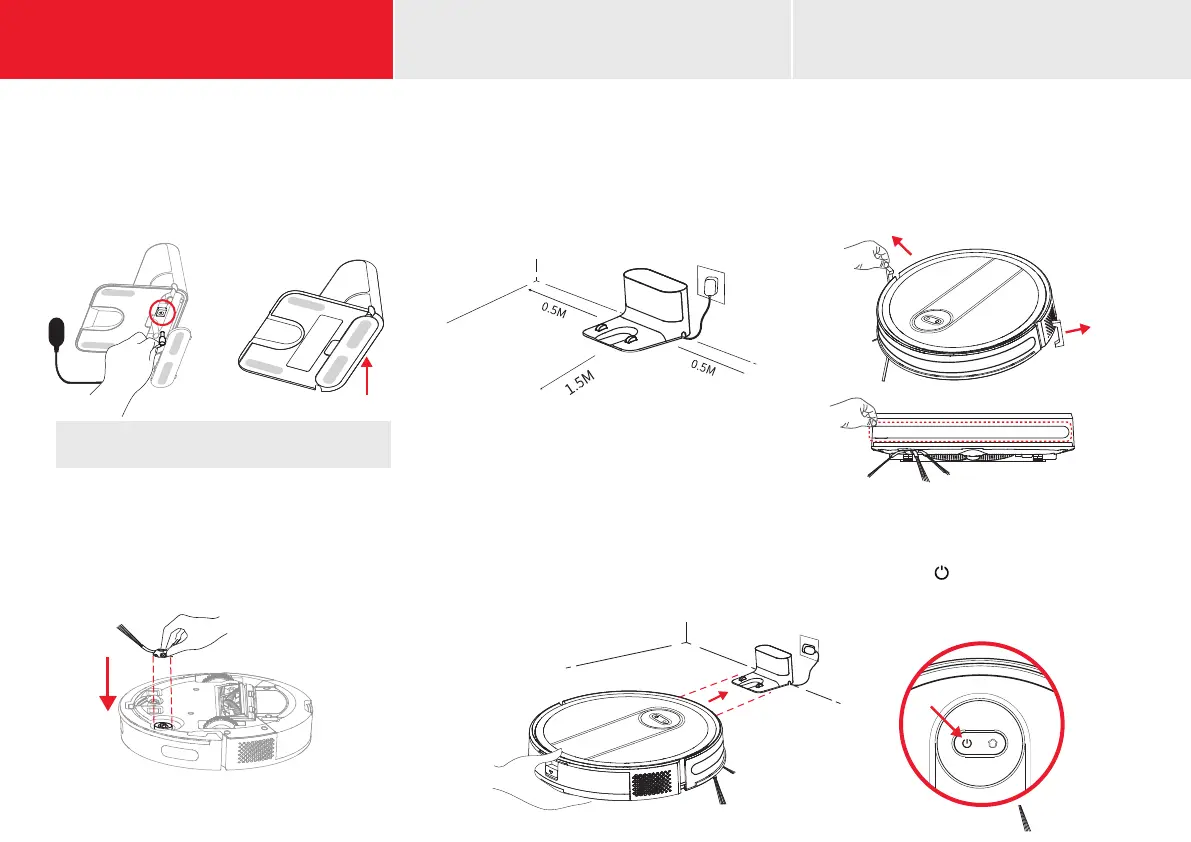
Remove cover from underside of charging base.
Insert power adapter wire and wrap excess wire
inside base to leave just enough wire for
connection to power outlet.
CONNECT CHARGING DOCK
u
NOTE: Use cord management to prevent the adapter
wire from winding the machine during sweep or return.
Locate the charging dock where is it easily accessible
by the robot vacuum with 5' (1.5M) clearance in
front, and 1.5" (0.5M) clearance to each side. Place
it against a wall near a power source and keep the
dock powered for auto return and charging.
PLACE THE CHARGING DOCK
v
Place the robot vacuum on the charging dock
and align it with the charging port. When the
white indicator light on the charging dock
goes off, charging will begin.
CHARGING
y U
First press the “ ” for 3 seconds to turn on
the unit. The robot vacuum shall be fully charged
(about 4 hours) to ensure normal operation.
STARTUP
Align the holes and press gently to x the
side brush on the device
INSTALL SIDE BRUSH
x
Remove the protective strips on both
sides of the front bumper and the
protective lm on the front
BEFORE FIRST USE
w
INSIDE FRONT COVER (LEFT)















 To Next Page