2
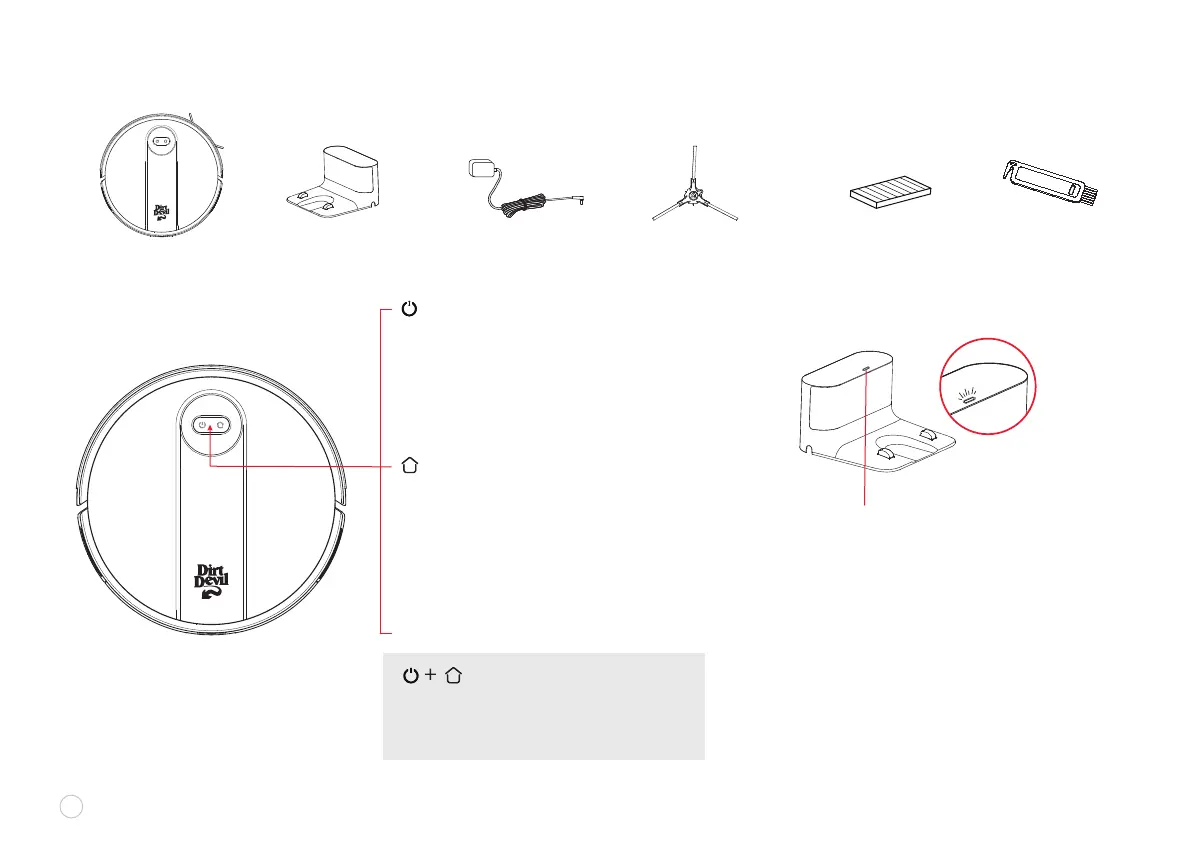
Charging Dock Power Adapter Side Brush High-performance FilterRobot Vacuum
IN THE BOX
Cleaning Brush
ROBOT VACUUM CHARGING DOCK
CLEANING • ON/OFF BUTTON
To turn robot vacuum on, toggle the main
switch from “O” to “I”:
• Press once (1X): start CLEANING.
• Press twice (2X): start SPOT Cleaning.
• Press and hold for 3 seconds
to turn robot vacuum ON/OFF.
RECHARGE BUTTON
• Press once (1X): RETURN for recharge.
• Press and hold for 15 seconds:
to RESTORE FACTORY SETTINGS.
POWER INDICATOR (illuminated icons)
• White color: battery level ≥ 15%
• Pink color: battery level < 15%
• Red color: Fault or abnormality
CHARGING DOCK INDICATOR
• Light ON: The charging dock has been
connected to a power supply
• Light OFF: Power off or the robot vacuum is
correctly connected with the charging dock
RECHARGE BUTTON +
CLEANING/POWER BUTTON
• Press both buttons at the same time
and hold for 3 seconds: to enter
NETWORK Conguration Mode















 To Next Page